
A 6502 SoC Project using a Spartan 3 FPGA

ElEctric_EyE wrote:
.The Spartan 2 was the first FPGA I grappled with after migrating from the XC9572 CPLD, schematic-only design entry. I was at the point of using 2 CPLD's and decided to tackle Xilinx FPGA's. However, ISE would not let me get away with what I described here... So it sounds very similar to what you have described. Others here seem to be having problems with internal bi-directional busses in HDL/Verilog...
Quote:
What I would really like to know about, is your USB interface. Did you write your own, or use another core? Is it register based? Easily interfaced to the 6502?
Quote:
I chose an SD card interface for non volatile mass storage because it looks easier... I am interested in pluggable/unpluggable non-volatile mass storage, because I would like to lose my old EEPROM burner...
Quote:
BTW, what is ETA?
-
ElEctric_EyE
- Posts: 3260
- Joined: 02 Mar 2009
- Location: OH, USA
kc5tja wrote:
...Xilinx just released Virtex 6 architecture along side Spartan 6. I don't think Xilinx is discarding Virtex any time soon.
Arlet wrote:
...If you want to interface a USB stick, you'll need a USB host, which is much more complicated...
Arlet wrote:
... But if, you have a SD card interface, then why do you still need the EEPROM ? You can put a simple bootloader in the FPGA itself. A single 2KB block RAM should be enough, I think...
I guess that's all I would need for a bootloader. But I think I would need to incorporate some basic commands as well. Commands that would copy over data from the SD card into system RAM. Or vice versa, for backup purposes. But I'm getting ahead of myself...I can say, all the adapter sockets have been ordered a few days ago, so all this talk is not for naught.

ElEctric_EyE wrote:
Most of that code is for the FAT filesystem. I don't know if you were planning to have that too, but it's going to be quite big on the 6502. Alternatively, you can just treat the SD card as a big binary block, and use 'dd' on a linux host to access the raw data.
-
ElEctric_EyE
- Posts: 3260
- Joined: 02 Mar 2009
- Location: OH, USA
Arlet wrote:
...Most of that code is for the FAT filesystem. I don't know if you were planning to have that too, but it's going to be quite big on the 6502. Alternatively, you can just treat the SD card as a big binary block, and use 'dd' on a linux host to access the raw data.
Access times on SD Cards and how they vary amongst cards...
-
ElEctric_EyE
- Posts: 3260
- Joined: 02 Mar 2009
- Location: OH, USA
Arlet wrote:
...The SD Card controller looks like it's fairly big...
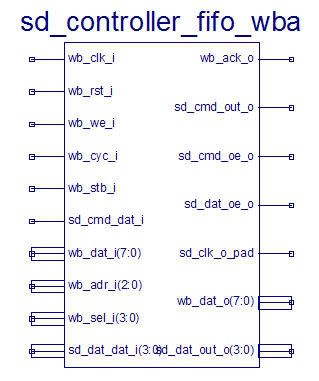
There seems to be many speed ratings for SD cards, with the read speeds being much faster than write speeds, but...
What I need to focus on now is bootstrapping the 6502 core, and lose the EEPROM altogether as Arlet suggested. I never worked with ROMs inside an FPGA, but I do think I remember seeing the options, now that I'm typing this, when I was trying to INIT some flip-flops to 1's in another thread... The 2 things I do know is the font data is 2K (128charactersx8bitsx2fonts), and the actual code is less than 1K. I think I could trim the font data...
-
ElEctric_EyE
- Posts: 3260
- Joined: 02 Mar 2009
- Location: OH, USA
-
ElEctric_EyE
- Posts: 3260
- Joined: 02 Mar 2009
- Location: OH, USA
ElEctric_EyE wrote:
I see now, I have to use the core generator to make a distributed memory which is easy enough. Everything is automated. Made a 4Kx8 ROM, and it automatically makes a symbol.
Now I have to see how to make/edit a .coe (coefficients) file which will be the addressed contents in the ROM...
Now I have to see how to make/edit a .coe (coefficients) file which will be the addressed contents in the ROM...
It's 4am, was back at it. So far, had success making a top level schematic and placing a 4Kx8 ROM. Was able to get to the memory editor from ISim, but there's no option to import like the help file says....
I'll try fitting Arlet's core in together with some simple address decoding and the ROM. Maybe then it will give me more options!
If it doesn't work with the ROM, I have a different method that I've used before. See this link for my ROM sources:
http://ladybug.xs4all.nl/arlet/fpga/source/rom_OS.v
The ROM is made from 2 parallel 4-bit wide block RAMs to create 8x4kB.
It includes the ROM contents using verilog `include statements. The included file uses 'defparam' statements to init the block RAM contents. You can see an example of what it looks like here:
http://ladybug.xs4all.nl/arlet/fpga/source/rom_F000L.v
I use a simple C program to convert a binary file into those 'defparam' lines.
http://ladybug.xs4all.nl/arlet/fpga/source/rom_OS.v
The ROM is made from 2 parallel 4-bit wide block RAMs to create 8x4kB.
It includes the ROM contents using verilog `include statements. The included file uses 'defparam' statements to init the block RAM contents. You can see an example of what it looks like here:
http://ladybug.xs4all.nl/arlet/fpga/source/rom_F000L.v
I use a simple C program to convert a binary file into those 'defparam' lines.
-
ElEctric_EyE
- Posts: 3260
- Joined: 02 Mar 2009
- Location: OH, USA
Thanks for the offer!
But looking at the syntax for a .COE file, it looks pretty easy. I just need to find a hex editor that can output a text file with a comma delimiter. Then I can copy and paste, then rename the .txt to .coe...
HHD software has such a hex editor called NEO. I've actually had it installed for awhile now, even though I use HxD primarily. The 14 day trial has ended quite awhile ago, so I can't take advantage of this feature yet...
I'll try to reinstall a new version, with a new 14 day trial, on another computer to see if it is worth buying...
But looking at the syntax for a .COE file, it looks pretty easy. I just need to find a hex editor that can output a text file with a comma delimiter. Then I can copy and paste, then rename the .txt to .coe...
Code: Select all
******************************************************************
********  Example of Single Port Block Memory .COE file  *********
******************************************************************
; Sample memory initialization file for Single Port Block Memory,
; v3.0 or later.
;
; This .COE file specifies initialization values for a block
; memory of depth=16, and width=8. In this case, values are
; specified in hexadecimal format.
memory_initialization_radix=16;
memory_initialization_vector=
ff,
ab,
f0,
11,
11,
00,
01,
aa,
bb,
cc,
dd,
ef,
ee,
ff,
00,
ff;I'll try to reinstall a new version, with a new 14 day trial, on another computer to see if it is worth buying...
Instead of using an editor, you can also use a simple program or script to do the conversion.
A quick google search for "bin2coe" led to this C program:
http://www.sfc.wide.ad.jp/~macchan/wiki ... =bin2coe.c
I haven't tried it, but it looks like it should do the trick.
A quick google search for "bin2coe" led to this C program:
http://www.sfc.wide.ad.jp/~macchan/wiki ... =bin2coe.c
I haven't tried it, but it looks like it should do the trick.
-
ElEctric_EyE
- Posts: 3260
- Joined: 02 Mar 2009
- Location: OH, USA
Regrettably, I'm not familiar with the C language, but all suggestions welcome! A friend of mine at work who is used to writing scripts suggested a program called ultraedit. It's a text editor and was able to hunt for and replace characters. In this case hunt for a space, and replace with comma. It worked, but it costs $40....
This HHD piece of software is very nice though. I think I'm going to purchase it. I don't buy much in the way of software, and maybe I shouldn't. Maybe I'll try to install it on a machine with no battery for the BIOS with incorrect dates, etc. and see if it still installs. If it doesn't I'm going to have complaints...
Still, it does what I need a real hex editor to do. That is, as a hex editor, it should have a text editor under it's "belt', which it does. Seems to have much more also...
My last 2 days off from work have passed by very quickly! Sorta been stuck, but not for long!........
This HHD piece of software is very nice though. I think I'm going to purchase it. I don't buy much in the way of software, and maybe I shouldn't. Maybe I'll try to install it on a machine with no battery for the BIOS with incorrect dates, etc. and see if it still installs. If it doesn't I'm going to have complaints...
Still, it does what I need a real hex editor to do. That is, as a hex editor, it should have a text editor under it's "belt', which it does. Seems to have much more also...
My last 2 days off from work have passed by very quickly! Sorta been stuck, but not for long!
........