
External Storage Options

Re: External Storage Options
Welcome to your first post! Sounds like a nice practical way forward - is everything working as you'd hoped?
Re: External Storage Options
BigEd wrote:
Welcome to your first post! Sounds like a nice practical way forward - is everything working as you'd hoped?
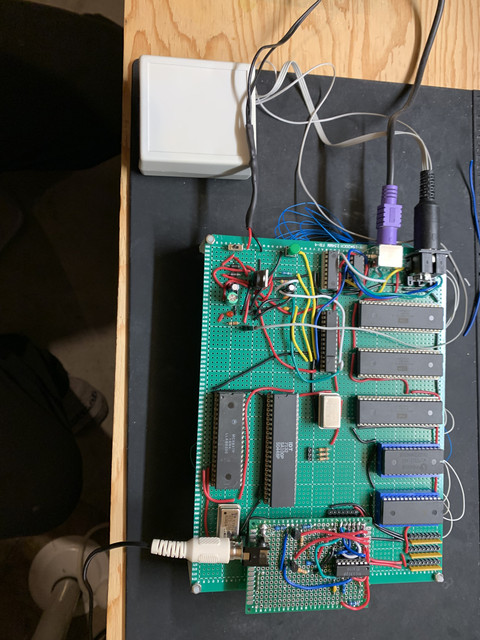
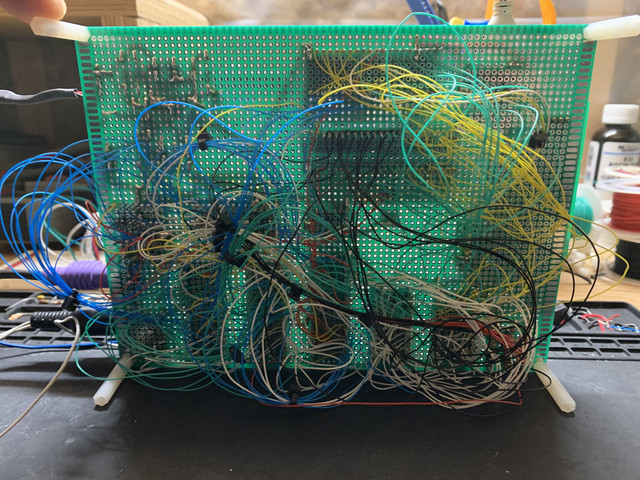
Thank you! It's been a fun journey for sure! My first attempt at a single board computer was on a perf board and I soldered all the wires. It was a mess but it worked! After that I switched to wire wrapping, investing in specialty sockets and a wrap tool. My current project has 2 - 65c22, 32kb SRAM, 2kb dual port ram for video, EEPROM mapped to $9000-$FFFF. Address decoding is done with a ATF16v8b PLD. I use a PIC 16f88 to handle the PS/2 keyboard, it strobes CA1 on one of the VIA's to trigger an interrupt on the 65c02 and sends the keycode over PORTA. I'm using a MC6847 for video, the computer runs on a 1mhz oscillator and the video is on a seperate 3.58mhz. The dual port ram makes it possible to have the video run at a different speed than the rest of the system.

Re: External Storage Options
Nice work, thegoat !
Allow me to remind you, BTW, that on this forum you can attach images with your post. There's no need to use a third-party site for images.
Cheers,
Jeff
Allow me to remind you, BTW, that on this forum you can attach images with your post. There's no need to use a third-party site for images.
Cheers,
Jeff
In 1988 my 65C02 got six new registers and 44 new full-speed instructions!
https://laughtonelectronics.com/Arcana/ ... mmary.html
https://laughtonelectronics.com/Arcana/ ... mmary.html

Re: External Storage Options
sburrow wrote:
2) Serial port through UART. This could be RS-232 or variants using USB.
Pros: All computers have USB, and some have an actual serial port.
Cons: There is overhead with required chips, either being MAX232's, 6551's, or daughter/breakout boards.
Pros: All computers have USB, and some have an actual serial port.
Cons: There is overhead with required chips, either being MAX232's, 6551's, or daughter/breakout boards.
I love this thing because besides reading the status bits to see if there is data to read or if you can write data there is no programming overhead, all the configuration you do is on the PC side via Device Manager or the FT_PROG Utility.
it works with a 16MHz 65C02 @ 5V without wait states as well, 20MHz Requires 1 RDY Cycle though (atleast on my SBC, your mileage may vary).
sburrow wrote:
5) SD cards. Typically using SPI interface (as far as I've seen).
Pros: All computers can read/write to SD cards somehow, sometimes through USB adapters.
Cons: Similar to serial port, and file type overhead is something to look out for.
Pros: All computers can read/write to SD cards somehow, sometimes through USB adapters.
Cons: Similar to serial port, and file type overhead is something to look out for.
plus SD Cards work at 3.3V, requiring a level shifter (or the whole system running at 3.3V).
so like others suggested already, CF seems like a good alternative, they run at 5V, and with a 8/16-bit wide data bus are easier to connect without hardware or software bit shifting.
and their interface protocol is probably the same for both old and new CF Cards (though i'm not 100% sure on that)
also i thought the whole idea of using external storage was to have something compatible with modern Computers to easily transfer files and data, so wouldn't using a custom or no file system at all kinda defeat that purpose by making it a bubble environment?
I mean you can still connect SD/CF Cards to a modern PC, but you would need a program like HxD to access the raw binary data on the storage decive, making it more of a hassle than a convenience when cross developing.
Atleast that's how i think about, while it's annoying to write the file system interface, you only really need to do it once and then you can enjoy the convenience of being able to easily tranfer files from/to the storage device in the long run.
-
GARTHWILSON

- Forum Moderator
- Posts: 8775
- Joined: 30 Aug 2002
- Location: Southern California
- Contact:
Re: External Storage Options
Quote:
plus SD Cards work at 3.3V, requiring a level shifter (or the whole system running at 3.3V).
http://WilsonMinesCo.com/ lots of 6502 resources
The "second front page" is http://wilsonminesco.com/links.html .
What's an additional VIA among friends, anyhow?
The "second front page" is http://wilsonminesco.com/links.html .
What's an additional VIA among friends, anyhow?
-
BigDumbDinosaur

- Posts: 9428
- Joined: 28 May 2009
- Location: Midwestern USA (JB Pritzker’s dystopia)
- Contact:
Re: External Storage Options
Proxy wrote:
also i thought the whole idea of using external storage was to have something compatible with modern Computers to easily transfer files and data, so wouldn't using a custom or no file system at all kinda defeat that purpose by making it a bubble environment?
I am getting ever-closer to a working filesystem for my POC units and don't have any concerns about trying to be compatible with something on a PC. For transfer to or from a “modern computer” (more specifically, one of my Linux servers), I use the real “universal serial bus,” which is TIA-232 (incidentally, USB, despite the name, is not a bus). TIA-232 is a standard that has been around for over 50 years and remains current in many applications. I've got two clients who use it and TIA-485 in their shops for machine tool interfaces.
Since my mass storage is on hard disks, I can always, if I choose, implement a different filesystem, e.g., FAT32, EXT2 or similar. Either would be read-write compatible with Linux.
x86? We ain't got no x86. We don't NEED no stinking x86!
Re: External Storage Options
Proxy wrote:
... i thought the whole idea of using external storage was to have something compatible with modern Computers to easily transfer files and data ...
I think it's best always to start from the premises of the person doing the project: they might be maximising convenience, or performance, or minimising cost, or maximising learning, or a number of other things.
One's own related project might embody different priorities, of course, and so one's own adventures might take a different turn, and possibly attract a different audience.

Re: External Storage Options
Proxy wrote:
also i thought the whole idea of using external storage was to have something compatible with modern Computers to easily transfer files and data, so wouldn't using a custom or no file system at all kinda defeat that purpose by making it a bubble environment?
-Gordon
--
Gordon Henderson.
See my Ruby 6502 and 65816 SBC projects here: https://projects.drogon.net/ruby/
Gordon Henderson.
See my Ruby 6502 and 65816 SBC projects here: https://projects.drogon.net/ruby/
Re: External Storage Options
Proxy wrote:
If you only want to connect to modern USB Hosts like PCs then you can skip the whole UART thing with a UART+USB Converter "all in one" chip like the FT240X (datasheet)
Proxy wrote:
IIRC SPI is not part of the SD Standard anymore, so you might find SDXC Cards that don't support it and simply wouldn't work. and I don't know how hard 4-bit SD Mode is to implement in software using bit banging compared to SPI.
plus SD Cards work at 3.3V, requiring a level shifter (or the whole system running at 3.3V).
plus SD Cards work at 3.3V, requiring a level shifter (or the whole system running at 3.3V).
Also, there are a couple *really* good tutorials on how to use SPI interface. I have heard about having to use older SD cards, or perhaps something with less size(?). I haven't used this yet, but my plans are to tie this to a 6522 and start messing around.
As far as the file systems, "that's just software". Using some C++ I am sure I can find a way to read/write raw binary using Linux. If a filesystem is indeed needed, then I'm supposing you simply read through the header junk and then get to the real data. Again I haven't done this yet, but I've done similar things in the past. More research would definitely be required!
So for those of you who know me, I want to inform you that I finally purchased a TL866II EEPROM programmer. And golly, I would have done that 4 months ago if I knew better. I should have listened to y'all veterans. Instead of trying to jerry-rig my own, making the 'big purchase' is WELL worth it in the end. And it works in Linux with minipro! So, using an EEPROM programmer is definitely one way to transfer data back and forth! Maybe not a good idea (I hate bending pins!) but it "works".
Thanks everyone! Good discussion.
Chad
Re: External Storage Options
I know there are many here who have added SD cards as storage by various means including fachat using a CPLD ala Daryl Rictor's 65SPI or by bit banging the SPI through a 6522. I followed the example of user dourish (Paul Dourish) where he, with the help of dr jefyll and others, implemented this on his system. I used Richard Cini's version of SBC2.7 as the hardware basis and was able to easily implement Paul's forth based (secnd9) system that allows for reading from a fat16 based SD card. His driver software is somewhat specific to a particular format of the SDcard ( SDHC formatted as 2GB)
I also translated Paul's software to run off the CF card of plasmo's (Bill Shen) CRC65 changing from bit banging the SPI to SD to plasmo's routines for the CF card. This took a little more effort and it is a bit tedious to set up the card so that it can run in plasmo's monitor and also be read as a FAT16 bit of media. All in all, I am stretching my understanding by "standing on the shoulders of others" and this has made my retro hobby much more satisfying.
I also translated Paul's software to run off the CF card of plasmo's (Bill Shen) CRC65 changing from bit banging the SPI to SD to plasmo's routines for the CF card. This took a little more effort and it is a bit tedious to set up the card so that it can run in plasmo's monitor and also be read as a FAT16 bit of media. All in all, I am stretching my understanding by "standing on the shoulders of others" and this has made my retro hobby much more satisfying.
Re: External Storage Options
GARTHWILSON wrote:
Quote:
plus SD Cards work at 3.3V, requiring a level shifter (or the whole system running at 3.3V).
BigDumbDinosaur wrote:
I am getting ever-closer to a working filesystem for my POC units and don't have any concerns about trying to be compatible with something on a PC. For transfer to or from a “modern computer” (more specifically, one of my Linux servers), I use the real “universal serial bus,” which is TIA-232 (incidentally, USB, despite the name, is not a bus). TIA-232 is a standard that has been around for over 50 years and remains current in many applications. I've got two clients who use it and TIA-485 in their shops for machine tool interfaces.
Since my mass storage is on hard disks, I can always, if I choose, implement a different filesystem, e.g., FAT32, EXT2 or similar. Either would be read-write compatible with Linux.
BigEd wrote:
Generally, people's values and intentions are quite diverse, so what the whole idea might be will vary from one person to another. Not just for storage but for any design choice in homebrew hardware or software.
I think it's best always to start from the premises of the person doing the project: they might be maximising convenience, or performance, or minimising cost, or maximising learning, or a number of other things.
One's own related project might embody different priorities, of course, and so one's own adventures might take a different turn, and possibly attract a different audience.
I think it's best always to start from the premises of the person doing the project: they might be maximising convenience, or performance, or minimising cost, or maximising learning, or a number of other things.
One's own related project might embody different priorities, of course, and so one's own adventures might take a different turn, and possibly attract a different audience.
drogon wrote:
I think "it depends". In my case I wanted to start with something suitably 'retro' in my era, so a filing system based on Apple DOS and subsequently ProDOS was the way I went. (although I was not interested in the actual physical media, so for me it was SD card rather than 5.25" floppy) I already had an efficient way to get data to/from my system via serial line although now I'm in 2-minds - it would be more convenient to just put the SD card into my laptop to do a transfer of backup of many files, but for now I can live with the serial line copy.
-Gordon
-Gordon
I meant that i thought the point of this thread specifically was discussing portable/compatible storage.
but re-reading the first post a bit more thoroughly i see that it's about storage options in general.
oops.
sburrow wrote:
I've toyed with something similar, the FT245RL. But this looks like I can directly attach this to the board, instead of going through a separate pre-fab module, correct?
you can buy the both the FT245R and FT240X as seperate chips, it's just that the FT245R is also sold as part of that module. which is more convenient for breadboards or testing on perf boards/PCBs.
but peronally i like using the seperate IC for space saving reasons.
the only real differences between the FT245R and FT240X is that the latter has 2 programmable IO Pins, a larger Sending/Receiving Buffer, and comes in a slightly smaller package (SSOP-24 instead of SSOP-28).
but in terms of Serial functionality they are identical.
sburrow wrote:
What I had in mind was this: https://theorycircuit.com/arduino-micro ... ta-logger/
Also, there are a couple *really* good tutorials on how to use SPI interface. I have heard about having to use older SD cards, or perhaps something with less size(?). I haven't used this yet, but my plans are to tie this to a 6522 and start messing around.
As far as the file systems, "that's just software". Using some C++ I am sure I can find a way to read/write raw binary using Linux. If a filesystem is indeed needed, then I'm supposing you simply read through the header junk and then get to the real data. Again I haven't done this yet, but I've done similar things in the past. More research would definitely be required!
So for those of you who know me, I want to inform you that I finally purchased a TL866II EEPROM programmer. And golly, I would have done that 4 months ago if I knew better. I should have listened to y'all veterans. Instead of trying to jerry-rig my own, making the 'big purchase' is WELL worth it in the end. And it works in Linux with minipro! So, using an EEPROM programmer is definitely one way to transfer data back and forth! Maybe not a good idea (I hate bending pins!) but it "works".
Thanks everyone! Good discussion.
Chad
Also, there are a couple *really* good tutorials on how to use SPI interface. I have heard about having to use older SD cards, or perhaps something with less size(?). I haven't used this yet, but my plans are to tie this to a 6522 and start messing around.
As far as the file systems, "that's just software". Using some C++ I am sure I can find a way to read/write raw binary using Linux. If a filesystem is indeed needed, then I'm supposing you simply read through the header junk and then get to the real data. Again I haven't done this yet, but I've done similar things in the past. More research would definitely be required!
So for those of you who know me, I want to inform you that I finally purchased a TL866II EEPROM programmer. And golly, I would have done that 4 months ago if I knew better. I should have listened to y'all veterans. Instead of trying to jerry-rig my own, making the 'big purchase' is WELL worth it in the end. And it works in Linux with minipro! So, using an EEPROM programmer is definitely one way to transfer data back and forth! Maybe not a good idea (I hate bending pins!) but it "works".
Thanks everyone! Good discussion.
Chad
also congrats on getting a TL866II+, that thing is so amazing! Programming everything from EEPROMs, FLASH, PLDs, to Microcontrollers.
-
Sheep64

- In Memoriam
- Posts: 311
- Joined: 11 Aug 2020
- Location: A magnetic field
Re: External Storage Options
The choices are SCSI, SATA, USB or other. BigDumbDinosaur is the leading proponent of SCSI on 6502. SATA can be bodged with an 8 bit, eight memory location minimal PATA interface and then a PATA/SATA bridge. I regard this as a non-solution because the bridge is probably 100MHz, 32 bit microcontroller. Faster methods to access SATA require SMD PCIe chips. USB is an unmitigated mess. USB 1.x, USB 2.x and USB 3.x all use different wire formats. Also, USB 1.x is 12Mb/s. This sets a very restrictive upper bound on transfer speed. Whereas, USB 2.x is 400Mb/s and USB 3.x is 800Mb/s. This also requires special handling via a bridge.
The other options seem appealing. However, the general advice for long-term storage is to keep one magnetic copy and one optical copy. Electostatic storage is neither. Any option which requires filing system over UART or Ethernet is a directly tethered solution where the 6502 is a Turing complete peripheral. However, any option which requires, for example, MicroSD, is indirectly tethered to magnetic storage or will be certainly lost.
That's where we get to the next problem. USB 3.x and FAT32 support would be desirable. I'll be very impressed if anyone implements this in 6502 assembly. On Z80, CollapseOS considered FAT32 support in assembly before re-writing the system in Forth. While FAT32 in Forth may have performance limitations, I suspect that C or C++ FAT32 over USB may exceed 64KB. Unfortunately, this may be the long-term solution. I've got a technique to minimize performance loss when a binary exceeds 64KB - and the binary can be pulled from serial EEPROM or MicroSD. Therefore, it may be desirable to have a boot-strap filing system before implementing an inter-operable filing system and/or a highly reliable filing system.
FAT32 is an extremely flaky filing system and this is particularly noticeable when duplicate allocations cause file truncation. Part of the problem is weak checksums over SPI or USB. There has been debate on the 6502 Forum whether a filing system should have a forward mapping or a reverse mapping to free/allocated blocks. However, this is a false dichotomy. With weak or absent checksum, data may be scribbled anywhere. I have partial solutions to this problem, including a vaguely idiotic RAID-within-one-volume. However, there is one overlooked partial solution which is fiddly but very cost effective.
Due to various firmware updates, Samsung MicroSD cards are known to have ARM microcontroller with a diagnostic mode which allows ARM code to be executed by the microcontroller. ARM, you say? Hmmm. There are multiple 6502 simulators for ARM and some of them are quite efficient. It is possible to temporarily or permanently configure a Samsung MicroSD card as a 6502 simulator. Such a simulator may have fast and (relatively) reliable access to bulk storage. Indeed, this is the modern equivalent of a Turing complete Commodore floppy drive. However, the MicroSD cards are vastly cheaper and more portable. Admittedly, I/O options are quite limited on MicroSD. However, a bootstrap 6502 could poll devices with an unused diagnostic code and mediate communication. Meanwhile, the virtual environment, in the MicroSD card, may have facility to walk FAT32 partitions. The resulting read/write operations would be compatible with any mainstream computer.
The minimal MicroSD interface requires one 6522, one shift register (74x195, 74x595 or another 6522) and voltage level shifters. Eight or more MicroSD cards may be selected using 74x138 or 74x238 (which may be chip stacked). With the addition of one 4052, this interface may be generalized to include I2C, PS/2 keyboard and PS/2 mouse.
The other options seem appealing. However, the general advice for long-term storage is to keep one magnetic copy and one optical copy. Electostatic storage is neither. Any option which requires filing system over UART or Ethernet is a directly tethered solution where the 6502 is a Turing complete peripheral. However, any option which requires, for example, MicroSD, is indirectly tethered to magnetic storage or will be certainly lost.
That's where we get to the next problem. USB 3.x and FAT32 support would be desirable. I'll be very impressed if anyone implements this in 6502 assembly. On Z80, CollapseOS considered FAT32 support in assembly before re-writing the system in Forth. While FAT32 in Forth may have performance limitations, I suspect that C or C++ FAT32 over USB may exceed 64KB. Unfortunately, this may be the long-term solution. I've got a technique to minimize performance loss when a binary exceeds 64KB - and the binary can be pulled from serial EEPROM or MicroSD. Therefore, it may be desirable to have a boot-strap filing system before implementing an inter-operable filing system and/or a highly reliable filing system.
FAT32 is an extremely flaky filing system and this is particularly noticeable when duplicate allocations cause file truncation. Part of the problem is weak checksums over SPI or USB. There has been debate on the 6502 Forum whether a filing system should have a forward mapping or a reverse mapping to free/allocated blocks. However, this is a false dichotomy. With weak or absent checksum, data may be scribbled anywhere. I have partial solutions to this problem, including a vaguely idiotic RAID-within-one-volume. However, there is one overlooked partial solution which is fiddly but very cost effective.
Due to various firmware updates, Samsung MicroSD cards are known to have ARM microcontroller with a diagnostic mode which allows ARM code to be executed by the microcontroller. ARM, you say? Hmmm. There are multiple 6502 simulators for ARM and some of them are quite efficient. It is possible to temporarily or permanently configure a Samsung MicroSD card as a 6502 simulator. Such a simulator may have fast and (relatively) reliable access to bulk storage. Indeed, this is the modern equivalent of a Turing complete Commodore floppy drive. However, the MicroSD cards are vastly cheaper and more portable. Admittedly, I/O options are quite limited on MicroSD. However, a bootstrap 6502 could poll devices with an unused diagnostic code and mediate communication. Meanwhile, the virtual environment, in the MicroSD card, may have facility to walk FAT32 partitions. The resulting read/write operations would be compatible with any mainstream computer.
The minimal MicroSD interface requires one 6522, one shift register (74x195, 74x595 or another 6522) and voltage level shifters. Eight or more MicroSD cards may be selected using 74x138 or 74x238 (which may be chip stacked). With the addition of one 4052, this interface may be generalized to include I2C, PS/2 keyboard and PS/2 mouse.
-
GARTHWILSON
- Forum Moderator
- Posts: 8775
- Joined: 30 Aug 2002
- Location: Southern California
- Contact:
Re: External Storage Options
Proxy wrote:
GARTHWILSON wrote:
Quote:
plus SD Cards work at 3.3V, requiring a level shifter (or the whole system running at 3.3V).
http://WilsonMinesCo.com/ lots of 6502 resources
The "second front page" is http://wilsonminesco.com/links.html .
What's an additional VIA among friends, anyhow?
The "second front page" is http://wilsonminesco.com/links.html .
What's an additional VIA among friends, anyhow?
-
GARTHWILSON
- Forum Moderator
- Posts: 8775
- Joined: 30 Aug 2002
- Location: Southern California
- Contact:
Re: External Storage Options
Sheep64 wrote:
However, the general advice for long-term storage is to keep one magnetic copy and one optical copy. Electostatic storage is neither.
http://WilsonMinesCo.com/ lots of 6502 resources
The "second front page" is http://wilsonminesco.com/links.html .
What's an additional VIA among friends, anyhow?
The "second front page" is http://wilsonminesco.com/links.html .
What's an additional VIA among friends, anyhow?
-
Sheep64
- In Memoriam
- Posts: 311
- Joined: 11 Aug 2020
- Location: A magnetic field
Re: External Storage Options
GARTHWILSON: I suspected that you hadn't heard of the advice to keep magnetic and optical copies. It is very old advice and probably from the era of "Never under-estimate the bandwidth of a station wagon full of tapes hurtling down the highway." Unfortunately, optical storage has fallen behind since the late 1990s. Regardless, very important data should be stored magnetically and optically.
Reliability of DVD is a separate issue, although it is generally junk. There is a hard limit on the strength of a laser in a consumer optical drive and this should be divided by the data rate. Single speed CD is 150KB/s. Single speed DVD is 900KB/s. Double speed DVD (which may be the minimum) is 12x CD speed. That's not sufficient to store data reliably. You might as well delete the data immediately and save yourself the time and money.
More seriously, I'm glad that you recovered anything from an archive DVD. For extra resilience, I recommend using JPEG re-start markers. At the very least, this will allow you to recover strips of a picture.
Reliability of DVD is a separate issue, although it is generally junk. There is a hard limit on the strength of a laser in a consumer optical drive and this should be divided by the data rate. Single speed CD is 150KB/s. Single speed DVD is 900KB/s. Double speed DVD (which may be the minimum) is 12x CD speed. That's not sufficient to store data reliably. You might as well delete the data immediately and save yourself the time and money.
More seriously, I'm glad that you recovered anything from an archive DVD. For extra resilience, I recommend using JPEG re-start markers. At the very least, this will allow you to recover strips of a picture.