Breadboard 6502 - Harder Than I Thought!

Building your first 6502-based project? We'll help you get started here.
Post Reply
DRG
Posts: 66
Joined: 19 Sep 2021

Breadboard 6502 - Harder Than I Thought!

Post by DRG »

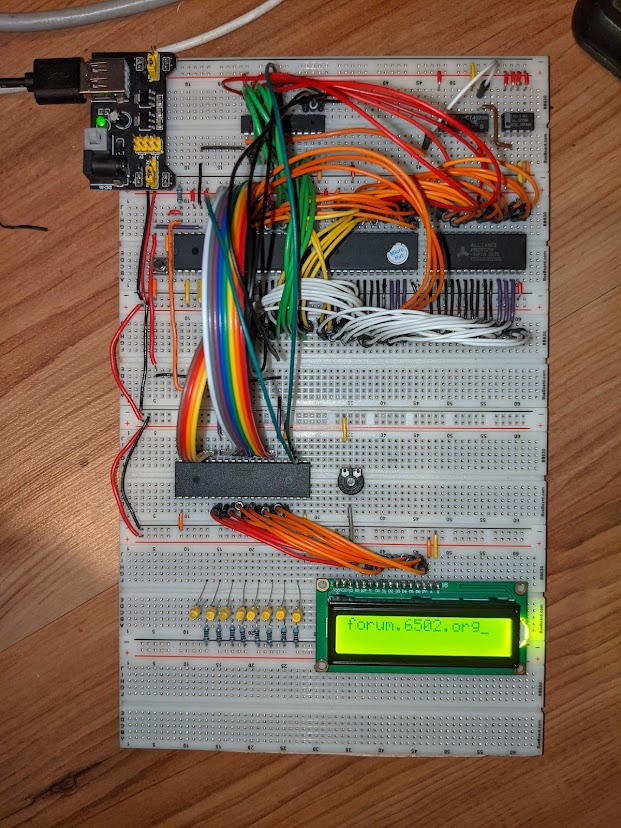
Well, this weekend (after many, many weekends) I finally managed to get my Ben Eater inspired breadboard 6502 up and running with an LCD display. It was my third attempt.

Image

Not a "standard" Ben Eater system as I went free form on a couple of choices. Mainly, I used Daryl Richter's GAL decoder and a 16 MHz programmable oscillator fed into a 14-bit ripple counter to get the clock going nice and slow for debugging purposes. I did use an Arduino Mega as per Ben's video series - very useful, I have to say. Although, I had to create a bit of additional space on the breadboard so I could plug in the address and data lines etc. This also made it so much easier to insert/extract the ROM - which was nice. :)

Pareto's Principle was in full force as well - 80% trouble shooting / 20% building, 80% debugging / 20% coding, 80% grimacing / 20% grinning, 80% VIA issues/20% everything else...

This was tough for me with zero electronics background so I am quite pleased with myself - an indulgence I'll allow.

However, I have to say that it is remarkable what an individual can achieve when "standing on the shoulders of giants". This forum has informed and educated me so much, so a big thank you for those who contribute. I really didn't have to ask many direct questions as a forum search turned up information that pointed me in the right direction.

So, what next? Since I used Daryl's GAL decoder, I pretty much have 32K RAM available so I need to work out how to get code into that. I have a Maxim 3100, so that'll be the next few weeks research sorted. I will look into some kind of monitor too.

Ultimately, I would love nothing more than to have my own PCB manufactured, but I have no idea, no ability and no confidence on being able to do that at the moment. Any pointers on this aspect would be gratefully received.
User avatar
drogon
Posts: 1671
Joined: 14 Feb 2018
Location: Scotland
Contact:

Re: Breadboard 6502 - Harder Than I Thought!

Post by drogon »

DRG wrote:
Ultimately, I would love nothing more than to have my own PCB manufactured, but I have no idea, no ability and no confidence on being able to do that at the moment. Any pointers on this aspect would be gratefully received.
Well done on the project - looks much better than mine did when at the breadboard stage.

For PCBs I used a package called Fritzing and various Chinese PCB makers - JLCPCB is my current "go to" - 6 day turnaround to the UK (or was last time I ordered some).

I'd hesitate to recommend Fritzing, however it does work - works OK for 2-layer boards which is really all you need - my Ruby 6502 and '816 systems run well at up to 16Mhz on these boards. To go 4-layer which many here will tell you is the only way to do it, then you'll need something else like KiCAD. I've tried once or twice to get into KiCAD and ultimately it's probably the way I'll go for my next project (non 6502), but it's quite a steep learning curve, so Fritzing will do OK for me now.

An alternative might be stripboard (or Perfboard) for something more permanent - that was my "phase 2" - See here: https://projects.drogon.net/ruby-6502-on-stripboard/ for my early efforts.

Cheers,

-Gordon
--
Gordon Henderson.
See my Ruby 6502 and 65816 SBC projects here: https://projects.drogon.net/ruby/
sburrow
Posts: 833
Joined: 09 Oct 2021
Location: Texas

Re: Breadboard 6502 - Harder Than I Thought!

Post by sburrow »

DRG wrote:
Ultimately, I would love nothing more than to have my own PCB manufactured, but I have no idea, no ability and no confidence on being able to do that at the moment. Any pointers on this aspect would be gratefully received.
Great story, great job, and indeed well done on that breadboard! That is definitely an accomplishment!

I know I am definitely the newbie here, but I saw Gordon's comment and felt I needed to chime in some. I use KiCad exclusively now (on Linux), and it does have a learning curve, but not as steep as I would have first imagined. I had been using some other junky program before that. I didn't even realize how junky it was until I switched to KiCad.

Some things I have learned about KiCad (and anyone else, tell me if you think I'm wrong):

1) It wants you to do a schematic first, THEN the PCB. KiCad is all about it's netlist, and if you are not following it, it will flag errors when you debug the board on the software. For a long while I just ignored all that, and did my own thing. But when I was recently designing my first board that I was actually going to have printed, I said "eh, I got time, lets try this netlist thing out". Good thing I did, I flipped some wires! [ I seem to do that a lot... ]

2) Using 2-layers on KiCad is super easy, but the 4-layer stuff is weird. I basically had to make 2 additional layers, tell it to make a copper pour on those layers, and then manually change any pins or vias netname, one by one by one by one. This cool plugin for KiCad called "WireIt" really helped a LOT when doing this netlist stuff, especially with the 4-layers.

3) Maybe it's just my version, but the thing bugs out a lot. Like when I switch between layers, the program says I'm on the top layer AND the bottom layer, so you just gotta 'know' what's going on. Likewise, sometimes when I put a new footprint on the board, the whole thing goes wild and flashy until I restart it. Again, that just might be mine.

4) As far as what size traces, spaces, vias, etc, that I had to discover over time. With Garth and BDD's help (and previous posts on the forum) I found some sizes that worked for me:

0.2 mm signal traces and spaces
1.6 mm power traces
0.9 / 0.4 mm vias for signals

I set my grid at 25 mils, and I can get signal lines in between the DIP footprint pins which is VERY important.

5) Start simple. Don't go full netlist stuff on the first try, because it'll just be frustrating. Don't do a schematic that will transport directly over to PCB-land, you'll just have this huge rats nest that would be confusing. Just start up pbcnew (that's it's particular name on the KiCad suite) and playing around with it. Start with the Edge.Cuts layer, make/draw a rectangle. Then add a DIP package footprint. Then use the default trace/via sizes and just connect things on F.Cu and B.Cu layers. Just play around with it before getting serious. Use their built in 3D viewer to have that sense of accomplishment every couple of hours. Be ok with ditching what you have been working with and starting new. I do that often, when my traces around the glue logic look ugly or something, I just delete it all and start over again. Before I sent off for my printed 4-layer board, I went through 10+ different KiCad board designs.

What I do not suggest (unless you like to learn a lot) is to buy perf board and solder each wire by-hand. That's what I did, and well, it worked eventually with some great help from folks here on the forum. But that was unnecessarily crazy. If you have $20 to spend on a printed board, print the board and save your time and energy (and even money).

Lastly Gordon suggested JLCPCB, and I definitely recommend them as well. Super cheap 10cm x 10cm boards, so if you keep it small and tight (seems impossible at first, but totally doable with what you have it seems) the cost is significantly less. I ended up printing two separate 10x10 boards which I will solder together to make a 10x20 board basically. WAY cheaper than having a single 10x20 board printed.

Anyone else, feel free to disagree with me, I am still the newbie here. I just really like KiCad and had to leave a comment. Thanks!

Chad

EDIT: One last thing, JLCPCB has a super awesome tutorial on how to grab the gerber/drill files from KiCad. It was such a good tutorial I bookmarked it.

https://support.jlcpcb.com/article/149- ... s-in-kicad
User avatar
drogon
Posts: 1671
Joined: 14 Feb 2018
Location: Scotland
Contact:

Re: Breadboard 6502 - Harder Than I Thought!

Post by drogon »

sburrow wrote:
Anyone else, feel free to disagree with me, I am still the newbie here. I just really like KiCad and had to leave a comment. Thanks!

Chad

EDIT: One last thing, JLCPCB has a super awesome tutorial on how to grab the gerber/drill files from KiCad. It was such a good tutorial I bookmarked it.

https://support.jlcpcb.com/article/149- ... s-in-kicad
Veering off the original topic here, but thanks for the KiCAD tips - I do need to make some effort but there's a lot of Fritzing usage in me right now - I've produced dozens of boards with it - and for a while development on it was non-existent, but it does seem to have had a recent revival, however...

With regard to stripboard (or perfboard) I do think there is a lot of age and/or experience AND cultural experience here. When I got into electronics ~45 years ago in the UK stripboard (or Veroboard as we often called it) was the thing . Perfboard was unheard of - I didn't even know of it's existence until just a few years back too....

PCBs were expensive, or required home chemistry, resist pens, dry transfer pads, etc. Even in the early 80's when we had some crude CAD software (on the Apple II, IIRC) we were printing, photocopying ontp acetate which added yet another step to the process involving photo-resist, developing then etching.. It was exciting, but time consuming - by contrast, breadboards were really expensive then! No-one would contemplate the large multi-board designs we're doing now.

So fun, but interesting times and for me to move to stripboard was an easy an logical choice - I put together my stripboard Ruby 6502 in just a few hours - but I had the advantage of years (decades!) experience.

Anyway, lots of good stuff to go on..

Cheers,

-Gordon
--
Gordon Henderson.
See my Ruby 6502 and 65816 SBC projects here: https://projects.drogon.net/ruby/
User avatar
GARTHWILSON
Forum Moderator
Posts: 8773
Joined: 30 Aug 2002
Location: Southern California
Contact:

Re: Breadboard 6502 - Harder Than I Thought!

Post by GARTHWILSON »

DRG wrote:
Ultimately, I would love nothing more than to have my own PCB manufactured, but I have no idea, no ability and no confidence on being able to do that at the moment. Any pointers on this aspect would be gratefully received.
The custom PCBs page of the 6502 primer has some ideas, considerations, recommendations, and links. (Be sure to go through the whole 6502 primer too though.) I'll try to make some updates to the custom PCBs page today, like about JLCPCB emerging as a popular choice on the forum, and probably remove a couple of things that have become less relevant. [Edit: Done.] Wikipedia has a brief comparison of a long list of CADs, many of them free, at https://en.wikipedia.org/wiki/Compariso ... A_software. See also http://pcbshopper.com/cad/ for some info and reviews on free PCB CAD. The latter page is not completing for me at the moment but maybe they'll have it fixed by the time you read this.

You'll want to make sure your CAD choice can produce standard gerber files to send to the board manufacturer. The reason I say that is that there are a few board manufacturers that have their own CAD that's free but then if you want to send your design to a different manufacturer, well, you're stuck. You can't. (That's probably on purpose, huh?) Even if you think "If it comes down to that, I'll just download and install a different CAD," the fact is that you'll be spending time to get familiar and proficient with each one, meaning you won't want to be bouncing around, and hopefully your first choice will keep you going for many years.

It's just a tad bit disappointing to me to hear that KiCAD requires you to do a schematic capture first. I still do my schematics by hand (like what's shown at http://wilsonminesco.com/6502primer/pot ... ml#BAS_CPU), even when that means an 18"x24" velum paper with hundreds of components; because of all the schematic-capture CAD I've evaluated, there are major parts I dislike about all of them. I got very proficient with OrCAD at my last place of work. I use a very old version of EasyPCB Pro from Number One Systems in England for laying out boards, for reasons that would not apply to most people now; and although it was originally inexpensive considering its capabilities, it was not free like so many CADs today are. I like the freedom it gives me though, and that it doesn't try to second-guess me and automatically "fix" things it thinks I did wrong or tell me I can't do one thing or another when it doesn't understand what I'm up to. I'm even able to do a lot of things with it that it wasn't really designed to do, just because it is so flexible. I quit taking updates long ago, because they were adding features I didn't need while making the existing ones harder to use.
http://WilsonMinesCo.com/ lots of 6502 resources
The "second front page" is http://wilsonminesco.com/links.html .
What's an additional VIA among friends, anyhow?
User avatar
BigEd
Posts: 11463
Joined: 11 Dec 2008
Location: England
Contact:

Re: Breadboard 6502 - Harder Than I Thought!

Post by BigEd »

I don't know KiCad but I'm fairly sure what it needs is a netlist. A schematic is one way to generate a netlist, but a netlist is just a text file describing connectivity. Revaldinho and I used a netlist flow for the beeb816 project, and it meant we could master a design in verilog, simulate it, then translate to netlist for the PCB software. (As it happens, we didn't use KiCad.)

Similarly, one could master a schematic with pencil and paper and then capture the connectivity into a text file, which is to say, write a corresponding netlist. The PCB will always correspond exactly to the netlist, so instead of scrutinising the PCB design to see that everything is as it should be, you would be scrutinising the netlist to see that everything is as it should be.
User avatar
GARTHWILSON
Forum Moderator
Posts: 8773
Joined: 30 Aug 2002
Location: Southern California
Contact:

Re: Breadboard 6502 - Harder Than I Thought!

Post by GARTHWILSON »

...and hopefully it makes backannotation easy, because there will be a lot of cases where you want to swap data pins on a SRAM or swap sections of a logic IC for example, to make layout easier, which are things you might not be able to anticipate when you're doing the schematic and haven't started the layout yet.
http://WilsonMinesCo.com/ lots of 6502 resources
The "second front page" is http://wilsonminesco.com/links.html .
What's an additional VIA among friends, anyhow?
kernelthread
Posts: 166
Joined: 23 Jun 2021

Re: Breadboard 6502 - Harder Than I Thought!

Post by kernelthread »

GARTHWILSON wrote:
...and hopefully it makes backannotation easy, because there will be a lot of cases where you want to swap data pins on a SRAM or swap sections of a logic IC for example, to make layout easier, which are things you might not be able to anticipate when you're doing the schematic and haven't started the layout yet.
I use KiCad and haven't found a way to do this. As far as I know you have to go back to the schematic, swap the lines around there, regenerate the netlist then update the PCB from the new netlist.
sburrow
Posts: 833
Joined: 09 Oct 2021
Location: Texas

Re: Breadboard 6502 - Harder Than I Thought!

Post by sburrow »

kernelthread wrote:
I use KiCad and haven't found a way to do this. As far as I know you have to go back to the schematic, swap the lines around there, regenerate the netlist then update the PCB from the new netlist.
Try to use the "WireIt" plugin. I found it super helpful. You can swap names, and change netnames and add netnames to the netlist, etc. I don't know if it will do exactly as what you are intending, but I found it very helpful.

To clarify my statements: KiCad "pcbnew" does not *require* a schematic, nor a netlist. BUT it really really suggests you do it. For a couple of months, I just ignored the netlist stuff, and just did my own thing. If I tried to debug the board, it would freak out, but whatever, I do my own thing.

What required me to start using the netlist at all was the 4-layer board. In order to differentiate pins and vias that go to only to a particular copper pour (as in, an internal 5V or GND layer), you needed netnames.

In fact, I did not use the 'transfer my schematic over to PCB-land' button when doing my 4-layer board, because it was just a rats nest, missing footprints, and very ugly and messy. Nope, I'd rather do it by hand. So I used the "WireIt" plugin then entire time, and I am very happy with with the time it saved and how I could customize it down to the nitty-gritty.

Ok, that's my clarification! So, if you are wanting to learn KiCad "pcbnew", don't start with netlists or the transfer-schematic button. Instead, just play around with Edge.Cuts, Footprints, and F.Cu / B.Cu layers. Once you are happy with how you connect traces and stuff, then start changing sizes of traces and vias, or adding a couple netnames to your (originally blank) netlist. Remember to throw away whatever you played with, and start fresh when you get serious. It will always turn out better the second time around. Just my opinion.

Thanks!

Chad
plasmo
Posts: 1273
Joined: 21 Dec 2018
Location: Albuquerque NM USA

Re: Breadboard 6502 - Harder Than I Thought!

Post by plasmo »

I don't use KiCad, nothing against it, but like Gordon (drogon), I have a 25-year old CAD tool that I'm accustomed to. I have not heard the word "autorouter" mentioned. I don't think I'll design PC boards without having an autorouter capability. Unless KiCad has absolutely terrible autorouter, newbie to pc board design should start with the autorouter. It'll untangle that rats nest quickly and let you know all is well. If not, try a different component placement. In my pc board design process, I spent majority of my time fiddling around with component placement and let the autorouter decides what's best. I'll manual route extra ground and power when autorouter is done.
Bill
kernelthread
Posts: 166
Joined: 23 Jun 2021

Re: Breadboard 6502 - Harder Than I Thought!

Post by kernelthread »

sburrow wrote:
Try to use the "WireIt" plugin. I found it super helpful. You can swap names, and change netnames and add netnames to the netlist, etc. I don't know if it will do exactly as what you are intending, but I found it very helpful.
Thanks for the tip. I'll give it a try.
Post Reply