- The IS61C5128AL/AS and IS64C5128AL/AS are packaged in the JEDEC standard 36-pin SOJ (400-mil), 32-pin sTSOP-I, 32-pin SOP, 44-pin TSOP-II and 32-pin TSOP-II packages
Starting with my first SBC Project, Plans and Confusions
- BigDumbDinosaur
- Posts: 9428
- Joined: 28 May 2009
- Location: Midwestern USA (JB Pritzker’s dystopia)
- Contact:
Re: Starting with my first SBC Project, Plans and Confusions
cjs wrote:
Most SRAM I've seen has, at first glance, what look like JEDEC pinouts, but I've not actually bothered to dig into their standards to see what JEDEC has to say about this.)
x86? We ain't got no x86. We don't NEED no stinking x86!
Re: Starting with my first SBC Project, Plans and Confusions
BigDumbDinosaur wrote:
Proxy wrote:
..."speaking of which i also need a power-up reset circuit" i meant "speaking of reset circuits i also need an additional circuit that brings the reset line low automatically on power up".
modern technology is amazing.
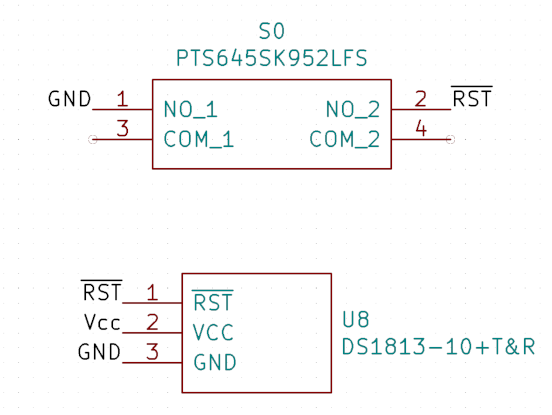
this is the new Reset circuit:

Re: Starting with my first SBC Project, Plans and Confusions
Microchip makes one, too. The MCP130 Microcontroller Supervisory Circuit is available in a TO-92 or SOT23-3 package and seven different trip voltages to support 3.0v, 3.3v, or 5.0v systems.
- GARTHWILSON
- Forum Moderator
- Posts: 8774
- Joined: 30 Aug 2002
- Location: Southern California
- Contact:
Re: Starting with my first SBC Project, Plans and Confusions
Proxy wrote:
BigDumbDinosaur wrote:
The simplest route and also the one that consumes the least amount of board space is using the Maxim DS1813 reset controller. It's available in TO-92 or SMT packaging (SOT-23, which is really tiny). The DS1813 is sensitive to power supply voltage, so it will hold the MPU in reset until 150 milliseconds after the power supply voltage has reached at least 4.0 volts (depends on which model is used). A pushbutton wired from reset to ground can be used to trigger a manual reset—the same 150ms pause will occur. No other components are required. See attached.
http://WilsonMinesCo.com/ lots of 6502 resources
The "second front page" is http://wilsonminesco.com/links.html .
What's an additional VIA among friends, anyhow?
The "second front page" is http://wilsonminesco.com/links.html .
What's an additional VIA among friends, anyhow?
- GARTHWILSON
- Forum Moderator
- Posts: 8774
- Joined: 30 Aug 2002
- Location: Southern California
- Contact:
Re: Starting with my first SBC Project, Plans and Confusions
Proxy wrote:
are ceramic 0.1uF caps enough for decoupling capacitors? or is there another type i should be using?
I'll just assume every unpolarized capacitor is supposed to be ceramic, and every polarized one electrolytic.
Quote:
oh i see. In KiCad Symbols are used for the Schematic, and Footprints for the PCB.
Quote:
i will update the previous comment that had the "IMAGE" link shortly after this
Quote:
so what diode should i choose? i know there are different types and that they all have different values like breakdown voltage, voltage drop, etc. but i'm not sure if any of those are really important
http://WilsonMinesCo.com/ lots of 6502 resources
The "second front page" is http://wilsonminesco.com/links.html .
What's an additional VIA among friends, anyhow?
The "second front page" is http://wilsonminesco.com/links.html .
What's an additional VIA among friends, anyhow?
- BigDumbDinosaur
- Posts: 9428
- Joined: 28 May 2009
- Location: Midwestern USA (JB Pritzker’s dystopia)
- Contact:
Re: Starting with my first SBC Project, Plans and Confusions
Proxy wrote:
well dammit, i wish i would've known of that earlier. and looking at the example circuit they have it's basically perfect as i can just hook the switch up in parallel to it and it will keep the line held low for 150ms after letting it go... does this also mean i don't need a capacitor for the Switch? and since it has an internal pull-up resistor it also seems i don't need to have an external one...
x86? We ain't got no x86. We don't NEED no stinking x86!
Re: Starting with my first SBC Project, Plans and Confusions
GARTHWILSON wrote:
Proxy wrote:
BigDumbDinosaur wrote:
The simplest route and also the one that consumes the least amount of board space is using the Maxim DS1813 reset controller. It's available in TO-92 or SMT packaging (SOT-23, which is really tiny). The DS1813 is sensitive to power supply voltage, so it will hold the MPU in reset until 150 milliseconds after the power supply voltage has reached at least 4.0 volts (depends on which model is used). A pushbutton wired from reset to ground can be used to trigger a manual reset—the same 150ms pause will occur. No other components are required. See attached.
GARTHWILSON wrote:
Proxy wrote:
are ceramic 0.1uF caps enough for decoupling capacitors? or is there another type i should be using?
I'll just assume every unpolarized capacitor is supposed to be ceramic, and every polarized one electrolytic.
Quote:
oh i see. In KiCad Symbols are used for the Schematic, and Footprints for the PCB.
GARTHWILSON wrote:
Quote:
i will update the previous comment that had the "IMAGE" link shortly after this
also it's hosted on imgur, even when you don't have an account they NEVER delete images (unless they were made public and deleted by admins for being agaist rules or similar), which is why i use that site.
GARTHWILSON wrote:
Quote:
so what diode should i choose? i know there are different types and that they all have different values like breakdown voltage, voltage drop, etc. but i'm not sure if any of those are really important
Michael wrote:
Microchip makes one, too. The MCP130 Microcontroller Supervisory Circuit is available in a TO-92 or SOT23-3 package and seven different trip voltages to support 3.0v, 3.3v, or 5.0v systems.
BigDumbDinosaur wrote:
Proxy wrote:
well dammit, i wish i would've known of that earlier. and looking at the example circuit they have it's basically perfect as i can just hook the switch up in parallel to it and it will keep the line held low for 150ms after letting it go... does this also mean i don't need a capacitor for the Switch? and since it has an internal pull-up resistor it also seems i don't need to have an external one...
Re: Starting with my first SBC Project, Plans and Confusions
Proxy wrote:
GARTHWILSON wrote:
Proxy wrote:
well dammit, i wish i would've known of that earlier.
(For an idea of what such notes look like when I've gone through a subject in detail, have a look at my CBM serial bus notes. That's eventually what my my SBC notes file will look like when I get around to doing more serious research on it.)
Proxy wrote:
looking online, 1N4148 seems to be a popular choice. i could order a few with the rest of the stuff i need to order if it's better suited for this.
Curt J. Sampson - github.com/0cjs
Re: Starting with my first SBC Project, Plans and Confusions
cjs wrote:
Proxy wrote:
GARTHWILSON wrote:
Proxy wrote:
well dammit, i wish i would've known of that earlier.
(For an idea of what such notes look like when I've gone through a subject in detail, have a look at my CBM serial bus notes. That's eventually what my my SBC notes file will look like when I get around to doing more serious research on it.)
Proxy wrote:
looking online, 1N4148 seems to be a popular choice. i could order a few with the rest of the stuff i need to order if it's better suited for this.
well i can order like 100 for 2 EUR so i might as well. (i'd only order 20 at most, because why would i need more? this is the first time i ever used a diode in something)
besides that, is there is anything else i'm missing on the schematic. i even added a Power LED.
also i'll add the image as attachment instead of a link as that seems to confuse some people.
Re: Starting with my first SBC Project, Plans and Confusions
Ok i'm having quite a lot of problems with aranging the components on the PCB.
i tried looking up other similar 65C02 or just any DIY Computer designs to get an idea on how to do it. and some tutorials.
i didn't really got a lot from either, i just know you're supposed to keep parts short and make sure nothing overlaps and stuff.
here is what i currently got, i'm very open to critism.
i tried looking up other similar 65C02 or just any DIY Computer designs to get an idea on how to do it. and some tutorials.
i didn't really got a lot from either, i just know you're supposed to keep parts short and make sure nothing overlaps and stuff.
here is what i currently got, i'm very open to critism.
Re: Starting with my first SBC Project, Plans and Confusions
Proxy wrote:
Ok i'm having quite a lot of problems with aranging the components on the PCB.
i tried looking up other similar 65C02 or just any DIY Computer designs to get an idea on how to do it. and some tutorials.
i didn't really got a lot from either, i just know you're supposed to keep parts short and make sure nothing overlaps and stuff.
here is what i currently got, i'm very open to critism.
i tried looking up other similar 65C02 or just any DIY Computer designs to get an idea on how to do it. and some tutorials.
i didn't really got a lot from either, i just know you're supposed to keep parts short and make sure nothing overlaps and stuff.
here is what i currently got, i'm very open to critism.
I also use the autorouter in Fritzing which is rubbish, but it gives me a proof of concept or at least lets me know that it's physically possible, then I undo it and manually route the board. And you can try to apply some of the usual guidelines - like horizontal lines on one side, vertical on the other but that never fully works for me.
Nice compact board though - hope it goes well!
Cheers,
-Gordon
--
Gordon Henderson.
See my Ruby 6502 and 65816 SBC projects here: https://projects.drogon.net/ruby/
Gordon Henderson.
See my Ruby 6502 and 65816 SBC projects here: https://projects.drogon.net/ruby/
- GARTHWILSON
- Forum Moderator
- Posts: 8774
- Joined: 30 Aug 2002
- Location: Southern California
- Contact:
Re: Starting with my first SBC Project, Plans and Confusions
Routing may seem pretty hopeless; but remember there are lots of tricks you can use. Again, remember you can mix up SRAMs' data lines if it helps, and mix up SRAMs' address lines. You could do that with (E)EPROM too, except that programming outside the board will require an adapter socket or software to pre-scramble them so the target computer will read it all correctly. You can also go as much as four traces between DIP pads without going smaller than .006" trace & space, if you use .045"x.055" DIP pads with .030" holes, like this:
If that seems too insane, you can do three traces with .007" trace & space between .050" pads. The green part is soldermasked; so you don't have to worry about bridging.
The following is more unusual, but actually has a standard name in the industry: the I-lead, or butt. The DIP's leads are trimmed just below the shank, then surface-mounted. It takes more solder than normal surface-mount, because you need to get a sizable fillet. An alternative is to J-lead the DIP, but that takes a special tool. The pads for the I-lead should be longer (although the .050" width is still fine); but an advantage is that since it only takes space on the one side and not all layers, other signal lines can be run underneath on other layers.
If that seems too insane, you can do three traces with .007" trace & space between .050" pads. The green part is soldermasked; so you don't have to worry about bridging.
The following is more unusual, but actually has a standard name in the industry: the I-lead, or butt. The DIP's leads are trimmed just below the shank, then surface-mounted. It takes more solder than normal surface-mount, because you need to get a sizable fillet. An alternative is to J-lead the DIP, but that takes a special tool. The pads for the I-lead should be longer (although the .050" width is still fine); but an advantage is that since it only takes space on the one side and not all layers, other signal lines can be run underneath on other layers.
http://WilsonMinesCo.com/ lots of 6502 resources
The "second front page" is http://wilsonminesco.com/links.html .
What's an additional VIA among friends, anyhow?
The "second front page" is http://wilsonminesco.com/links.html .
What's an additional VIA among friends, anyhow?
Re: Starting with my first SBC Project, Plans and Confusions
My current idea is to just let FreeRouting have a try at it (because i don't think i can actually route this manually, especailly with my skill level and attention span). I left the default trace width at 0.25mm but increased the width of the Power traces to 0.3mm, i cannot really go any larger than that because of the tiny pads of the SMD Chip. but it shouldn't require a lot of power anyways.
I'm also not sure if there are options for the auto router to fill all (or most) of the unused space with a GND Plane, i didn't really find anything online or in the options menu.
i added a Ground plane manually on both sides after using FreeRouting but i'm not sure how good it is.
also i know i can mix data and adress lines without any real effect on the COmputer, but to be honest i couldn't look at the board if i did that... it just seems wrong to me.
Technically i'm done... i got the PCB "finished" as far as i can tell and would only need to order the parts. which is the scariest part as that's the one that includes Money.
I could upload the PCB files so someone could take a look at it to see if there are any mistakes or similar, but i've looked over it and don't think there is anything... otherwise i don't know what else to do before ordering.
it would costs me 7 EUR on JLCPCB + shipping (19 EUR). so that would be quite a hit.
I'm also not sure if there are options for the auto router to fill all (or most) of the unused space with a GND Plane, i didn't really find anything online or in the options menu.
i added a Ground plane manually on both sides after using FreeRouting but i'm not sure how good it is.
also i know i can mix data and adress lines without any real effect on the COmputer, but to be honest i couldn't look at the board if i did that... it just seems wrong to me.
Technically i'm done... i got the PCB "finished" as far as i can tell and would only need to order the parts. which is the scariest part as that's the one that includes Money.
I could upload the PCB files so someone could take a look at it to see if there are any mistakes or similar, but i've looked over it and don't think there is anything... otherwise i don't know what else to do before ordering.
it would costs me 7 EUR on JLCPCB + shipping (19 EUR). so that would be quite a hit.
Re: Starting with my first SBC Project, Plans and Confusions
In KiCad, you can manually add a ground plane as a flood polygon, and it will automatically space itself from non-ground pads. An autorouter can then be let loose on everything else. I normally set up for a four-layer board and provide both ground and power planes on the inner layers, leaving both outer layers free for signal traces; this is not an expensive option any more. An SMD chip can have a short trace leading to a via which connects with a ground or power plane.
The JEDEC memory pinouts are a genuine PITA to route to from a 6502. Once you've figured out how to do it to one memory chip, it's definitely worth putting any others directly next to it and feeding traces between pins. This is an art that takes practice to do manually, but learning how will help you place components to make an autorouter's job easier. Don't be afraid to rotate components for convenience, either; the silkscreen will indicate which way around they go for assembly. And you may find that moving gates to different units of the same 74-series IC makes routing easier.
(Speaking of which, don't forget to include and wire up the power units of any multi-unit ICs you might have in the schematic, and tie off the inputs of any unused units. KiCad will not warn you about this, which I consider a serious bug in the ERC algorithms.)
The JEDEC memory pinouts are a genuine PITA to route to from a 6502. Once you've figured out how to do it to one memory chip, it's definitely worth putting any others directly next to it and feeding traces between pins. This is an art that takes practice to do manually, but learning how will help you place components to make an autorouter's job easier. Don't be afraid to rotate components for convenience, either; the silkscreen will indicate which way around they go for assembly. And you may find that moving gates to different units of the same 74-series IC makes routing easier.
(Speaking of which, don't forget to include and wire up the power units of any multi-unit ICs you might have in the schematic, and tie off the inputs of any unused units. KiCad will not warn you about this, which I consider a serious bug in the ERC algorithms.)
Re: Starting with my first SBC Project, Plans and Confusions
Chromatix wrote:
In KiCad, you can manually add a ground plane as a flood polygon, and it will automatically space itself from non-ground pads. An autorouter can then be let loose on everything else. I normally set up for a four-layer board and provide both ground and power planes on the inner layers, leaving both outer layers free for signal traces; this is not an expensive option any more. An SMD chip can have a short trace leading to a via which connects with a ground or power plane.
also increasing the amount of layers from 2 to 4 increases the cost by ~27 EUR (JLCPBC), so i'd say that is still pretty expensive.
Chromatix wrote:
The JEDEC memory pinouts are a genuine PITA to route to from a 6502. Once you've figured out how to do it to one memory chip, it's definitely worth putting any others directly next to it and feeding traces between pins. This is an art that takes practice to do manually, but learning how will help you place components to make an autorouter's job easier. Don't be afraid to rotate components for convenience, either; the silkscreen will indicate which way around they go for assembly. And you may find that moving gates to different units of the same 74-series IC makes routing easier.
Chromatix wrote:
(Speaking of which, don't forget to include and wire up the power units of any multi-unit ICs you might have in the schematic, and tie off the inputs of any unused units. KiCad will not warn you about this, which I consider a serious bug in the ERC algorithms.)