
Dan's 6502 build, aka, The WOPR Jr.
-
GARTHWILSON

- Forum Moderator
- Posts: 8775
- Joined: 30 Aug 2002
- Location: Southern California
- Contact:
Re: Dan's 6502 build, aka, The WOPR Jr.
That's what stacks are good at. They just take care of the allocation problems automatically with no waste of memory. Somewhat related, I'm interested in the software buffer idea that Arlet presented the challenge for. I have imagined it for years, but never needed it badly enough to figure it out. Whether anyone shows any real interest in the challenge itself or not, I'm still hoping there will me more helpful ideas and uses posted. Again, I'm always straining for an expanded tool box.
http://WilsonMinesCo.com/ lots of 6502 resources
The "second front page" is http://wilsonminesco.com/links.html .
What's an additional VIA among friends, anyhow?
The "second front page" is http://wilsonminesco.com/links.html .
What's an additional VIA among friends, anyhow?

Re: Dan's 6502 build, aka, The WOPR Jr.
It's true, a stack is ideal, I was just thinking within the framework of 6502, where stack access for locals isn't much fun. And even if can get the locals, if they are pointers you'll need to copy them to zero page to use them.
-
GARTHWILSON
- Forum Moderator
- Posts: 8775
- Joined: 30 Aug 2002
- Location: Southern California
- Contact:
Re: Dan's 6502 build, aka, The WOPR Jr.
As shown in the 6502 stacks treatise, I think the access works pretty nicely, but the pointers issue remains if we're talking about the page-1 hardware stack rather than a ZP virtual stack. In ZP, the (ZP,X) addressing mode is hugely useful for that. The '02 has no such thing outside of ZP though (except for JMP), so copying a byte pair to a ZP "register" would be necessary. Fortunately, it wouldn't be needed for more than a few cycles, and then something else can use the same "register" if necessary.
http://WilsonMinesCo.com/ lots of 6502 resources
The "second front page" is http://wilsonminesco.com/links.html .
What's an additional VIA among friends, anyhow?
The "second front page" is http://wilsonminesco.com/links.html .
What's an additional VIA among friends, anyhow?
-
BigDumbDinosaur

- Posts: 9428
- Joined: 28 May 2009
- Location: Midwestern USA (JB Pritzker’s dystopia)
- Contact:
Re: Dan's 6502 build, aka, The WOPR Jr.
BigEd wrote:
Hmm, I would have thought a few re-used locations in zero page was a good model for the local variables in a language like C. In neither case do you expect the values to be retained from one invocation to the next. Of course if you have nested routines you need to take care that the inner routines don't use the locations used by the outer ones. But if your call graph is simple enough, and static, and there's no recursion, I would think you could plan it out.
x86? We ain't got no x86. We don't NEED no stinking x86!
Re: Dan's 6502 build, aka, The WOPR Jr.
An observation as I code my monitor.
Assembly code is way more compact than I thought it would be coming from higher level languages like C/C++.
I guess I always imagined it would take many lines of code in assembly to do even the most simple thing. So far, that has not been my (admittedly small) experience.
I am currently writing the code to parse arguments to commands, specifically, getting a HEX number from a character string. I am amazed at how few lines of code it is taking, considering I want to allow both upper and lowercase A-F characters, and that the letters and numbers aren't consecutive in ASCII.
I think the key is that there are so many branching opcodes, and that they seem to cover pretty much everything. I think that has been the biggest revelation. When I first started reading on 6502 assembly, I kinda glossed over the status register, but its the key to everything!
Another pleasant observation. In C, and especially in C++, I found myself spending as much time wrestling with the particulars of the language itself, as I did solving the actual problem. Not so here. Even at this early stage of my learning, I feel like 95% of my time is spent designing the algorithm.
Anyone else have a similar experience? Also, I have no other assembly language experience, so I'm curious if I'd find other common CPU's as pleasant to code for. I'm specifically curious about x86 assembly.
Assembly code is way more compact than I thought it would be coming from higher level languages like C/C++.
I guess I always imagined it would take many lines of code in assembly to do even the most simple thing. So far, that has not been my (admittedly small) experience.
I am currently writing the code to parse arguments to commands, specifically, getting a HEX number from a character string. I am amazed at how few lines of code it is taking, considering I want to allow both upper and lowercase A-F characters, and that the letters and numbers aren't consecutive in ASCII.
I think the key is that there are so many branching opcodes, and that they seem to cover pretty much everything. I think that has been the biggest revelation. When I first started reading on 6502 assembly, I kinda glossed over the status register, but its the key to everything!
Another pleasant observation. In C, and especially in C++, I found myself spending as much time wrestling with the particulars of the language itself, as I did solving the actual problem. Not so here. Even at this early stage of my learning, I feel like 95% of my time is spent designing the algorithm.
Anyone else have a similar experience? Also, I have no other assembly language experience, so I'm curious if I'd find other common CPU's as pleasant to code for. I'm specifically curious about x86 assembly.
-
GARTHWILSON
- Forum Moderator
- Posts: 8775
- Joined: 30 Aug 2002
- Location: Southern California
- Contact:
Re: Dan's 6502 build, aka, The WOPR Jr.
Quote:
I guess I always imagined it would take many lines of code in assembly to do even the most simple thing. So far, that has not been my (admittedly small) experience.

Next, usually not affecting the length of the assembler's output, but making the source code a lot shorter and clearer, are macros. I wouldn't introduce them to someone who's brand new to assembly-language programming, but I wouldn't wait long either.
http://WilsonMinesCo.com/ lots of 6502 resources
The "second front page" is http://wilsonminesco.com/links.html .
What's an additional VIA among friends, anyhow?
The "second front page" is http://wilsonminesco.com/links.html .
What's an additional VIA among friends, anyhow?
Re: Dan's 6502 build, aka, The WOPR Jr.
An interesting first-hand report! You only get once chance to come across something for the first time, so it's good to have some insight into how it comes together. I hadn't previously heard anyone say that about the status register, but it makes sense. It can be surprising how a skilled 6502 programmer can perform a calculation or comparison and then quite some time later, perhaps some distant part of code, perform a test which uses one of the flags that were set. The carry bit is sometimes used explicitly as a one-bit register.
I think many people - especially on this forum - would say the 6502 is especially straightforward to pick up. There are not many registers, not too many addressing modes, not much machine state to track.
There's a neat diagram by Bob Sander-Cederlof which I like a lot:
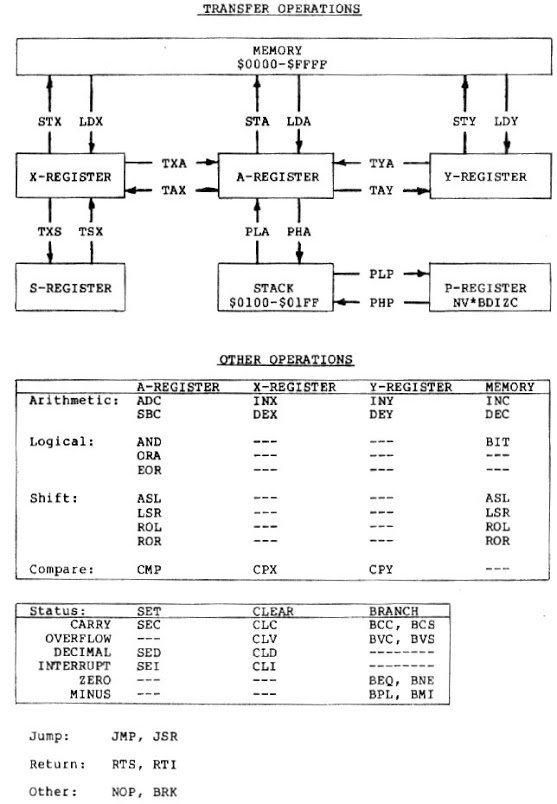
I think many people - especially on this forum - would say the 6502 is especially straightforward to pick up. There are not many registers, not too many addressing modes, not much machine state to track.
There's a neat diagram by Bob Sander-Cederlof which I like a lot:
Last edited by BigEd on Wed Mar 27, 2019 10:26 pm, edited 1 time in total.
Re: Dan's 6502 build, aka, The WOPR Jr.
Dan Moos wrote:
Also, I have no other assembly language experience, so I'm curious if I'd find other common CPU's as pleasant to code for. I'm specifically curious about x86 assembly.
Re: Dan's 6502 build, aka, The WOPR Jr.
Update:
Had a harddrive crash on the computer with my monitor's source code on it
Dumb drive isn't even recognized by the BIOS of any machine I hook it to. I even swapped PCBs with an equivalent drive.
I think it's the dreaded fluid bearing seize-up that that drive is susceptible to. Cheapest physical recovery place around here starts at $300 or so. Not bad, but there really isn't much of value on the drive. My monitor is probably one of the least bothersome losses because, not only was it still relatively small, I do have the code on the ROM if I want to reconstruct it. Also, there was a good portion that I posted here. I'm toying with the idea of a DIY platter transplant if it turns out I'm truly out of options. Of course I'd have to conjure some sort of clean air box, and get a few specialized tools. The scotch tape method I see often for maintaining platter alignment frankly terrifies me. Yeah, DIY swap probably not a likely plan...
Probably the most annoying loss is a bunch of C code for a MCU project I also have going. A scratch written driver for a character LCD with an I2C expander for I/O is gone now.
Cloud based backups will probably be something I use now guess
Anyway, just wanted to let you guys know I'm still at it since Its been a bit.
Had a harddrive crash on the computer with my monitor's source code on it
Dumb drive isn't even recognized by the BIOS of any machine I hook it to. I even swapped PCBs with an equivalent drive.
I think it's the dreaded fluid bearing seize-up that that drive is susceptible to. Cheapest physical recovery place around here starts at $300 or so. Not bad, but there really isn't much of value on the drive. My monitor is probably one of the least bothersome losses because, not only was it still relatively small, I do have the code on the ROM if I want to reconstruct it. Also, there was a good portion that I posted here. I'm toying with the idea of a DIY platter transplant if it turns out I'm truly out of options. Of course I'd have to conjure some sort of clean air box, and get a few specialized tools. The scotch tape method I see often for maintaining platter alignment frankly terrifies me. Yeah, DIY swap probably not a likely plan...
Probably the most annoying loss is a bunch of C code for a MCU project I also have going. A scratch written driver for a character LCD with an I2C expander for I/O is gone now.
Cloud based backups will probably be something I use now guess
Anyway, just wanted to let you guys know I'm still at it since Its been a bit.
-
GARTHWILSON
- Forum Moderator
- Posts: 8775
- Joined: 30 Aug 2002
- Location: Southern California
- Contact:
Re: Dan's 6502 build, aka, The WOPR Jr.
Not good news! I'm sorry to hear that. After a couple of hard-disc failures many years ago, I installed a second hard disc on the computer, and I occasionally copied the main one to the secondary one. What we have at home now, as of five years ago or more, is the server computer in the garage that our son put in, and every day, the computers back up to it. It has two identical hard discs, and one gets backed up to the other. The garage is a separate building, and occasionally, he backs that up to yet another computer in his room in the opposite corner of the house from my office. The server also backs up my website which is on a virtual server 3,000 miles away, and sometimes I back it up to SD card or to my PC's hard disc as well. So neither disc failure, nor fire, nor theft, will make us lose more than a day's work. Our daughter-in-law (married to the other son, not the one who lives here) is a professional programmer and she backs things up to an external hard disc. When I'm done with a project, I make a paper copy of everything, so even if everything electronic goes down, having to re-type it all is much easier than having to re-develop it.
http://WilsonMinesCo.com/ lots of 6502 resources
The "second front page" is http://wilsonminesco.com/links.html .
What's an additional VIA among friends, anyhow?
The "second front page" is http://wilsonminesco.com/links.html .
What's an additional VIA among friends, anyhow?
Re: Dan's 6502 build, aka, The WOPR Jr.
Turns out the best thing I did was put that resistor in the clock line 
See, that caused some wacky behavior that caused me to post a fairly recent version of my code here for help debugging what turned out to be a hardware problem.
The bulk of the more recent parts are my white board. Turns out all I really lost on this project was a routine that clears the terminal screen by sending the appropriate number of newline characters. Nothing at all really.
I plan on using the drive that I bought for a donor PCB as a backup drive. And some sort of cloud based solution. My wife is an aspiring fiction writer, and even she was smart enough to have cloud copies of everything she does.
See, that caused some wacky behavior that caused me to post a fairly recent version of my code here for help debugging what turned out to be a hardware problem.
The bulk of the more recent parts are my white board. Turns out all I really lost on this project was a routine that clears the terminal screen by sending the appropriate number of newline characters. Nothing at all really.
I plan on using the drive that I bought for a donor PCB as a backup drive. And some sort of cloud based solution. My wife is an aspiring fiction writer, and even she was smart enough to have cloud copies of everything she does.
-
BigDumbDinosaur
- Posts: 9428
- Joined: 28 May 2009
- Location: Midwestern USA (JB Pritzker’s dystopia)
- Contact:
Re: Dan's 6502 build, aka, The WOPR Jr.
Dan Moos wrote:
Had a harddrive crash on the computer with my monitor's source code on it
That said, all disks will eventually fail—you can take it to the bank. I have replaced hundreds and hundreds of them over the years, and have seen grown men weep because the disk went south and they had no viable backups.
"Backing up" to the "cloud" is not backing up. If the machine that has been backed up goes completely DOA due to a failed disk, you cannot restore it from an off-site backup because you won't have any Internet access, because you won't have an operating system loaded. In other words, you can't do a bare-metal restoration, something which is only possible with local backup media that you have in your possession, along with a bootable medium that can start an operating system to give you access to the backup media.
Everything around here gets backed up to tape every night. Both of my Linux boxes have LTO SCSI tapes and I can do a bare metal recovery using a custom boot CD. None of that cloud-based snake oil for me. If the root disk in either box blows, I can put a new disk in and boot the machine on the CD, which gives me a working Linux kernel and set of utilities. From that, I can restore the tape back to the disk, including the boot block, and on the next reboot, everything will be up and running as though nothing had happened.
Each night a 4 AM, the Window$ PCs' disks are imaged to one of the Linux boxes. The previous night's images will have been backed up to tape. So if a PC disk goes south I can restore the server-based image and in less than an hour have normal operation. None of it would be possible if the files were being copied to an off-site "backup facility."
x86? We ain't got no x86. We don't NEED no stinking x86!
Re: Dan's 6502 build, aka, The WOPR Jr.
BigDumbDinosaur wrote:
"Backing up" to the "cloud" is not backing up.
A common tactic is to have a couple of removable drives or USB drives, so there is always a copy off-site.
A common mistake is never to check that the backed up data is really there and can be restored.
Another common mistake is to copy the present data on top of the (only) previous copy. If your data is corrupted, you will have overwritten the good copy.

Re: Dan's 6502 build, aka, The WOPR Jr.
I use a 1TB external USB drive for backup. I only copy my personal working directories, not the OS, or other stuff that can be downloaded again. I use the linux 'rsync' program to create a 1:1 copy of the entire directory structure, one for each day of the week, uncompressed. In my experience, files are most often corrupted by simple user error, so I can go to the backup disk, and just copy a single file back.
In case of something like a house fire, I can quickly yank off the external drive and stick it in my pocket.
In case of something like a house fire, I can quickly yank off the external drive and stick it in my pocket.
-
BigDumbDinosaur
- Posts: 9428
- Joined: 28 May 2009
- Location: Midwestern USA (JB Pritzker’s dystopia)
- Contact:
Re: Dan's 6502 build, aka, The WOPR Jr.
BigEd wrote:
BigDumbDinosaur wrote:
"Backing up" to the "cloud" is not backing up.
Quote:
A common tactic is to have a couple of removable drives or USB drives, so there is always a copy off-site.
USB drives are pretty trustworthy these days and inexpensive enough to make purchasing several of them practical. A rotating grandfather strategy gives good assurance that a viable backup will be available if needed.
Quote:
A common mistake is never to check that the backed up data is really there and can be restored.
Quote:
Another common mistake is to copy the present data on top of the (only) previous copy. If your data is corrupted, you will have overwritten the good copy.
For home use, one doesn't have to be as elaborate. However, I recommend a minimum of three backup media in the rotation, both to improve redundancy and to reduce wear and tear on the media.
x86? We ain't got no x86. We don't NEED no stinking x86!