
Ok, will try that tomorrow!
EDIT (3/13/2012): I can try this wednesday 3/14. Almost done the .b core... I can't stop until it's finished or I'll lose my train of thought.
65Org16.x Dev. Board V1.1 using a Spartan 6 XC6SLX9-3TQG144
-
ElEctric_EyE
- Posts: 3260
- Joined: 02 Mar 2009
- Location: OH, USA
Last edited by ElEctric_EyE on Tue Mar 13, 2012 6:26 pm, edited 1 time in total.

Arlet wrote:
In any case, I was planning to use RGB internally, and perform the RGB -> YUV conversion as the last step in the video pipeline. Switching between YUV and YCbCr is then just a matter of using different coefficients.
Using this method, we need 216 Mbit/sec from the SDRAM during active display. If you include the horizontal blank/sync time, the average throughput is about 180Mbit/sec for full-color/high resolution. Since the SDRAM can easily run at 1600Mbit/sec, there's plenty of bandwidth.
-
ElEctric_EyE
- Posts: 3260
- Joined: 02 Mar 2009
- Location: OH, USA

-
ElEctric_EyE
- Posts: 3260
- Joined: 02 Mar 2009
- Location: OH, USA
-
ElEctric_EyE
- Posts: 3260
- Joined: 02 Mar 2009
- Location: OH, USA
Arlet wrote:
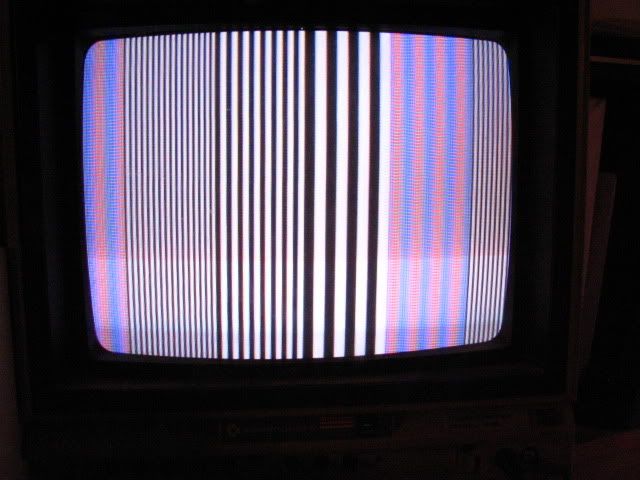
Cool. Did you try to use the '+' and '-' on the USB port to move the picture sideways ? There should be a blue area on the left, and I'm curious if the color turned out okay.
Do the fine vertical lines really turn purple/blue on the screen, or is that an aliasing effect of the camera ?
Do the fine vertical lines really turn purple/blue on the screen, or is that an aliasing effect of the camera ?
That's a real purple/bluish "meshed" type pattern.
ElEctric_EyE wrote:
That's a real purple/bluish "meshed" type pattern.
6502.org wrote:
Image no longer available: http://ladybug.xs4all.nl/arlet/fpga/bars.png
By the way, I've ordered a cheap USB composite video grabber. I should receive it this week. That way, I can test the image by just capturing it on my PC, and playing it in a small window on the desktop, rather than on a bulky TV set on my desk.
-
ElEctric_EyE
- Posts: 3260
- Joined: 02 Mar 2009
- Location: OH, USA
Yeah it's old alright. C-64 hi-res was 320x200. HSync frequency low with pixel clock @14.318MHz...
The CS4954 has all the signals present necessary for an RGB display. I should have pursued that in V1.1 like I did V1.0. I'm thinking a 15-pin VGA-style connector should replace the S-video connector for V1.2 of the Devboard (it's a space hog though), while keeping the composite video connector onboard.
The CS4954 has all the signals present necessary for an RGB display. I should have pursued that in V1.1 like I did V1.0. I'm thinking a 15-pin VGA-style connector should replace the S-video connector for V1.2 of the Devboard (it's a space hog though), while keeping the composite video connector onboard.
Last edited by ElEctric_EyE on Wed Mar 14, 2012 7:39 pm, edited 1 time in total.
-
ElEctric_EyE
- Posts: 3260
- Joined: 02 Mar 2009
- Location: OH, USA
Arlet wrote:
...By the way, I've ordered a cheap USB composite video grabber. I should receive it this week. That way, I can test the image by just capturing it on my PC, and playing it in a small window on the desktop, rather than on a bulky TV set on my desk.
Where did you get it from?
Arlet wrote:
Do you know if a VGA monitor will sync on the NTSC/PAL signal ?
-
ElEctric_EyE
- Posts: 3260
- Joined: 02 Mar 2009
- Location: OH, USA
My USB video grabber has arrived. The nice thing is that it will do both PAL and NTSC, so I can test them both. Here's the same test image, grabbed in NTSC mode. The device also has an S-Video input, so if I install the connector on the board, I could use that for better quality.
6502.org wrote:
Image no longer available: http://ladybug.xs4all.nl/arlet/fpga/ntscbars.png
By the way, don't expect too much resolution, especially not with the chroma part of the signal. For PAL the chroma bandwidth is 1.3 MHz, and for NTSC it is only 650 kHz. Because the pixel clock is 13,5 MHz, this means that it takes quite a few pixels for a color change.
I was playing around with a image consisting of constant luma, and single pixel lines where only chroma is changed. It's quite shocking to see how these lines turn into big blurry bars. When I change both luma and chroma in a single pixel, the big blurry chroma pixels are still there, but they aren't nearly as obvious anymore. That's why in a normal TV program, you don't really notice how poor the quality is.
I was playing around with a image consisting of constant luma, and single pixel lines where only chroma is changed. It's quite shocking to see how these lines turn into big blurry bars. When I change both luma and chroma in a single pixel, the big blurry chroma pixels are still there, but they aren't nearly as obvious anymore. That's why in a normal TV program, you don't really notice how poor the quality is.
-
ElEctric_EyE
- Posts: 3260
- Joined: 02 Mar 2009
- Location: OH, USA