Page 1 of 1
help with simple example
Posted: Tue Mar 10, 2015 12:03 pm
by interp
i am following along, with a simple example, from this webpage:
http://www.atariarchives.org/mlb/chapter1.php
and using dasm and winVICE. compiles with no errors.
when running in vice, gives no errors, BUT does NOT output the letter "A".
i tried moving the starting address, still doesnt work.
its probably some small detail overlooked.
processor 6502
;org $360 ; SYS 864
org $1000 ; SYS 4096
LDY #01
LDA #41
STA 8000
RTS
original text snippet:
"Here's how the same example would look on a PET/CBM after you answered 0360 as the starting address when the SA asked for it:
0360 LDY #01
0362 LDA #41
0364 STA 8000
0367 RTS
0368 END
(The word "END" isn't a 6502 ML instruction; it's a special signal to the SA to stop constructing a program and exit the SA program. Such special words are called pseudo-ops.)
Then you could test it in direct mode (just typing in the instruction onto the screen with no line number and not as part of a BASIC program) by typing:
SYS 864 and you should see the "A" on the screen."
Re: help with simple example
Posted: Tue Mar 10, 2015 12:10 pm
by BigEd
Hello and welcome!
Might it be that the #41 needs to be #$41, which is to say, #65 in decimal?
Edit: oh, and also the 8000 should be $8000.
I think you know already that if you change the start address, you also need to SYS the same address (in decimal)
Cheers
Ed
Re: help with simple example
Posted: Tue Mar 10, 2015 1:53 pm
by teamtempest
I took a look at that page and yes, the example does not use a "$" prefix on any of the numbers but it appears that whatever software is being used assumes all numbers are hexadecimal rather than decimal. That is not the usual practice in the world of 65xx assemblers; most understand both decimal and hexadecimal numbers and use a leading "$" to indicate when a hexadecimal interpretation is desired.
So go ahead and put a "$" in front of all the numbers except the SYS address, which should remain in decimal since the BASIC interpreter that will execute it does not understand hexadecimal.
Incidentally, what that snippet does is put a character code in the first byte of screen memory. The video circuitry of the PET scans that location, finds the character code and outputs the character pattern it specifies to the screen.
It doesn't matter where in memory that snippet exists, it will do the same thing (although it might be interesting to put the code in screen memory to see what the screen shows). I don't know what the "ldy #$1" instruction is for, since it isn't obviously used for anything.
Re: help with simple example
Posted: Tue Mar 10, 2015 5:16 pm
by interp
thanks guys!
i made the following changes, but still same thing.
tried
#41 #$41 $41
8000 $8000
#$8000 gives error
also did with and without LDY.
it should print, to top left of screen?
i tried fullscreen.
i have successfully done, a few 'hello world' type examples,
with the same dasm+vice setup.
i have noticed, that dasm is very sensitive to white space.
latest code:
processor 6502
org $0360 ; SYS 864
;org $1000 ; SYS 4096
;LDY #01
;LDA #41
;LDA #$41
LDA $41
STA $8000
RTS
Re: help with simple example
Posted: Tue Mar 10, 2015 8:30 pm
by BitWise
Try this
Code: Select all
  processor 6502
  org $0360       ; SYS 864

  LDA #$41
  STA $8000
  RTS
Re: help with simple example
Posted: Tue Mar 10, 2015 9:57 pm
by 8BIT
My guess is also that $8000 is the upper left corner of the screen.
Be sure when you execute the code that your cursor is not at the bottom or your "A" might end up scrolling off the screen.

Re: help with simple example
Posted: Wed Mar 11, 2015 3:51 am
by teamtempest
Yes. The "#" character is conventionally used to indicate a numeric literal. It is not possible to store ("STA") anything into a numeric literal - ie., data - but only into memory addresses (typically RAM, but sometimes I/O addresses).
So "#$41" is a numeric literal specified in hexadecimal. "$8000" is a memory address specified in hexadecimal.
Bitwise's code should work. The only possible issue I can think of might not apply to the PET, but on the C64 it was necessary to make sure the background and foreground colors were different, otherwise the character would not appear.
Various editions of the C64 did different things to initialize color screen memory. The very first ones filled it with a white foreground color, so the code shown was enough to make a character appear on a blue background. And Commodore's own examples of beginning assembly code were exactly like the code shown.
But later editions filled the color memory with the same color for foreground and background, and the character would not show up. Did Commodore change its examples? No it did not. Which led to great confusion among some.
Re: help with simple example
Posted: Mon Aug 03, 2015 12:17 am
by barrym95838
Hello and welcome!
Might it be that the #41 needs to be #$41, which is to say, #65 in decimal?
...
I just tried a
POKE 32768,65 on a PET 4032 in WinVICE, and it placed a "spade" character in the upper left of the screen. Like the Apple 2 (and probably others), the
screen code and and the
ASCII code are not the same.
POKE 32768,1 did the trick of placing a capital
A.
Mike B.
Re: help with simple example
Posted: Mon Aug 03, 2015 12:36 am
by BigDumbDinosaur
Hello and welcome!
Might it be that the #41 needs to be #$41, which is to say, #65 in decimal?
...
I just tried a
POKE 32768,65 on a PET 4032 in WinVICE, and it placed a "spade" character in the upper left of the screen. Like the Apple 2 (and probably others), the
screen code and and the
ASCII code are not the same.
POKE 32768,1 did the trick of placing a capital
A.
Mike B.
You're correct. Printing $41 via the BSOUT ($FFD2) kernel subroutine will display an 'A'. It doesn't display an 'A' however if written directly to screen RAM, which is true of all eight bit Commodore machines.
Re: help with simple example
Posted: Mon Aug 03, 2015 9:03 am
by BigEd
Hello and welcome!
Might it be that the #41 needs to be #$41, which is to say, #65 in decimal?
...
I just tried a
POKE 32768,65 on a PET 4032 in WinVICE, and it placed a "spade" character in the upper left of the screen. Like the Apple 2 (and probably others), the
screen code and and the
ASCII code are not the same.
POKE 32768,1 did the trick of placing a capital
A.
Well spotted! It's the same, as it should be, in the JavaScript PET at
http://www.thomasskibo.com/6502/pet2001/
Note that this is not the nature of PETSCII, rather the nature of the character ROM, but it is mentioned in passing at
https://en.wikipedia.org/wiki/PETSCII#Codepage_layout
I see that the Simple Assembler used in the book Machine Language For Beginners has a number of non-standard notations, so trying to code the examples in another assembler such as dasm might well lead to confusion rather than enlightenment. That's unfortunate.
There may be another lesson here though: interp said that the example did not output an A. But, did nothing happen? Or did the space character appear? Did the program return successfully to Basic?
Re: help with simple example
Posted: Mon Aug 03, 2015 10:46 am
by BigEd
Printing $41 via the BSOUT ($FFD2) kernel subroutine will display an 'A'.
Sounds like a good worked example. I'll use
easy6502 to assemble and to get a listing:
Code: Select all
Address  Hexdump   Dissassembly
-------------------------------
$0600    a9 41     LDA #$41
$0602    20 d2 ff  JSR $ffd2
$0605    60        RTS
To run this using SYS we'll need to convert the program to decimal bytes and POKE them in. (Easy6502 defaults to producing code at $600 and always disassembles from there, so I've left that as is. In this case the code isn't sensitive to where it's placed)
Code: Select all
POKE 1536,169
POKE 1537,65
POKE 1538,32
POKE 1539,210
POKE 1540,255
POKE 1541,96
SYS 1536
and it works as expected:
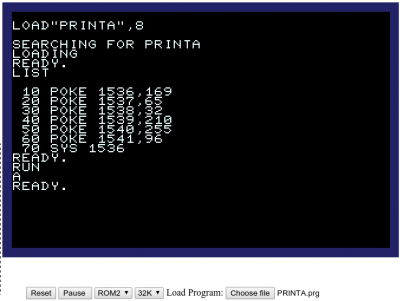
- Screenshot from http://www.thomasskibo.com/6502/pet2001/
As an optimisation, which could easily be confusing for the beginner, you can always replace a sequence
with the shorter and faster alternative
To do that, we note that JMP is 4c in hex, or 76 decimal, so we need
instead.