Highest speed graphic functions in a Spartan 6 XC6SLX9

Topics relating to PALs, CPLDs, FPGAs, and other PLDs used for the support or creation of 65-family processors, both hardware and HDL.
ElEctric_EyE
Posts: 3260
Joined: 02 Mar 2009
Location: OH, USA

Re: Highest speed graphic functions in a Spartan 6 XC6SLX9

Post by ElEctric_EyE »

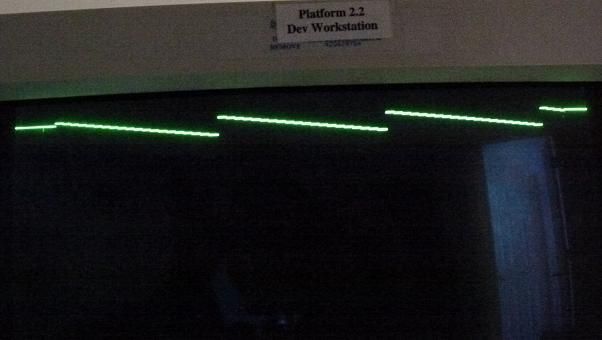
2 more states have been added. 1 to plot a line where dx>dy and another to plot a line where dy>dx. A state after the init_state also assigns dx or dy to num depending. So there is some progress towards the final correct algorithm. Simulation shows case following proper order depending on quadrant the line is in. When it works, the plan is to change dy>dx to dy>=dx, and then to check for x0=x1 or y0=y1 within each case, for the purely vertical or horizontal lines.

Code: Select all

module LineGen( input clk108,
					 input countflag,				//flag, plot inside borders
					 input vblank,
					 input vsync,
					 output reg [15:0] X,			//H component of pixel to BRAM
					 output reg [15:0] Y			//V component of pixel to BRAM
					);
					
reg [15:0] x0;
reg [15:0] y0;
reg [15:0] x1;	
reg [15:0] y1;
reg [15:0] dx;
reg [15:0] dy;
reg [15:0] num;
reg [15:0] e2;
reg [0:0] sx;

reg [2:0] state;
parameter init_state = 0, prep_state = 1, Hplot_state = 2, Vplot_state = 3;

always @(posedge clk108)
if ( vblank & vsync )
	state <= init_state;
	else
		case (state)
			init_state :
					state <= prep_state;
			prep_state :
				if ( countflag )
					if ( dx > dy )
						state <= Hplot_state;
					else
						state <= Vplot_state;
			Hplot_state :
				if ( !countflag )
				state <= init_state;
			Vplot_state :
				if ( !countflag )
				state <= init_state;
		endcase
				
always @(posedge clk108) begin
case (state)
init_state:
	if ( vblank & vsync ) begin
		x0 <= 0;
		y0 <= 0;
		x1 <= 200;
		y1 <= 300;
			if ( x0 > x1 ) begin			//negative "/" slope, sx=0
				dx <= x0 - x1;
				sx <= 1'b0;
			end
				else begin					//positive "\" slope, sx=1
					dx <= x1 - x0;
					sx <= 1'b1;
				end
		dy <= y1 - y0;						//CPU sending coordinates must follow y1>y0
	end

prep_state:
		if ( dx > dy ) begin
			num <= dx;
		end
			else
				num <= dy;
		
Hplot_state:
	if ( countflag ) begin
		if ( y0 < y1 ) begin
			num <= num + dy;
			e2 <= num + num;
				if ( e2 >= dx ) begin
					num <= num - dy;
					x0 <= sx ? x0 + 1'b1 :
								  x0 - 1'b1;
					X <= x0;
				end
				else begin
					y0 <= y0 + 1'b1;
					Y <= y0;
				end
		end
	end
	
Vplot_state:
	if ( countflag ) begin
		if ( y0 < y1 ) begin
			num <= num + dx;
			e2 <= num + num;
				if ( e2 >= dy ) begin
					num <= num - dx;
					x0 <= sx ? x0 + 1'b1 :
								  x0 - 1'b1;
					X <= x0;
				end
				else begin
					y0 <= y0 + 1'b1;
					Y <= y0;
				end
		end
	end
endcase
end

endmodule
White Flame
Posts: 704
Joined: 24 Jul 2012

Re: Highest speed graphic functions in a Spartan 6 XC6SLX9

Post by White Flame »

Using e2, you should initialize num to 0 in prep_state. If you don't use e2, but just compare num directly against the denominator, then you should initialize num to denom >> 1. Either of these approaches draw from the middle of the pixel instead of the corner, but putting both in simultaneously will not be correct. By initializing num to denom in prep_state, you're just shifting the line over one pixel too far, as that always overflow your num/denom fraction, especially because you're checking num*2/denom for overflow.

I don't know all the HDL specifics, but in your plot_state cases, you potentially assign num twice, which was discussed as being an error case. Maybe try breaking out the added delta into num_adjusted or something to keep the intermediate value separately named.
ElEctric_EyE
Posts: 3260
Joined: 02 Mar 2009
Location: OH, USA

Re: Highest speed graphic functions in a Spartan 6 XC6SLX9

Post by ElEctric_EyE »

White Flame wrote:
...Either of these approaches draw from the middle of the pixel instead of the corner, but putting both in simultaneously will not be correct...
Can you explain? I believe this is the major flaw in my overall thinking.
White Flame
Posts: 704
Joined: 24 Jul 2012

Re: Highest speed graphic functions in a Spartan 6 XC6SLX9

Post by White Flame »

Let's go back to my previous example, drawing from 0,0 to 3,5. This is without using e2, and starting off with num=0.

Code: Select all

                    Rendered pixels
y=0, x = 0 + 0/5    #...
y=1, x = 0 + 3/5    #...
y=2, x = 1 + 1/5    .#..
y=3, x = 1 + 4/5    .#..
y=4, x = 2 + 2/5    ..#.
y=5, x = 3 + 0/5    ...#
This line isn't very straight. Consider the line going from the upper-left corner of the top # to the upper-left corner of the bottom #. At each top-edge of a pixel line, the pixel that contains the line's intersection is filled in. That describes the shape of this pixellated line, as per the algorithm.

Because x only reaches 3 in the very last line, you'll always have a 1-pixel "hop" into the final coordinate. You'll notice that in all the prior examples, starting with num=0, the final pixel always ends up as "x1 + 0/denom" exactly, thus no pixel before will ever reach x1.

Consider when dx is only +1, and it becomes really apparent. 0,0 to 3,1:

Code: Select all

y=0, x = 0 + 0/4   #.
y=1, x = 0 + 1/4   #.
y=2, x = 0 + 2/4   #.
y=3, x = 1 + 0/3   .#
Ideally, this should be 2 pixels in column 0, then 2 pixels on column 1 to look even. This is what happens when you start off num as denom/2:

Code: Select all

y=0, x = 0 + 1/3   #.
y=1, x = 0 + 2/3   #.
y=2, x = 1 + 0/3   .#
y=3, x = 1 + 1/3   .#
Here you can see numerically that, in the x-coordinate, the line starts off in the middle of the pixel and ends on the middle of the final pixel (well, as close as thirds allow).

The reason e2 works as well is because it says you can only reach half of the denominator before rolling over the fraction. The more I think about this approach, you do need to do a signed comparison with e2. Start with num=0, using e2:

Code: Select all

y=0, x = 0 + ( 0*2)/3   #.
y=1, x = 0 + ( 1*2)/3   #.
y=2, x = 0 + ( 2*2)/3        this wraps, so subtract 3 from num
       = 1 + (-1*2)/3   .#   this needs to be a signed comparison, checking num vs denom, or else it'll think the negative num is really big and always wrap
y=3, x = 1 + (0*2)/3    .#
For conceptual simplicity, and to avoid signedness issues, I do advise against using that e2 method and just stick to starting with num = denom/2. Here's the original line done like this:

Code: Select all

y=0, x = 0 + 2/5    #...   add 3/5 every step
y=1, x = 1 + 0/5    .#..
y=2, x = 1 + 3/5    .#..
y=3, x = 2 + 1/5    ..#.
y=4, x = 2 + 4/5    ..#.
y=5, x = 3 + 2/5    ...#
The line looks good, fundamentally because it starts & ends in the middle of the pixel (or a rounded 2/5ths of the way in).


But back to the original point, you had both a non-zero starting num (starting incorrectly as the full denom), and e2 in play at once:

Code: Select all

y=0, x = 0 + 5*2/5 = 1 +  0*2/5  .#..
y=1, x = 1 + 3*2/5 = 2 + -2*2/5  ..#.
y=2, x = 2 + 1*2/5               ..#.
y=3, x = 2 + 4*2/5 = 3 + -1*2/5  ...#
y=4, x = 3 + 2*2/5               ....#
y=5, x = 3 + 5*2/5 = 4 +  0*2/5  ....#
You're throwing too much stuff at num, and it's overflowing too often. Combined with potential signedness issues, you could be forcing an overflow every line.
ElEctric_EyE
Posts: 3260
Joined: 02 Mar 2009
Location: OH, USA

Re: Highest speed graphic functions in a Spartan 6 XC6SLX9

Post by ElEctric_EyE »

Thank you for putting up with my ignorance!
I have made some progress. I see the value in the >>1!
I've tested the Hplot and made the Vplot intuitively. I wish I could say for the most part it works, but it doesn't for some reason. I will have to experiment more... What got me on the right track was when I was trying to do a line from (10,10)to(300,15). The code has changed quite a bit since the last post. One note: when I make y1=40, things do not work as expected. More testing needed.

Code: Select all

module LineGen( input clk108,
					 input countflag,				//flag, plot inside borders
					 input vblank,
					 input vsync,
					 output reg [15:0] X = 0,			//H component of pixel to BRAM
					 output reg [15:0] Y = 0,			//V component of pixel to BRAM
					 output reg WE = 0						// write enable for BRAM
					);
					
reg [15:0] x0;
reg [15:0] y0;
reg [15:0] x1;	
reg [15:0] y1;
reg [15:0] dx;
reg [15:0] dy;
reg [15:0] num;
reg [0:0] sx;

reg [2:0] state;
parameter init_state = 0, prep_state = 1, Hplot_state = 2, Vplot_state = 3;

always @(posedge clk108)
if ( vblank & vsync ) 
	state <= init_state;
	else
		case (state)
			init_state :
					state <= prep_state;
			prep_state :
				if ( countflag )
					if ( dx > dy )
						state <= Hplot_state;
					else
						state <= Vplot_state;
			Hplot_state :
				if ( !countflag )
				state <= init_state;
			Vplot_state :
				if ( !countflag )
				state <= init_state;
		endcase
				
always @(posedge clk108) begin
case (state)
init_state:
	begin
		x0 <= 10;
		y0 <= 10;
		x1 <= 200;
		y1 <= 30;
		dy <= y1 - y0;						// CPU sending coordinates must follow y1>y0
			if ( x0 > x1 ) begin			
				dx <= x0 - x1;
				sx <= 0;						// negative "/" slope, sx=0
			end
				else begin					
					dx <= x1 - x0;
					sx <= 1;					// positive "\" slope, sx=1
				end
	end

prep_state:
		if ( dx > dy ) 
			num <= dy >> 1;
			else
				num <= dx >> 1;
		
Hplot_state:								// dx/dy=(x1-x0)/(y1-y0).  Hplot_state when dx is larger than dy
		if ( y0 < y1 ) begin
			X <= x0;							// output pixel coordinates to BRAM
			Y <= y0;
			num <= num + dy;				// keep plotting on same raster line...
			x0 <= sx ? x0 + 1 :
						  x0 - 1;
				if ( num >= dx ) begin	// ...until (dx/dy) > 1
					num <= dy >> 1;		// reset num
					y0 <= y0 + 1;			// next raster line
				end
		end
		else begin							// at end of line (y0=y1) reset origin
			x0 <= 10;
			y0 <= 10;
		end
	
Vplot_state:
		if ( x0 < x1 ) begin
			Y <= y0;
			X <= x0;		
			num <= num + dx;
			y0 <= y0 + 1;
				if ( num >= dy ) begin
					num <= dx;                                                                                                                            ;
					x0 <= sx ? x0 + 1 :
								  x0 - 1;
				end
		end
		else begin
			x0 <= 10;
			y0 <= 10;
		end
endcase
end

endmodule
Image
White Flame
Posts: 704
Joined: 24 Jul 2012

Re: Highest speed graphic functions in a Spartan 6 XC6SLX9

Post by White Flame »

If num >= denom, you don't want to reset num to the initial value. You subtract denom from it and increment the integer portion.

1 + 7/6 -> 2 + 1/6

num = num - denom
ElEctric_EyE
Posts: 3260
Joined: 02 Mar 2009
Location: OH, USA

Re: Highest speed graphic functions in a Spartan 6 XC6SLX9

Post by ElEctric_EyE »

OK! now we get down to the nitty gritty so to speak. I did this modification to the Hplot_state in my previous code based on your advice WF. The output was identical to my last pic too. A step in the right direction I think...:

Code: Select all

Hplot_state:								// dx/dy=(x1-x0)/(y1-y0).  Hplot_state when dx is larger than dy
		if ( y0 < y1 ) begin
			X <= x0;							// output pixel coordinates to BRAM
			Y <= y0;
			num <= num + dy;				// keep plotting on same raster line...
			x0 <= sx ? x0 + 1 :
						  x0 - 1;
				if ( num >= dx ) begin	// ...until (dx/dy) > 1
					num <= num - dx;		// hmmm, num is denominator for this case?
					y0 <= y0 + 1;			// next raster line
				end
		end
		else begin							// at end of line (y0=y1) reset origin
			x0 <= 10;
			y0 <= 10;
		end
White Flame
Posts: 704
Joined: 24 Jul 2012

Re: Highest speed graphic functions in a Spartan 6 XC6SLX9

Post by White Flame »

The body of your code generally looks right, but your comments don't match what's going on with dx, dy, and the fraction. I'll leave that to you.

Does the line get drawn onscreen where you expect it to, and the only problem is that it's repeated?

What goes on that the end of the loop? countflag seems to be the only thing that ends the line drawing, and that's externally controlled. At the end of your plot state, you reset the coordinate; I could imagine that if for some reason only the y-coord was reset but not the x-coord, that it would continue re-drawing the line to the right as the picture looks, since the outside world has no indication of when the line is done. WE is also never touched and might be kept asserted somewhere, continuing to draw in some unwanted state.
ElEctric_EyE
Posts: 3260
Joined: 02 Mar 2009
Location: OH, USA

Re: Highest speed graphic functions in a Spartan 6 XC6SLX9

Post by ElEctric_EyE »

I had only minutes to change the code and test it out. It looked very similar, if not the same, to the pic I posted on the 28th. Tonight I can try different coordinates. It does appear to be correct, however I am getting away with something regarding writing and reading from the BRAM, because in simulation I see X's coming out. I had started to experiment with adding a WE signal, but stopped short after it appeared it was working correctly.

I am unsure why it is repeating, but it may have something to do in the other module where it reads from the BRAM and plots the coordinates.
ElEctric_EyE
Posts: 3260
Joined: 02 Mar 2009
Location: OH, USA

Re: Highest speed graphic functions in a Spartan 6 XC6SLX9

Post by ElEctric_EyE »

I need to take a step back for a day or two and rethink the overall structure of this entire machine. This LineGen Module which writes to the BRAM appears close though. I need to focus on the VRAMif module that reads from the BRAM and plots the pixels based on a match for the X and Y pixel counters with the coordinates stored and the Z address counter for the BRAM. At this point it looks like I get very lucky just for some certain coordinates.
ElEctric_EyE
Posts: 3260
Joined: 02 Mar 2009
Location: OH, USA

Re: Highest speed graphic functions in a Spartan 6 XC6SLX9

Post by ElEctric_EyE »

White Flame wrote:
... countflag seems to be the only thing that ends the line drawing, and that's externally controlled....
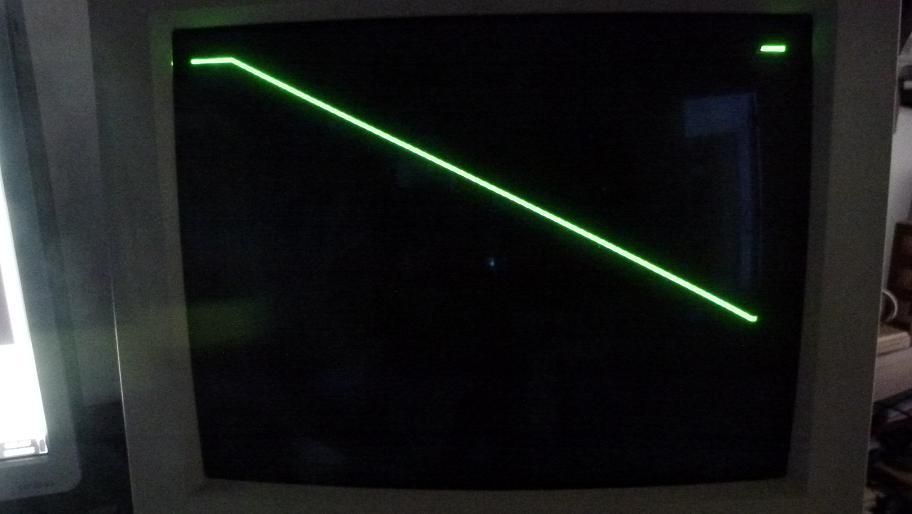
This was a clue! I removed it from the state machine and the plotting is much better! :D I was very surprised at this. Now very many different coordinates appear to be working, except when dy>dx.
Code: Select all

module LineGen( input clk108,
					 input countflag,				//flag, plot inside borders
					 input vblank,
					 input vsync,
					 output reg [15:0] X = 0,			//H component of pixel to BRAM
					 output reg [15:0] Y = 0,			//V component of pixel to BRAM
					 output reg WE = 0						// write enable for BRAM
					);
					
reg [15:0] x0 = 20;
reg [15:0] y0 = 20;
reg [15:0] x1 = 600;	
reg [15:0] y1 = 400;
reg [15:0] dx;
reg [15:0] dy;
reg [15:0] num;
reg [0:0] sx;

reg [2:0] state;
parameter init_state = 0, prep_state = 1, Hplot_state = 2, Vplot_state = 3;
				 
always @(posedge clk108)
if ( vblank & vsync ) 
	state <= init_state;
	else
		case (state)
			init_state :
					state <= prep_state;
			prep_state :
					if ( dx > dy )
						state <= Hplot_state;
					else
						state <= Vplot_state;
			Hplot_state :
				if ( !countflag )
				state <= init_state;
			Vplot_state :
				if ( !countflag )
				state <= init_state;
		endcase
				
always @(posedge clk108) begin
case (state)
init_state:
	begin
		x0 <= 20;
		y0 <= 20;
		x1 <= 500;
		y1 <= 400;
		dy <= y1 - y0;						// CPU sending coordinates must follow y1>y0
			if ( x0 > x1 ) begin			
				dx <= x0 - x1;
				sx <= 0;						// negative "/" slope, sx=0
			end
				else begin					
					dx <= x1 - x0;
					sx <= 1;					// positive "\" slope, sx=1
				end
	end

prep_state:
		if ( dx > dy ) 
			num <= dy;
			else
				num <= dx;
		
Hplot_state:								// dx/dy=(x1-x0)/(y1-y0).  Hplot_state when dx is larger than dy
		if ( y0 < y1 ) begin
			X <= x0;							// output pixel coordinates to BRAM
			Y <= y0;
			num <= num + dy;				// keep plotting on same raster line...
			x0 <= sx ? x0 + 1 :
						  x0 - 1;
				if ( num >= dx ) begin	// ...until (dx/dy) > 1
					num <= num - dx;		// reset num
					y0 <= y0 + 1;			// next raster line
				end
		end
		else begin							// at end of line (y0=y1) reset origin
			x0 <= 20;
			y0 <= 20;
		end
	
Vplot_state:
		if ( x0 < x1 ) begin
			Y <= y0;
			X <= x0;		
			num <= num + dx;
			y0 <= y0 + 1;
				if ( num >= dy ) begin
					num <= num - dy;                                                                                                                            ;
					x0 <= sx ? x0 + 1 :
								  x0 - 1;
				end
		end
		else begin
			x0 <= 20;
			y0 <= 20;
		end
endcase
end

endmodule
The y1 value does not reach to where it should. More experimentation tomorrow...

Image
Post Reply