
This is easy to understand, but hard to explain. Let's see if this works. You might do best to just look at the data sheets for the display controller IC.
Scrolling in the reverse direction is the same thing, just done in reverse. It's different from the circular buffer I showed for RS-232 though. You can write to any part of the display memory in the display controller IC (ie, you don't have to go in order); but a command tells the display's controller where to start reading for the top line. You can adjust that pointer to whatever you want. It starts at the memory row that you tell it, and scans the screen from top to bottom. If you don't have the top line of the screen set to match the first row in the display memory, then it won't reach the end of the screen and the end of the memory at the same time. Regardless, when it reaches the end of each, it just loops back to the beginning and continues. To scroll down instead of up, just decrement the memory row it starts the screen at (instead of incrementing). This will make everything go down a row except that the bottom row now ends up back at the top, so you just re-write that one row, not the whole screen.
The way the left-to-right scrolling would work (if the display controller has that function) shouldn't be much different.
best route for video
-
GARTHWILSON

- Forum Moderator
- Posts: 8773
- Joined: 30 Aug 2002
- Location: Southern California
- Contact:
Re: best route for video
http://WilsonMinesCo.com/ lots of 6502 resources
The "second front page" is http://wilsonminesco.com/links.html .
What's an additional VIA among friends, anyhow?
The "second front page" is http://wilsonminesco.com/links.html .
What's an additional VIA among friends, anyhow?
Re: best route for video
You explain how to implement reverse scrolling. I cannot understand, for wich purpose we need it. We write from the top down. The terminal should do the same. Is not it?
-
GARTHWILSON
- Forum Moderator
- Posts: 8773
- Joined: 30 Aug 2002
- Location: Southern California
- Contact:
Re: best route for video
I'm sure you use the scroll wheel on your mouse in both directions.
http://WilsonMinesCo.com/ lots of 6502 resources
The "second front page" is http://wilsonminesco.com/links.html .
What's an additional VIA among friends, anyhow?
The "second front page" is http://wilsonminesco.com/links.html .
What's an additional VIA among friends, anyhow?
Re: best route for video
GARTHWILSON wrote:
I'm sure you use the scroll wheel on your mouse in both directions.
If a BASIC program consists of 100 lines and I make LIST (my terminal has 20 lines), I will see the lines from 81 to 100. How can I ask the BASIC after this using the mouse wheel to show me lines from 80 to 99 ?

Re: best route for video
I've used full screen editors on serial terminals, even without a mouse, just using (cursor) keys.
Re: best route for video
Vladimir wrote:
GARTHWILSON wrote:
I'm sure you use the scroll wheel on your mouse in both directions.
If a BASIC program consists of 100 lines and I make LIST (my terminal has 20 lines), I will see the lines from 81 to 100. How can I ask the BASIC after this using the mouse wheel to show me lines from 80 to 99 ?
6502 sources on GitHub: https://github.com/Klaus2m5
-
BigDumbDinosaur

- Posts: 9425
- Joined: 28 May 2009
- Location: Midwestern USA (JB Pritzker’s dystopia)
- Contact:
Re: best route for video
Vladimir wrote:
GARTHWILSON wrote:
I'm sure you use the scroll wheel on your mouse in both directions.
If a BASIC program consists of 100 lines and I make LIST (my terminal has 20 lines), I will see the lines from 81 to 100. How can I ask the BASIC after this using the mouse wheel to show me lines from 80 to 99 ?
x86? We ain't got no x86. We don't NEED no stinking x86!
Re: best route for video
If you're interested in going the Atmel route for video, I played around with bit-banging a 40x25 NTSC composite video requiring just a couple of resistors. The character set is a file to include - I added some block graphics characters to make low-resolution graphics possible. It might provide a little inspiration: https://www.youtube.com/watch?v=vEfm9Pm9MkI
Source: https://github.com/dschmenk/Arduino/tre ... r/VideoSPI
I hijacked the secondary SPI port on the Atmega328 as a high speed video shift register.
Source: https://github.com/dschmenk/Arduino/tre ... r/VideoSPI
I hijacked the secondary SPI port on the Atmega328 as a high speed video shift register.
Re: best route for video
BigDumbDinosaur wrote:
I've worked with serial terminals ever since the first VT-series. Every terminal I've used is capable of scrolling in either direction, a feature widely used in full-screen editors. For example, the escape sequence in a Wyse 60 to move the cursor up the screen and scroll the display if the cursor is already on the top row is <ESC>J, referred to as a reverse linefeed. The screen can be scrolled in either direction without moving the cursor with the escape sequences <ESC>wE to go up and <ESC>wF to go down.
In what direction are the codes transmitted? Reverse linefeed, for example...
You press the button 'cursor up' , "Wyse 60" sends to mainframe <ESC>J and mainframe program sends content of the top line...?
To resman: Thank you, I will see.
-
BigDumbDinosaur
- Posts: 9425
- Joined: 28 May 2009
- Location: Midwestern USA (JB Pritzker’s dystopia)
- Contact:
Re: best route for video
Vladimir wrote:
BigDumbDinosaur wrote:
I've worked with serial terminals ever since the first VT-series. Every terminal I've used is capable of scrolling in either direction, a feature widely used in full-screen editors. For example, the escape sequence in a Wyse 60 to move the cursor up the screen and scroll the display if the cursor is already on the top row is <ESC>J, referred to as a reverse linefeed. The screen can be scrolled in either direction without moving the cursor with the escape sequences <ESC>wE to go up and <ESC>wF to go down.
In what direction are the codes transmitted? Reverse linefeed, for example...
You press the button 'cursor up' , "Wyse 60" sends to mainframe <ESC>J and mainframe program sends content of the top line...?
Let's suppose I'm on a Wyse 60 terminal operating in native emulation that is connected to a Linux box, and am using vim to edit a file. I'm somewhere in the middle of the file and the cursor is on the topmost row of the screen. I press the cursor-up key on the terminal's keyboard. Doing so causes the terminal to transmit <VT> ($0B) to the editor. Working through the termcap file for the Wyse 60 (assuming the TERM environment variable is correct set), the editor recognizes <VT> as a cursor-up keystroke, that is, a reverse linefeed.
The control sequence for a reverse linefeed is looked up in the Wyse 60 termcap file and vim transmits <ESC>J to the terminal. Upon seeing that escape sequence, the Wyse 60 attempts to move the cursor up a row. However, the cursor is already on the top row, so the terminal internally shifts video RAM so everything is 80 bytes higher and then writes nulls into the first 80 bytes, causing a blank row to appear at the top of the screen. A corresponding shift is also made in attribute memory so display attributes such as reverse or flashing are moved along with the visible characters.
After vim has sent the reverse linefeed it will write the now visible previous line of text to the terminal, starting at column 0, row 0, causing the blank row that was opened up by the terminal to display the text being edited. So the scrolling of the screen is actually performed by the terminal. vim's work is limited to recognizing the cursor-up keystroke and sending a reverse linefeed escape sequence to the terminal, followed by writing to the top row once the terminal has scrolled the display.
Although terminals such as the DEC VT-series and Wyse 60 are referred to as "dumb," they actually have quite a bit of intelligence—especially so, in the case of the Wyse 60 and its descendants, requiring only simple escape sequences to perform complex display operations. The Wyse 60 also has block graphics, which can be used to draw rectangles, enlarged characters, etc. A derivative of the Wyse 60, the Wyse 325 (I have one of those in my old computer stuff inventory), has color as well. The even more advanced Wyse 370 can do bit-map style graphics.
x86? We ain't got no x86. We don't NEED no stinking x86!
-
AldoBrasil
- Posts: 13
- Joined: 14 Apr 2017
Re: best route for video
Vladimir wrote:
Hi Jim.
Until now, I have not had a chance to get acquainted with the products of Ohio Scientific. Everyone in his life had their own toys. I do not think that you can once again get the same pleasure from that old stuff as in those nice days. The 'first time' is possible only once. Nevertheless, going forward, I would not forget the past, there was a lot of good, and experience is one of the riches of man. We can apply it now. I wish you success in all your endeavors.
About L-Star, I saw something here and try to read more in detail.
Maybe I'm wrong. I need to study the datasheet better.
OTOH, as far as I understand, this chip is not yet 'mass production' and manufacturing is not expected in a form convenient for fans. Is not it?
Vladimir.
Edit: Correction of translation of underlined words
Until now, I have not had a chance to get acquainted with the products of Ohio Scientific. Everyone in his life had their own toys. I do not think that you can once again get the same pleasure from that old stuff as in those nice days. The 'first time' is possible only once. Nevertheless, going forward, I would not forget the past, there was a lot of good, and experience is one of the riches of man. We can apply it now. I wish you success in all your endeavors.
About L-Star, I saw something here and try to read more in detail.
AldoBrasil wrote:
If you are talking about the vs23s010, it has a internal blitter to accelerate things, and the lines shown in the screen are a linked list on the memory, so they can be changed on the fly to do scroll.
OTOH, as far as I understand, this chip is not yet 'mass production' and manufacturing is not expected in a form convenient for fans. Is not it?
Vladimir.
Edit: Correction of translation of underlined words
There are versions with or without video generator.
Its a 128kb SRAM that happens to have a internal video generator and a blitter. It does 1bit SPI, 2bit SPI, 4bit SPI and 8 bits parallel interface. It uses YUV color space and can do arbitary number of bits per pixel and arbitrary resolution, provided everything fits in memory. I dont believe there is something easier to get video out of a 8bit microprocessor than this chip.
It can do VGA if you provide multiple synchronized ICs (one for R, other for G and other for B). But i've never seen this configuration in practice (not even the manufacturer tried that yet).
But composite does work out of the box, thats a screen from it :
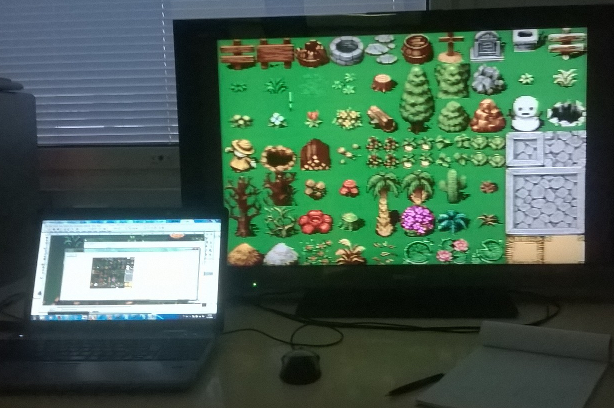
Source code on how to manipulate the thing :
http://www.vsdsp-forum.com/phpbb/viewto ... =14&t=1751
In the example it is generating a PAL video signal.
BTW their sound chips are nice too, both chips (VS1003 for example + VS23S010) can easily add video and sound to any 6502 based board...
Re: best route for video
The WY-60 and its kin (VT-100, ANSI, etc. etc.) are called "smart terminals". They're actually pretty sophisticated, but, they've been relegated to a Lowest Common Denominator status of supporting basically cursor position and such.
In the end, they're actually pretty stupid, but specifically, as BDD suggested, they don't have any local storage.
If you want to "scroll up and down", the terminal doesn't do anything, it's up to the program driving the terminal to handle that.
The terminal has features, such as cursor positioning, insert/delete line, etc., that make this illusion work. But the host computer is the participant driving the terminal, the terminal itself is essentially a "write only" display.
Many modern terminal emulators hosted on our PCs offer a native scroll back facility. Back in the day, on Windows, I used to have my scroll back limit set to 10,000 lines. On my Mac, scroll back is bounded by memory and swap space (which means it can go pretty far). I've left my machine up over a weekend and come back to find several GB of log data gorging my scroll back buffer. The machine takes a few seconds to catch its breath after I clear that out as it frees up the space.
Having used to have worked exclusively on "green screens", it's hard to imagine going back to a terminal without scroll back. Having worked a bit in F83 is a DosBOX implementation, I certainly missed scroll back. I worked a lot using "more" and Ctrl-S/Q back in the day.
Of course, on a machine with as limited of RAM as a 6502 machine, you'd only have a limited amount of scroll back were you to try and actually implement it in your monitor or whatever.
Also, as I mentioned earlier, the terminals are "write only". On machines with built in graphics, the screen is represented by memory, thus it can be changed by storing values in the display memory or, even better, it can be read by reading the memory.
That's how the screen editors on the C64 and Atari worked. You'd move the cursor up to the line of interest, change it in place, hit ENTER, and, viola, screen editing. No scroll back, but you could at least just fly the cursor around and make easy code changes in BASIC.
That can't be easily done on a dumb terminal, as it's difficult to "read" the screen. Instead, you'd have to mirror it in your memory and sync it with the display, which is essentially the task of a full screen editor.
And, mind, there are some terminals, that you actually can read from, but I've never seen it done in the wild.
In the end, they're actually pretty stupid, but specifically, as BDD suggested, they don't have any local storage.
If you want to "scroll up and down", the terminal doesn't do anything, it's up to the program driving the terminal to handle that.
The terminal has features, such as cursor positioning, insert/delete line, etc., that make this illusion work. But the host computer is the participant driving the terminal, the terminal itself is essentially a "write only" display.
Many modern terminal emulators hosted on our PCs offer a native scroll back facility. Back in the day, on Windows, I used to have my scroll back limit set to 10,000 lines. On my Mac, scroll back is bounded by memory and swap space (which means it can go pretty far). I've left my machine up over a weekend and come back to find several GB of log data gorging my scroll back buffer. The machine takes a few seconds to catch its breath after I clear that out as it frees up the space.
Having used to have worked exclusively on "green screens", it's hard to imagine going back to a terminal without scroll back. Having worked a bit in F83 is a DosBOX implementation, I certainly missed scroll back. I worked a lot using "more" and Ctrl-S/Q back in the day.
Of course, on a machine with as limited of RAM as a 6502 machine, you'd only have a limited amount of scroll back were you to try and actually implement it in your monitor or whatever.
Also, as I mentioned earlier, the terminals are "write only". On machines with built in graphics, the screen is represented by memory, thus it can be changed by storing values in the display memory or, even better, it can be read by reading the memory.
That's how the screen editors on the C64 and Atari worked. You'd move the cursor up to the line of interest, change it in place, hit ENTER, and, viola, screen editing. No scroll back, but you could at least just fly the cursor around and make easy code changes in BASIC.
That can't be easily done on a dumb terminal, as it's difficult to "read" the screen. Instead, you'd have to mirror it in your memory and sync it with the display, which is essentially the task of a full screen editor.
And, mind, there are some terminals, that you actually can read from, but I've never seen it done in the wild.

Re: best route for video
The VS23S010D is pretty cool. I really just want character graphics, but I have to admit that if I was going to try to build a graphics beast, that chip would be a good place to start.
I'll have to take a look at the sound chip. That is one gap that I haven't figured out yet. I was thinking about using the SID out of one of the C64s I somehow ended up with.
Thanks,
Jim
I'll have to take a look at the sound chip. That is one gap that I haven't figured out yet. I was thinking about using the SID out of one of the C64s I somehow ended up with.
Thanks,
Jim
Re: best route for video
Feeling of dawn in the brain.
Thank you BDD. You answered literally what I asked and in great detail.
Thank you whartung. You guessed what I could have asked (but could not formulate the question) and answered earlier (I'm not kidding).
Arbitrary? Strong word. As far as I know, all the parameters of the video signal are very much interdependent. Change of one immediately leads to a change in the other. Let's consider an example from the VS23S010D Guide. The device can generate PAL 520x576 pix., 8 colors, and requires in this case 112320 bytes of memory (from the table on page 11). Could I reduce the resolution (and thus the memory) so that the PAL basic frequencies (frame and scan lines rate) remain unchanged?
Thank you BDD. You answered literally what I asked and in great detail.
Thank you whartung. You guessed what I could have asked (but could not formulate the question) and answered earlier (I'm not kidding).
AldoBrasil wrote:
...can do arbitrary number of bits per pixel and arbitrary resolution...
-
BigDumbDinosaur
- Posts: 9425
- Joined: 28 May 2009
- Location: Midwestern USA (JB Pritzker’s dystopia)
- Contact:
Re: best route for video
whartung wrote:
The WY-60 and its kin (VT-100, ANSI, etc. etc.) are called "smart terminals".
Quote:
They're actually pretty sophisticated, but, they've been relegated to a Lowest Common Denominator status of supporting basically cursor position and such.
Quote:
Also, as I mentioned earlier, the terminals are "write only".
BTW, there are quite a few applications where terminals (more specifically, thin clients running in terminal emulation mode) are preferred over PCs. We have clients who do not want PCs in warehouses and shops because they are maintenance headaches in those environments. Thin clients have no disk, require no active cooling and are impervious to malware. Also, we can lock out functions that are not needed, which prevents users from fooling around with stuff and causing trouble.
We usually connect thin clients to the LAN and run Telnet services on the host for connectivity—all the processing is done on the host, of course. However, in some applications we run the thin clients on serial lines, which are more reliable in electrically hostile environments, especially longer runs that pass by machines with big motors. We have one application where a thin client is some 650 feet (198 meters) from the host and adjacent to a humongous rubber calender powered by a 100 horsepower variable speed DC motor that throws all sorts of junk back into the mains. That thin client is connected to a TIA-485 line and is powered through a ferroresonant UPS.
x86? We ain't got no x86. We don't NEED no stinking x86!