So, you could make a sprite list where the first sprite (in the top left corner) has an absolute position. All the other sprites would be programmed (only one time) with a relative offset to this first one. If the CPU then moves the first sprite, all the others would automatically follow...
Video/sprites for the 65org16 Dev. board
-
ElEctric_EyE
- Posts: 3260
- Joined: 02 Mar 2009
- Location: OH, USA
Arlet wrote:
...The relative positioning would be a new feature, and what it does is make the X/Y coordinate work as an offset with respect to the previous sprite.
So, you could make a sprite list where the first sprite (in the top left corner) has an absolute position. All the other sprites would be programmed (only one time) with a relative offset to this first one. If the CPU then moves the first sprite, all the others would automatically follow...
ElEctric_EyE wrote:
This is the result of the SDRAM pipeline?
Code: Select all
X=0, Y=00, Sprite=0
X=0, Y=16, Sprite=0
X=0, Y=32, Sprite=0
...
X=0, Y=208,Sprite=2,
X=0, Y=224,Sprite=2
Now, if I want to scroll the entire play field 1 pixel to the left, the CPU has to go through that list, and subtract #1 from all the X coordinates. Like this:
Code: Select all
X=-1, Y=00, Sprite=0
X=-1, Y=16, Sprite=0
X=-1, Y=32, Sprite=0
...
X=-1, Y=208,Sprite=2,
X=-1, Y=224,Sprite=2
Code: Select all
X=00, Y=00, Sprite=0
X+=0, Y+=16, Sprite=0
...
X+=0, Y+=16,Sprite=2,
X+=0, Y+=16,Sprite=2
Code: Select all
X=-1, Y=00, Sprite=0
X+=0, Y+=16, Sprite=0
...
X+=0, Y+=16,Sprite=2,
X+=0, Y+=16,Sprite=2
I've been trying to modify the video rendering pipeline. Instead of a shared memory between the cs4954 module and the sprite renderer, I've moved to a local memory in the sprite renderer, and an async FIFO between the two blocks.
This means there's no more line-by-line lockstep operation between generating the pixel values, and displaying them. The renderer starts generating a new screen when it gets a signal, and then generates the whole screen as fast as possible. The data is then send through a FIFO. When the FIFO gets full, the renderer pauses.
This design makes it easy send the pixel data to SDRAM instead of the screen, or even to my UART port for a low-speed (but 100% digital) video capture. The new local memory inside the sprite module uses both ports in parallel, so it can do single cycle read/modify/writes on the data. This will be useful for alpha blending.
There's still a bug in the code. Sometimes there's some jitter in the screen, which I suspect is a problem somewhere at the corner cases of the FIFO empty/full handling. Since it appears to be dependent on exact timing between CS4954-generated hsync/vsync and the FPGA, it is hard to reproduce in sims.
This means there's no more line-by-line lockstep operation between generating the pixel values, and displaying them. The renderer starts generating a new screen when it gets a signal, and then generates the whole screen as fast as possible. The data is then send through a FIFO. When the FIFO gets full, the renderer pauses.
This design makes it easy send the pixel data to SDRAM instead of the screen, or even to my UART port for a low-speed (but 100% digital) video capture. The new local memory inside the sprite module uses both ports in parallel, so it can do single cycle read/modify/writes on the data. This will be useful for alpha blending.
There's still a bug in the code. Sometimes there's some jitter in the screen, which I suspect is a problem somewhere at the corner cases of the FIFO empty/full handling. Since it appears to be dependent on exact timing between CS4954-generated hsync/vsync and the FPGA, it is hard to reproduce in sims.
Re:
Arlet wrote:
There's still a bug in the code. Sometimes there's some jitter in the screen, which I suspect is a problem somewhere at the corner cases of the FIFO empty/full handling. Since it appears to be dependent on exact timing between CS4954-generated hsync/vsync and the FPGA, it is hard to reproduce in sims.
Re: Video/sprites for the 65org16 Dev. board
I tried the YUV844 format, but I didn't really like how it looked for subtle color changes, such as skin tones. I decided to add a RGB555 -> YUV conversion, and see if RGB555 looked better. I think it does. Here's the result of a test image:
I think it's pretty good, considering it's only 256x256 pixels, and the image wasn't dithered. With dithering, and at double the resolution, it should look even better.
Here's the code for the RGB->YUV conversion. It's actually quite straightforward, and ISE does a good job of optimizing out all the multiplications.
This is also running with the new rendering code.
6502.org wrote:
Image no longer available: http://ladybug.xs4all.nl/arlet/fpga/rgb555.jpg
Here's the code for the RGB->YUV conversion. It's actually quite straightforward, and ISE does a good job of optimizing out all the multiplications.
Code: Select all
always @(posedge clk54) begin
Yr <= 13'd66 * r;
Yg <= 13'd129 * g;
Yb <= 13'd25 * b;
Ur <= 13'd38 * r;
Ug <= 13'd74 * g;
Ub <= 13'd112 * b;
Vr <= 13'd112 * r;
Vg <= 13'd94 * g;
Vb <= 13'd18 * b;
end
always @(posedge clk54) begin
Ys <= Yr + Yg + Yb + 16;
Us <= Ub - Ug - Ur + 16;
Vs <= Vr - Vg - Vb + 16;
end
always @* begin
y <= Ys[12:5] + 16;
u <= Us[12:5] + 128;
v <= Vs[12:5] + 128;
end
Re: Video/sprites for the 65org16 Dev. board
After fixing a few more bugs in the new sprite renderer (this is probably the most complex piece of Verilog I've written so far), I added a transparency feature, and made a simple test with 10 sprites, 64x64 pixels each.
See it here on YouTube
-
ElEctric_EyE
- Posts: 3260
- Joined: 02 Mar 2009
- Location: OH, USA
Re: Video/sprites for the 65org16 Dev. board
That is awesome! I have a couple questions:
1) Is there a delay on the fastest of those green orbs? I'm curious what max speed is.
2) What speeds are your CPU and the SDRAM clock right now?
How cool would this be when all these sprites could 'page flip' their images, so instead of an orb, maybe a rotating 3D vector cube changing colors?!
1) Is there a delay on the fastest of those green orbs? I'm curious what max speed is.
2) What speeds are your CPU and the SDRAM clock right now?
How cool would this be when all these sprites could 'page flip' their images, so instead of an orb, maybe a rotating 3D vector cube changing colors?!
Re: Video/sprites for the 65org16 Dev. board
There's no "delay" on any of the sprites, except the inherent delay in the frame rate. PAL has 50 fields per second. For every field, you can change the position of all of the sprites by writing new X/Y coordinates. The slowest orbs have the coordinates changed by 1 pixel, and the fastest go by 5 pixels. You can make them even faster by skipping more pixels, but the more pixels you skip the less natural the motion will seem. NTSC has 60 fields per second, so they'll go slightly faster. Because of the fixed frame rate, you'll always be limited in the choice of smooth speeds.
Everything is still clocked at 100 MHz.
By the way, the CPU interfaces with the video module by accessing a bunch of registers. For now, I have the following interfaces. There's a separate interface to control the CS4954:
The Status/Control byte is used to synchronize the animation to the frame rate. There is a status bit that indicates the current field is finished, so the CPU can modify the sprite tables. There's also a control bit that the CPU can set to indicate it is ready with the changes, and the new field can be rendered.
To control the sprites, there are a number of tables, each 512 bytes long, with 1 byte per sprite. The first set of 4 tables determine the position/image of the sprite:
In my demo, image number 0 is the green ball, so if you do the following:
Then you'll get a green ball at coordinates (10,10). To move the ball, just write the new coordinates to the $C000/$C200 registers. To change the appearance of the ball, just change the image number. For instance, you can make a "boing ball" demo, by preparing a set of 8 images at different angles of rotation, and then cycle the image register through 0..7 to make the ball appear to rotate.
To describe the images there are some further tables:
Everything is still clocked at 100 MHz.
By the way, the CPU interfaces with the video module by accessing a bunch of registers. For now, I have the following interfaces. There's a separate interface to control the CS4954:
Code: Select all
$B030 = Left border width
$B032 = Top border width
$B034 = Status/Control (VSYNC bit etc)
To control the sprites, there are a number of tables, each 512 bytes long, with 1 byte per sprite. The first set of 4 tables determine the position/image of the sprite:
Code: Select all
$C000-$C1FF = X coordinate (LSB)
$C200-$C3FF = Y coordinate
$C400-$C5FF = Image number
$C600-$C7FF = Extra/Reserved bits (currently has bit 9 of X coordinate, and enable bit)
Code: Select all
LDA #10
STA $C000 ; X = 10
STA $C200 ; Y = 10
LDA #0
STA $C400 ; image = 0
LDA #2
STA $C600 ; extra = 2 (sprite enable)
To describe the images there are some further tables:
Code: Select all
$C800 - $C9FF = Image width
$CA00 - $CBFF = Image height
$CC00 - $CDFF = X offset in bitmap
$CE00 - $CFFF = Y offset in bitmap
$D000 - $D7FF = Bitmap origin in SDRAM (3 bytes address, plus 8 reserved bits)
Re: Video/sprites for the 65org16 Dev. board
Here's an example of how you can use a small bitmap to define a larger sprite. The background is a 256x256 sprite, but only has a 64x64 bitmap definition. As a result, the bitmap is tiled to fill the entire 256x256 space. By using the X/Y bitmap offsets, it is possible to scroll the bitmap inside the sprite.
http://www.youtube.com/watch?v=VwXqZmVg-lU
-
ElEctric_EyE
- Posts: 3260
- Joined: 02 Mar 2009
- Location: OH, USA
Re: Video/sprites for the 65org16 Dev. board
Ok, so your CPU is running at 100MHz as is your SDRAM video controller. I assume the CPU is your original 8 bit version?
I would like to experiment with your SDRAM code.
I hope I'm not being too presumptuous here!... On my system, I would like to use the current version of 65016.b core, although it's only spec'd at ~90MHz.
I would like to experiment with your SDRAM code.
I hope I'm not being too presumptuous here!... On my system, I would like to use the current version of 65016.b core, although it's only spec'd at ~90MHz.
Re: Video/sprites for the 65org16 Dev. board
ElEctric_EyE wrote:
Ok, so your CPU is running at 100MHz as is your SDRAM video controller. I assume the CPU is your original 8 bit version?
Quote:
I would like to experiment with your SDRAM code
Code: Select all
sdram_wr_data <= { DOH, DO };
sdram_addr <= { ABH, AB[7:0] };
Code: Select all
sdram_wr_data <= DO;
sdram_addr <= AB[23:0];
You can also remove this code here:
Code: Select all
always @(posedge clk)
if( ctrl & WE )
case( AB[1:0] )
0: ABH[ 7:0] <= DO;
1: ABH[15:8] <= DO;
2: DOH <= DO;
endcase
- Attachments
-
- 65org16dev.zip
- Verilog sources for SDRAM controller
- (13.92 KiB) Downloaded 122 times
-
ElEctric_EyE
- Posts: 3260
- Joined: 02 Mar 2009
- Location: OH, USA
Re: Video/sprites for the 65org16 Dev. board
I'll have to use an older 100MHz version of .b core. Thanks so much for your contributions, it is much appreciated! I have some little troubleshooting left on my board, then I can dive in. I've put much time recently into understanding and expanding your original 6502 core, but I think I need a rest from that now.
Re: Video/sprites for the 65org16 Dev. board
ElEctric_EyE wrote:
I'll have to use an older 100MHz version of .b core.
The SDRAM refresh can be modified in the sdram.v file. Replace the number 768 with a smaller number to get more frequent refresh cycles.
Code: Select all
refresh_count <= refresh_count - 16'd768;
-
ElEctric_EyE
- Posts: 3260
- Joined: 02 Mar 2009
- Location: OH, USA
Re: Video/sprites for the 65org16 Dev. board
Arlet wrote:
... Also, I moved the stack page into page zero. I didn't need so much zero page/stack, so now I have extra room for code.
This is definately a wise decision IMO. I will modify my testbech and cpu and see if there is any speed increase!
-
ElEctric_EyE
- Posts: 3260
- Joined: 02 Mar 2009
- Location: OH, USA
Re: Video/sprites for the 65org16 Dev. board
Just to finish up my last comment, I didn't notice any speed increase when I put the stack and zero page in the same 64K block with the stack on top. 1Kx16 each...
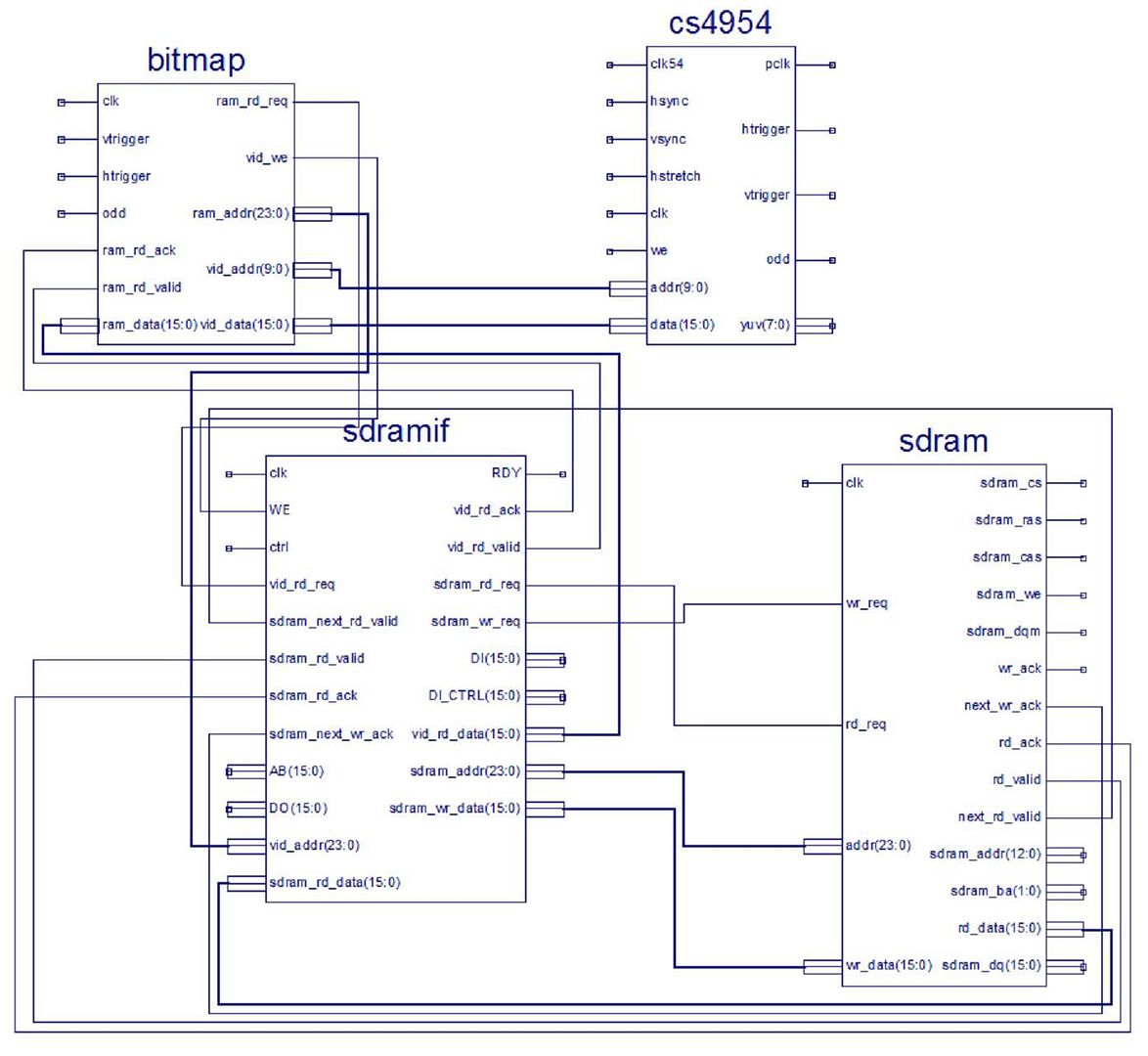
For bitmap generation only, no sprites, using the SDRAM, can I use 4 modules as connected here?
Sorry, this is a poor quality picture. I'll make a larger one tonight.
EDIT: Added a larger pic just now, will take some time to update.
For bitmap generation only, no sprites, using the SDRAM, can I use 4 modules as connected here?
Sorry, this is a poor quality picture. I'll make a larger one tonight.
EDIT: Added a larger pic just now, will take some time to update.