Page 1 of 1
Struggling with the ACIA
Posted: Tue Oct 17, 2023 6:11 pm
by GregCoonrod
Introduction
As with many others, I got started playing with the 6502 after watching Ben Eater's series of videos. I quickly became frustrated with all of the wires and flakiness of a breadboard and decided to design a simple PCB to continue exploring the 6502. During research for my PCB design project, I quickly found my way to Mr. Wilson's excellent site and tried to follow many of his suggestions and guidelines. The result is what I call the
u6502. My overall goal was to make something simple enough that I could understand it but capable enough to be a useful long-term learning platform. With that in mind, I started with Mr. Wilson's example schematic and added a second VIA and an ACIA along with some simple additional support circuitry.
My initial schematic revision:
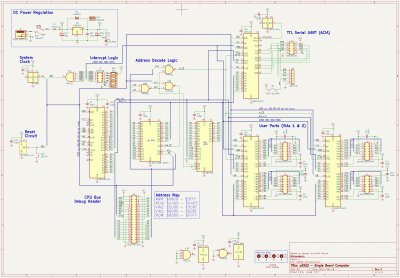
- Rev0 schematic
I used a 100mm^2 4-layer PCB design with a signal, ground, ground, signal stack up to keep production costs low.
PCB Front:
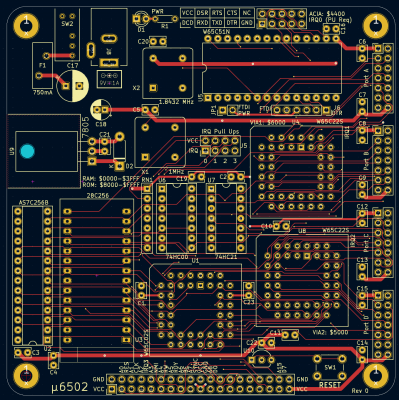
- PCB front
PCB Back:
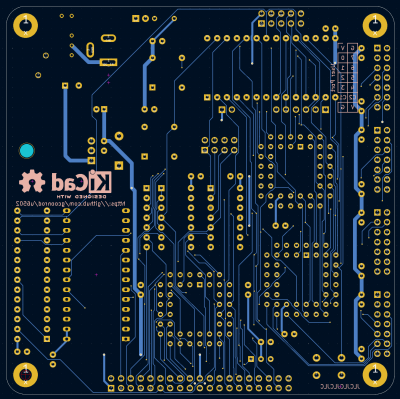
- PCB back
The following image shows the rev0 PCB in place in my "development system".
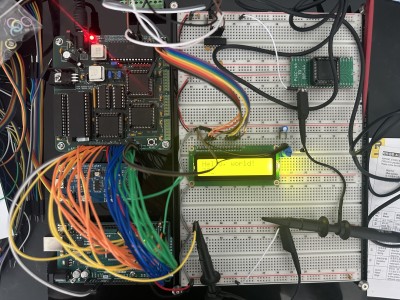
- Rev0 PCB in situ
The Problem
My initial testing seems to show that the VIAs are working as expected and I am able to drive a common 16-character LCD with only minor issues. However, I have been completely unsuccessful in my attempts at interacting with the ACIA. I have not been able to get any serial data into or out of the RX/TX pins on the ACIA. I have tried the following troubleshooting steps:
- Validate CS logic with a logic analyzer. I think the chip is being correctly addressed, however, I only have a cheap 8-channel LA and am not 100% certain.
- Validate clock signals on PHI2 and XTAL1. Both the PHI2 clock and 1.8432MHz baud rate clock seem to be producing clean signals and are connected to the correct pins.
- Review assembly listing file and compare with known working examples.
- acia-test.txt
- Test program listing file
- (13.04 KiB) Downloaded 137 times
Here is the snippet from the listing file that covers the ACIA setup and data sending:
Code: Select all
008092  1               .include "serial.s"
008092  2               ; ACIA Include File
008092  2
008092  2               ACIA_DATA   = $4400
008092  2               ACIA_STATUS = $4401
008092  2               ACIA_CMD    = $4402
008092  2               ACIA_CTRL   = $4403
008092  2
008092  2               .segment "CODE"
008092  2
008092  2               init_acia:
008092  2  48               pha
008093  2  9C 01 44         stz ACIA_STATUS ; clear status register
008096  2  A9 1E            lda #%00011110  ; 8-N-1, 9600 baud
008098  2  8D 03 44         sta ACIA_CTRL   ; set control register
00809B  2  A9 0B            lda #%00001011  ; No parity or rcv echo, RTS true, receive IRQ but no
00809D  2  8D 02 44         sta ACIA_CMD    ; set command register
0080A0  2  68               pla
0080A1  2  60               rts
0080A2  2
0080A2  2               acia_send_char:
0080A2  2  48               pha
0080A3  2  8D 00 44         sta ACIA_DATA
0080A6  2  A9 FF            lda #$FF
0080A8  2               @tx_delay:
0080A8  2  3A               dec
0080A9  2  D0 FD            bne @tx_delay
0080AB  2  68               pla
0080AC  2  60               rts
Any suggestions or ideas about additional troubleshooting steps would be very greatly appreciated!
Re: Struggling with the ACIA
Posted: Tue Oct 17, 2023 6:48 pm
by and3rson
Welcome!
Your code looks good (including the loop part when you're waiting after writing the byte - since it's a well-known bug in ACIA which prevents "TX buffer empty" flag from being set properly).
One small note: your comment says "receive IRQ but no" - looks like it's truncated, but I assume you're expecting ACIA to fire an IRQ when data is received? If so, bit 1 of command register should be set to 0 - see
https://www.westerndesigncenter.com/wdc ... 65c51n.pdf (page 13)
Also, in case you're not connecting /DSR, /DCD, & /CTS lines anywhere (e. g. if you're probing your UART with a logic analyzer, or using USB-UART converter), you should tie them low, otherwise they will prevent you from sending/receiving the data.
Here's an excerpt from Garth's
RS-232 primer on this:
The 6551 ACIA (UART) will not send data if CTS is not true, and it won't receive if DCD is not true. This doesn't mean you absolutely have to use CTS and DCD. If you only want a two- or three-wire interface with no hardware handshaking, then ground these UART inputs so the 6551 will run.
Here's another good article that I used to get my ACIA up & running:
http://retro.hansotten.nl/6502-sbc/lee- ... acia-6551/
Re: Struggling with the ACIA
Posted: Tue Oct 17, 2023 6:56 pm
by gfoot
Welcome Greg, and very nice first post with lots of details - and a nicely laid out system you've built. I can't help with the 6551 but wish you all the best with it! My only suggestion would be to make it transmit something before getting receive to work, but that's not from experience with this particular chip.
Re: Struggling with the ACIA
Posted: Tue Oct 17, 2023 7:02 pm
by GARTHWILSON
I was going to suggest what Andrew said, about DCD and CTS, but he beat me to it. 
On the subject of the LCD, let met suggest going through http://wilsonminesco.com/6502primer/LCDcode.asm which has LCD code in several forms, particularly the part about writing the functions set three times, to get an always-reliable setup. We had occasional problems at work until an applications engineer sent us code that showed this, which is information that you don't get in the data sheets.
Re: Struggling with the ACIA
Posted: Tue Oct 17, 2023 7:24 pm
by Chromatix
I see that you're using a PIO delay loop to regulate transmission, which is indeed necessary with the current production ACIAs. However, you should consider whether it's introducing enough delay.
The loop you have will perform 255 loops, consuming 5 cycles per loop, for a total of 1275 cycles. With a 1MHz Phi2 clock, that corresponds to 1.275 milliseconds. At 9600 baud 8N1, you need 10 bit times with each bit occupying 1/9600 sec, so 1/960 sec in total, which is 1.042 milliseconds. So the delay loop should work, and indeed there should be about a 20-25% margin between characters.
I would suggest setting up your SBC to continuously print characters (eg. ASCII 42 is '*') and use your scope or analyser to see whether the Tx output line shows a pattern consistent with the above.
One obvious cause of not getting such output would be if the /CTS line (which may be floating in your design) is going high (inactive). The /CTS line is not even connected to your FTDI header. The ACIA will interpret that as a demand to stop transmitting! At the very least, add a weak pull-down resistor so that if it isn't actively driven, it will default to active-low.
There's another important point, which is that a normal RS-232 port (such as on the back of a PC) uses very different voltage levels than the ACIA. NEVER directly connect the ACIA to a serial port - it will be damaged. Use a level-shifter device, such as the MAX232, to do the necessary voltage translation. Some of FTDI's devices use "normal" TTL voltages, and these won't cause any damage - but MAKE SURE that it specifies "TTL-232" and not "RS-232 levels", since they also make a lot of devices with the latter.
As for your address decoding, I do notice one or two problems here. You've avoided the pitfall of qualifying the ACIA's CS lines with Phi2 (though really the RAM chip doesn't need this either), but the RAM chip is decoded to be active across all addresses below $8000 - and only the /OE line tied to A14 prevents it from conflicting the data bus when reading your devices. This does not, however, prevent writes to your devices from causing aliasing writes to RAM at $040x, $100x and $200x respectively. The rule of thumb is that you should have mutually exclusive chip-selects for address decoding (the 74HC138 and 74HC139 are particularly useful for this) that are not Phi2-qualified, and that /WE and /OE for asynchronous devices (your RAM and ROM) should be generated as simple combinations of R/W and Phi2.
Re: Struggling with the ACIA
Posted: Tue Oct 17, 2023 7:32 pm
by GARTHWILSON
but the RAM chip is decoded to be active across all addresses below $8000 - and only the /OE line tied to A14 prevents it from conflicting the data bus when reading your devices. This does not, however, prevent writes to your devices from causing aliasing writes to RAM at $040x, $100x and $200x respectively. The rule of thumb is that you should have mutually exclusive chip-selects for address decoding (the 74HC138 and 74HC139 are particularly useful for this), and that /WE and /OE for asynchronous devices (your RAM and ROM) should be generated as simple combinations of R/W and Phi2.
Re: Struggling with the ACIA
Posted: Tue Oct 17, 2023 8:24 pm
by GregCoonrod
Thanks all for the warm welcome and quick replies!
Also, in case you're not connecting /DSR, /DCD, & /CTS lines anywhere (e. g. if you're probing your UART with a logic analyzer, or using USB-UART converter), you should tie them low, otherwise they will prevent you from sending/receiving the data.
Andrew, is this also the case for the W65C51N? I should have been more specific in my description. I am using all current production CMOS ICs from WDC. Either way, I will run my test program again after grounding those lines.
On the subject of the LCD, let met suggest going through
http://wilsonminesco.com/6502primer/LCDcode.asm which has LCD code in several forms, particularly the part about writing the functions set three times, to get an always-reliable setup. We had occasional problems at work until an applications engineer sent us code that showed this, which is information that you don't get in the data sheets.
Mr. Wilson, I
knew that you had example code for this somewhere but couldn't remember where when I was troubleshooting the LCD. Thanks for reminding me! Given that I was able to get it printing at all I was fairly sure that my problems were just software. I did wonder about using a MOSFET gated by the RESb signal to power down the LCD during reset to clear the LCD controller's internal state. But my experiments with that approach have proved unfruitful thus far.
As for your address decoding, I do notice one or two problems here. You've avoided the pitfall of qualifying the ACIA's CS lines with Phi2 (though really the RAM chip doesn't need this either), but the RAM chip is decoded to be active across all addresses below $8000 - and only the /OE line tied to A14 prevents it from conflicting the data bus when reading your devices.
Chromatix, Mr. Wilson is correct in that I am only using 16k of the 32k RAM as in his example SBC schematic. I followed the
address decoding example in the 6502 Primer so any errors in implementation here would be from my own ignorance/inexperience. But if I understand it correctly then I shouldn't have to worry about any bus contention between my RAM and IO.
There's another important point, which is that a normal RS-232 port (such as on the back of a PC) uses very different voltage levels than the ACIA. NEVER directly connect the ACIA to a serial port - it will be damaged.
This is a great reminder. I am aware of this and all of my testing has either been with a logic analyzer or a cheap TTL FTDI to USB adapter.
Thanks again to everyone for responding to my questions so quickly. I will try out the suggestions soon and report back.
Re: Struggling with the ACIA
Posted: Tue Oct 17, 2023 9:12 pm
by Chromatix
Also, in case you're not connecting /DSR, /DCD, & /CTS lines anywhere (e. g. if you're probing your UART with a logic analyzer, or using USB-UART converter), you should tie them low, otherwise they will prevent you from sending/receiving the data.
Andrew, is this also the case for the W65C51N? I should have been more specific in my description. I am using all current production CMOS ICs from WDC. Either way, I will run my test program again after grounding those lines.
It's not clear whether the W65c51N has an internal pull-up on the /CTS line etc. An old NMOS device would have one, which would hold the line in the inactive state if left open. A CMOS device may or may not not have it, and if left floating it could drift to either state and/or react to high-frequency noise. So whatever type of device you have, you MUST pull /CTS low for the transmitter to be enabled.
It's also unclear whether the W65c51N reacts in the same way as older devices to the /DCD line. Older versions of the ACIA may discard a character being received when /DCD goes high, on the grounds that it is likely corrupted, and won't enable the receiver unless it's pulled low. To be on the safe side, tie it down with a weak resistor, and do the same for /DSR just so that it doesn't float around randomly (it doesn't affect the receiver or transmitter functions).
/DTR and /RTS are outputs driven by the ACIA, so you wouldn't tie those either way. Just be aware that the ACIA drives /RTS according to an obsolete "peripheral mode" protocol, not the modern "peer to peer" protocol, ie. it won't tell the remote end to stop transmitting if the receive buffer is full.
Re: Struggling with the ACIA
Posted: Fri Oct 20, 2023 1:01 am
by GregCoonrod
Pulldowns on the right signals and a MAX232 transceiver did the trick!
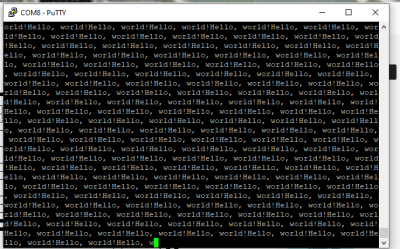
- It works!
Thanks again, everyone!