Page 1 of 3
W65C02SXB board
Posted: Sun Oct 18, 2020 9:10 pm
by marko
Hello there...new to this resource.
Hope this question hasn't been asked before - or at least recently.
I just bought a W65C02SXB board from WDC. Looked like a modern and well built piece of kit...
Can't say that of the software IMO. Infact I was thinking it was abandon ware as the tools are woeful - at least to my unsuspecting eyes. Also the documentation seems out of kilter with what is available to d/l.
I guess the question is - is their an alternative assembler/monitor that will work in with this board in order to single step through some code? I don't really have a full appreciation of what is involved and I apologise if I have failed to appreciate the shortcomings.
Ive used PIC and Arduino in the past and I seem to recall going wayback that there were some very capable oldskool DOS based emulator assembler / monitors for the 8051 - was it Emily51 or something?
Please excuse the ranting nature of this :O)
Re: W65C02SXB board
Posted: Sun Oct 18, 2020 10:29 pm
by BitWise
The '02 and '816 SXBs only have minimal firmware that interfaces with WDC's debugger rather than a full monitor like the '134 and '265. I wrote a simple monitor for the '816 but have not yet ported my SXB-Hacker program to the '02 yet.
I have a .Net program that can download S28 files into an SXB and run them but its not been tested on the '02 only the '816 and '165. I use my own assembler to build applications and download them. Someone else on this forum published a python script that can download and run code as well based on reverse engineering the communications protocol.
WDC's tools have issues. I've been working with them to fix some of them. I not being paid so I work on it when I have time. I have managed to build example programs for the '165 (the '02 on an FPGA) with my fixed version of their C compiler but the library is not complete yet.
What kind of tools are you looking for and what operating systems do you want to run them on?
Re: W65C02SXB board
Posted: Mon Oct 19, 2020 8:09 am
by marko
Thank you for the response. I figure as a newbie anything that gets me going with the 6502 would be beneficial. I'm not looking for a C compiler just yet! Im really looking to code a few lines (with some help assembling it maybe) - a way to step through the code and view data and registers. Baby steps with a new (to me) CPU.
Im happy to be a guinea-pig for your work or accept any alternative...
Maybe a link if you have one to the python script? I use Mac but windows on VM available
Best, Mark in UK semi lockdown
Re: W65C02SXB board
Posted: Mon Oct 19, 2020 9:17 am
by BitWise
I'm close to having the beta of the WDC assembler, linker and librarian working on Linux and MacOs. They all run but the object file isn't right. The assembler fwrites structures in native memory format into objects -- not very portable. I'll have to do some rewriting.
The python code is in this thread
viewtopic.php?f=4&t=5698&p=70481&hilit= ... col#p69799
Re: W65C02SXB board
Posted: Mon Oct 19, 2020 10:03 am
by marko
I appreciate your help with this and thanks for the links...
I think I need a more basic approach.
The board powers up - that's good.
I really don't know what to do next!
If it was an Arduino I'd write a few lines of code in the IDE and get an LED blinking and understand it in 5 minutes.
With this I don't even know how to start writing a line of assembler and executing it. Have I missed something? BTW I have downloaded the WDCtools but it really hasn't helped as their example code doesn't exist in the zip and this thing called TIDE is seemingly not supported or falls over at every click of the mouse.
I wonder if I should return this and get a refund. Go for something I can understand.
Ironically you'd thing it has everything in place to be a powerful educational tool. Right now I have a 12 yr old (and me) just scratching our heads as to what we do after we plugged in the USB/power lead
Best,
Mark
Re: W65C02SXB board
Posted: Mon Oct 19, 2020 10:30 am
by BitWise
I'll get my '02 out and see if I can get something running later.
I'm locked down in the Uk too.
Re: W65C02SXB board
Posted: Mon Oct 19, 2020 11:15 am
by marko
Thanks Andrew...
Re: W65C02SXB board
Posted: Mon Oct 19, 2020 11:23 am
by BigEd
Welcome Mark!
Andrew is surely one of the best-placed to help you. Unfortunately, for all that we're great fans of the 6502 here, WDC leave a lot to be desired. But on the face of it, this board should be quite promising:
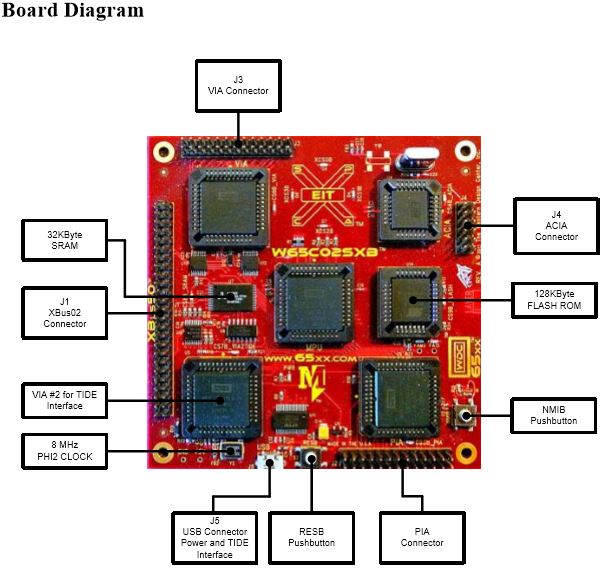
(Image from
an Instructables tutorial.)
Re: W65C02SXB board
Posted: Mon Oct 19, 2020 3:55 pm
by marko
Yes agreed - the board looks the business for sure.
However I cannot make any sense of a strategy right now to put code into it. I can copy and paste a few lines of assembler. Blindly use the linker etc, however after that all bets are off. When I upload (at least I think that's what is happening) I don't think it ever makes it to the board...No progress lights etc
I look forward to someone directing me!
Meanwhile its on the back burner...
Best, Mark
Re: W65C02SXB board
Posted: Mon Oct 19, 2020 4:07 pm
by floobydust
I've been using WDC Tools for over 7 years now... TIDE has it's issues, but I've managed to use it as part of my dev environment. As for the WDC SXB, I'd just yank the EEPROM and reprogram it to use the ACIA port with a Serial to usb adapter as a console. Granted, the W65C51 has the Xmit bug, but you can work around that as well. You should be able to add a newer UART to it via the expansion port.
I've got the 65C02 and 65C816 SXBs, but haven't gotten around to porting my BIOS/Monitor over yet... but the source is on my Github page. They are decent boards, but as Andrew noted, they only software is to interface to their debug code, which I don't care for.
Re: W65C02SXB board
Posted: Mon Oct 19, 2020 4:36 pm
by BitWise
I'd just yank the EEPROM and reprogram it to use the ACIA port with a Serial to usb adapter as a console. Granted, the W65C51 has the Xmit bug, but you can work around that as well. You should be able to add a newer UART to it via the expansion port.
Its not that hard to use the FTDI chip connected to the system VIA and you get the benefit of very big transmit and receive buffers.
Re: W65C02SXB board
Posted: Mon Oct 19, 2020 7:20 pm
by marko
I've been using WDC Tools for over 7 years now... TIDE has it's issues, but I've managed to use it as part of my dev environment. As for the WDC SXB, I'd just yank the EEPROM and reprogram it to use the ACIA port with a Serial to usb adapter as a console. Granted, the W65C51 has the Xmit bug, but you can work around that as well. You should be able to add a newer UART to it via the expansion port.
I've got the 65C02 and 65C816 SXBs, but haven't gotten around to porting my BIOS/Monitor over yet... but the source is on my Github page. They are decent boards, but as Andrew noted, they only software is to interface to their debug code, which I don't care for.
Floobydust - Can you help with this please?
Can I program the eeprom without an adaptor? I have a TL866 programmer but no PLCC adaptors.
The other question I have is re: TIDE...It looks like a grown up way to consolidate all the command line stuff etc except almost every option kicks up 'Failed to set data for version'. I gave up after an hour of adjusting windows for compatibility issues.
I'd like to persevere with everyones help on here...
Re: W65C02SXB board
Posted: Mon Oct 19, 2020 9:16 pm
by floobydust
I've been using WDC Tools for over 7 years now... TIDE has it's issues, but I've managed to use it as part of my dev environment. As for the WDC SXB, I'd just yank the EEPROM and reprogram it to use the ACIA port with a Serial to usb adapter as a console. Granted, the W65C51 has the Xmit bug, but you can work around that as well. You should be able to add a newer UART to it via the expansion port.
I've got the 65C02 and 65C816 SXBs, but haven't gotten around to porting my BIOS/Monitor over yet... but the source is on my Github page. They are decent boards, but as Andrew noted, they only software is to interface to their debug code, which I don't care for.
Floobydust - Can you help with this please?
Can I program the eeprom without an adaptor? I have a TL866 programmer but no PLCC adaptors.
The other question I have is re: TIDE...It looks like a grown up way to consolidate all the command line stuff etc except almost every option kicks up 'Failed to set data for version'. I gave up after an hour of adjusting windows for compatibility issues.
I'd like to persevere with everyones help on here...
Hi Marko,
Well, if you pull the EEPROM out of the SXB, you will need some way to get it connected to any programmer, hence an adapter. Granted, you could likely make your own adapter and get it working that way.
Alternately, looking at the schematic for the SXB, the WE (write enable) line for the EEPROM is connected to the WE signal (same as the RAM). Looking at the Datasheet for the EEPROM, you can program it insitu. However... this can be a challenge. You do need to be able to download code to the SXB (using the WDC tools) which will program the EEPROM, but you also need to ensure you're loading code that will function on the board. If you overwrite the main code and your's doesn't work, the board becomes nonfunctional.
As for TIDE, I'm using WDC Tools under Win7 running in a VM under Fusion. The WDC Tools were written back in the WinXP (or earlier era)... so I'm not sure how well it will run on the latest release of Windows. As a simple test, you might want to try using the attached monitor/BIOS source code. All of my code was assembled/linked using WDC Tools using TIDE, hence there is a .wdc file which you can load, then click on the assemble/link icon at the top. If it doesn't work, you might have to change the location of the source code (to match the path info in the .wdc file), or edit the .wdc file for path information.
- V104.zip
- (116.8 KiB) Downloaded 279 times
If you can't get this code to work with WDC Tools using TIDE, then you likely have a system issue, i.e, DLL, Path info, incompatible code , etc. NOTE: The Monitor code has a routine which will program the Atmel 28Cxxx EEPROMs insitu, which I believe is similar to how the SST EEPROMs are programmed. Let me know if the above works for you.
Re: W65C02SXB board
Posted: Thu Oct 22, 2020 3:15 pm
by BitWise
I've written a Java version of my SXB uploading tool and added to to my Dev65 toolkit. This repository ...
https://github.com/andrew-jacobs/w65c02sxb-monitor
... contains everything you need to assemble, download and run a program on a W65C02SXB and contains the ported code of my SB-65C02 monitor as an example.
I've tested it on Windows 10 and Ubuntu Linux 20.04 (running in VirtualBox). It should work on MacOS and Raspberry Pi but I don't have them to hand for testing.
Re: W65C02SXB board
Posted: Sun Nov 15, 2020 3:53 am
by abqlewis
Andrew,
I'm glad this post happened when it did, because I just ordered a W65C02SXB, and when I first got it I thought I made a huge mistake.
I found this post and cloned your monitor, and ran it on my 20.04 Linux box (I don't have a Windows machine) and it worked great! I have to thank you for creating it and putting it out there!
I took a course in Tech School to program 6502's in the mid 1980's, so it was a LONG time ago and it was really simplified. In lockdown, I wanted to pickup something I kinda knew, but would challenge me, and your monitor really helps.
If you don't mind, I have a few questions/discussions/rambles :
1) To anyone else trying this on Linux, I had to add myself to the dialout group, AND restart to get it to work.
2) Do I have to do anything special to the code I load, to make sure that I returns to your monitor when it's done? In other words, if I load a program with the 'S' command and then run it with the 'G' command, HOW does it get back to the monitor, or DOES it get back?
3) My plan for now is to find a cross-assembler/compiler that runs in Linux (thinking cc65) that can make an S19 file (or something I can script into it), and loading through your monitor until I get something that works. Does this fit into what your monitor is meant for?
4) A sub-discussion in the thread is about re-programing the flash. One of my theories is that I can dump the contents of ROM with your monitor and write a little script to make it into an SRecord file as a backup to the existing TIDE ROM. Does this make sense? I don't have a programmer (with adapters) yet, but that's next. I need to investigate more, because this level of detail in hardware is a little out of my realm.
5) I copied your run.sh command but removed the "term" parameter. This allows your program to just load your monitor into RAM, and then I can just run the Linux "screen" anytime I want to connect to the board.
6) As far as the ROM is concerned, I think I could continue to uses the old TIDE ROM where it is and add my rom-program to a different "page" of the ROM. The docs mention changing ROM banks, but don't really say how. I've gleaned from the schematic that it involves the CA and CB ports of VIA2. I'm not quite there yet, but I will be.
I think this thread should be it's own WIKI. I don't know how many W65C02SXBs are out there (they are advertised on Amazon, Mouser, Dig-Key and others), but this post stopped me from returning or junking the board.
Thanks! ...for now