Tools for drawing block diagrams
Posted: Thu Dec 04, 2014 4:21 pm
A pencil and paper, or a whiteboard, can be very productive ways to capture or explore a system organisation using a block diagram.
Elsewhere, new member Dave said:
and I'd like to hear other recommendations for tools.
For my part, I've been attracted to the ASCII tools at
http://asciiflow.com/
http://www.asciidraw.com/
and the prettification tool at http://ditaa.sourceforge.net/ which can turn basic ASCII diagrams into something presentable. (There used to be an online ditaa service, but it's gone - you need to download and run locally, or find it inside Emacs)
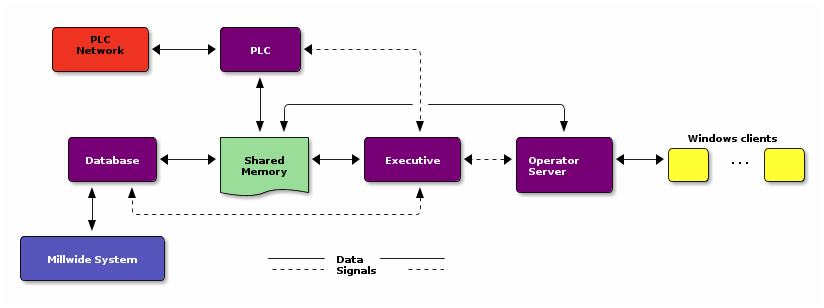
Here's an example of Ditaa input and output:
Elsewhere, new member Dave said:
cospan wrote:
I use this tool http://www.yworks.com/en/products_yed_download.html to create block diagrams of my projects to share with clients, in my opinion it creates very professional looking block diagrams that really help people get the high level idea of my designs.
For my part, I've been attracted to the ASCII tools at
http://asciiflow.com/
http://www.asciidraw.com/
and the prettification tool at http://ditaa.sourceforge.net/ which can turn basic ASCII diagrams into something presentable. (There used to be an online ditaa service, but it's gone - you need to download and run locally, or find it inside Emacs)
Here's an example of Ditaa input and output:
Code: Select all
    +-----------+        +---------+
    |    PLC    |        |         |
    |  Network  +<------>+   PLC   +<---=---------+
    |    cRED   |        |  c707   |              |
    +-----------+        +----+----+              |
                              ^                   |
                              |                   |
                              |  +----------------|-----------------+
                              |  |                |                 |
                              v  v                v                 v
      +----------+       +----+--+--+      +-------+---+      +-----+-----+       Windows clients
      |          |       |          |      |           |      |           |      +----+      +----+
      | Database +<----->+  Shared  +<---->+ Executive +<-=-->+ Operator  +<---->|cYEL| . . .|cYEL|
      |   c707   |       |  Memory  |      |   c707    |      | Server    |      |    |      |    |
      +--+----+--+       |{d} cGRE  |      +------+----+      |   c707    |      +----+      +----+
         ^    ^          +----------+             ^           +-------+---+
         |    |                                   |
         |    +--------=--------------------------+
         v
+--------+--------+
|                 |
| Millwide System |            -------- Data ---------
| cBLU            |            --=----- Signals ---=--
+-----------------+
 One of my friends who needed to draw complicated block diagrams for his master's thesis was pulling his hair out trying to get several different block diagram programs to work correctly. He then found that the newest version of LibreOffice Writer had one of the best block diagram editors which included the ability to add special symbols to and in-between blocks, including mathematical symbols and the like.