Page 1 of 2
W65C134 Prototype
Posted: Thu Jan 02, 2014 5:27 pm
by BitWise
Using my PIC based clock generator/reset monitor (and a some pull up resistors for the IRQ and NMI pins I forgot to install) I managed to get my W65C134 SBC to boot the WDC monitor application.
The board has 32K SRAM and 32K EEPROM (in the ZIF) which it can self write. I need to add a jumper somewhere to disable the self write to stop accidental damage.
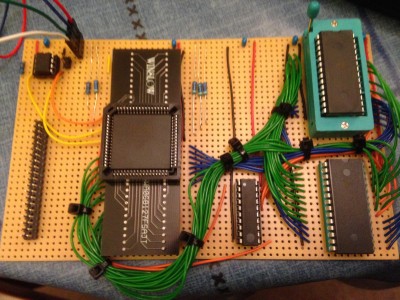
- W65C134 Prototype
Haven't tested the 8Mhz mode yet - needs a jumper on the header beside the PIC.
Boots into the WDC monitor as the EEPROM contains random garbage.
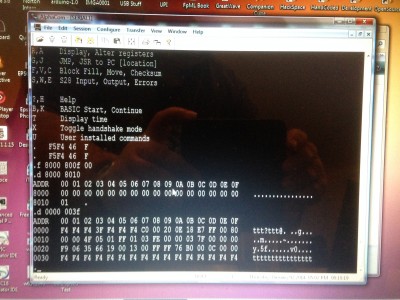
- The WDC monitor connected thru a Windows USB terminal.
Re: W65C134 Prototype
Posted: Thu Jan 02, 2014 6:09 pm
by orgwood
I am also interested in this device from WDC but I'm thinking of putting a 64KBx16 Ferromagnetic SRAM or nvSRAM as the memory components. Are you using a 3V power rail? Are you using their SIB for the USB? I see a 4 pin plug in the upper left of the Proto Board. Also, it looks like you aren't using the FPGA that their Designer Board uses so I assume you decoded the memory space differently - can you post your schematic? Thanks, Dave Colglazier

Re: W65C134 Prototype
Posted: Thu Jan 02, 2014 6:31 pm
by BitWise
I am also interested in this device from WDC but I'm thinking of putting a 64KBx16 Ferromagnetic SRAM or nvSRAM as the memory components. Are you using a 3V power rail? Are you using their SIB for the USB? I see a 4 pin plug in the upper left of the Proto Board. Also, it looks like you aren't using the FPGA that their Designer Board uses so I assume you decoded the memory space differently - can you post your schematic? Thanks, Dave Colglazier
The 4-pin connector at the top connects to a PL2303 USB Serial adapter which provides logic level RXD/TXD signals along with power (currently I'm using 5V). Not tried it at 3V3 yet. Need to check the data sheets for the RAM and EEPROM.
An ATF16V8C GAL takes all the chip select outputs from the 65C134 along with PHI2 and WEB to produce /OE, /WE and a /CE for RAM and EEPROM.
Re: W65C134 Prototype
Posted: Thu Jan 02, 2014 7:14 pm
by orgwood
Thanks for the quick reply. My purpose for using the F-SRAM x 16 would be to bring the 65C134 up in a preliminary mode to set up the hardware decoding, language loading and then switch to the other 8 bits to run it in one of 4 emulation modes...specifically, AIM/SYM/KIM & custom memory maps. I'm not sure the internal monitor mode has a real use in my product but it's interesting that it is there and actually works...I like the idea of a serial interface.
Re: W65C134 Prototype
Posted: Wed Jan 08, 2014 8:02 pm
by Martin_H
This project looks interesting. I particularly like the built in monitor and UART as that should allow for a smaller board size. If the final system could fit within Express PCB's mini-board size that might reduce the PCB cost somewhat. I particuarly like the idea that the W65C134's monitor ROM could be used to program the EEPROM.
Re: W65C134 Prototype
Posted: Wed Jan 08, 2014 8:29 pm
by orgwood
Hi Martin, I'm not certain their monitor contains the code to program the EEPROM. I think Andrew meant it could self-program itself so he needed to be careful by adding a jumper to prevent that but I'm not sure. The use of a nvSRAM or FerroMagSRAM allows for R/W within the device by memory location so that design would allow changing specific memory portions whereas the EEPROM might need block erase - again not sure.
Re: W65C134 Prototype
Posted: Wed Jan 08, 2014 8:52 pm
by Martin_H
It's been a while since I used a monitor on an 8 bit machine, but when I did you could change memory locations and good ones even had a mini-assembler to patch RAM. I figure that if you have a decent monitor you can always download code from a PC to the W65C134 and execute it. So that code could have the logic to have the W65C134 program an EEPROM.
I read the data sheet but I couldn't find a list of features in their monitor. Do you know where they document it?
Update: I just found it here:
http://www.westerndesigncenter.com/wdc/ ... monrom.pdf
Re: W65C134 Prototype
Posted: Wed Jan 08, 2014 9:01 pm
by orgwood
I've been to their site but didn't find it - probably in one of the download packages. I'm sure Andrew knows and will share. You're right about loading code to RAM. The on-board RAM is only 192 bytes I think and changing to the external bus would allow the execution of any program loaded there. The problem with programming an EEPROM hanging on the bus is probably the timing requirements - the use of the devices that I propose run at full bus speeds with 35-50nsec access times. They are also pin compatible with normal 32KB SRAMs. Dave
Re: W65C134 Prototype
Posted: Thu Jan 09, 2014 12:52 am
by BitWise
The WDC monitor can write to any memory location including the EEPROM but you need to poll the chip to see when the page write has completed or use a timed delay so you can't load S19 records directly. I tested it by putting a few bytes at $8000 manually.
There's nothing to stop you loading a larger amount of data into RAM and then copying into the EEPROM under the control of a program that manages the page writing delays.
The monitor commands and source are available on the WDC download page at the bottom I seem to remember.
I'm going to design a small PCB for the final version maybe adding my VT200 chip to the board with video and keyboard connections.
Re: W65C134 Prototype
Posted: Fri Jan 10, 2014 3:18 pm
by Martin_H
I've been reading the data sheet about this processor and have a question, maybe someone who's used it knows the answer. The data sheet mentioned something about internal ROM and I/O masking external off chip IC's connected to the address bus, unless a control bit was set.
Does this mean I could connect an EEPROM so that it is mapped to high RAM (via A15) and it would be visible except the portion that was overlapped (masked) by the internal monitor ROM? Likewise with RAM the internal memory mapped I/O masks any RAM that I connect to the address bus?
If true then that simplifies address decoding considerably. I would only need A15 for RAM versus EEPROM, and then a few gates to address decode an external 65c22 I was planning to use.
If so it might be worthwhile for me to order a chip from Mouser along with some wire wrapping supplies to play around with.
Re: W65C134 Prototype
Posted: Fri Jan 10, 2014 3:56 pm
by BitWise
The chip has an internal boot ROM at $F000-$FFFF but changing a bit in the BCR register disables this and the region is read from the external bus. The boot ROM looks for the string 'WDC' at locations $8000 and $0200 and if found jumps into the code at $8004 or $0204. Once in your own code you can desable the internal ROM to take control of the full memory area.
I thought my EEPROM was working but I'm not so sure at the moment. I'm not seeing any active low chip select pulses on its pins. More testing is required to see what I've done wrong.
My design uses the chip select outputs (CSx) to determine RAM vs ROM but access but I'm going add a connect to A15 and an input for write protection. As all my decoding is done in a GAL I just need to connect a new inputs, change the CUPL and reprogram the GAL.
WDC list the verilog for thier CPLD in the W65C134 Development board manual and they seem to be using the address buffer to derive chip selects rather than the chip select bits.
Re: W65C134 Prototype
Posted: Sat Jan 11, 2014 6:00 pm
by Michael
Hi Andrew,
Congratulations on bringing up the W65C134S.
May I ask about your PIC Clock Generator and connections to W65C134S, please? When I tried to bring up my W65C134S board in single-chip mode I used a 32768 Hz crystal and caps connected to the '134S and I used a PIC12F1822 to generate a 4-MHz 'FCLK' (from the oscout pin) and to control the '134S reset pin. I also pulled up the CTS pin on the '134S. Unfortunately, "no joy"...
Regards, Mike
<added>
Just found your PIC12F1822 source code which explains almost everything. I apologize for not looking first.
Thanks you, Sir...
Re: W65C134 Prototype
Posted: Sat Jan 11, 2014 6:42 pm
by BitWise
Reprogrammed the GAL to use A15 for RAM/ROM select and added a write protect input. I can now reliably access the EEPROM and have started writing code to replace the monitor. Currently I'm fighting with the UART which is transmitting garbage.
Re: W65C134 Prototype
Posted: Sun Jan 12, 2014 1:28 am
by Michael
Andrew, I'm using your 12F1822 design but still no luck... May I ask how you handled pin 61 (serial port hand-shake input) on the '134S, please?
Re: W65C134 Prototype
Posted: Sun Jan 12, 2014 12:36 pm
by BitWise
Nothing special. RXD and TXD are just connected to the four pin header with (5V,TXD,RXD,GND) which connects to the PL2303 adapter.
Mine did not run until I had memory installed and pull ups on NMI/IRQ1/IRQ2, The attached PDF shows the effective state of my board. The connections to my GAL are a bit different - I was using the chip select outputs but I don't think they work very well so now I use address lines (as WDC do in on thier development board) instead.