Page 5 of 5
Re: W65C265SXB
Posted: Sat Aug 12, 2017 7:24 pm
by handyandy
Following are some older documents from 1990s regarding the w65c265 and the mythical w65c365 that may help in deciphering the PIB.
Cheers!
Andy
Re: W65C265SXB
Posted: Thu Aug 17, 2017 6:33 pm
by whartung
Besides the block diagrams at the end for the "Mensch" computer, at least in the *365 document, how do these really differ from the data sheets we have already available? How does the *265 differ from the *365?
Interesting that these chips are 27 years old.
Re: W65C265SXB
Posted: Sun Aug 27, 2017 10:22 pm
by handyandy
Hi Whartung,
I find that that the formatting of the original older text documents to be superior to the pdfs of today. For example see page 12 of the current datasheet for the 65c265s for the formula for UART data rates and compare to page 10 of the Aug 1997 document of the same.
Why that is so I can't say.
The 265 differs from the 365 only in what the core cpu is i.e. 65c816 in the 65c265 and 65832 in the 65c365. It appears in all other respects that the mcus are identical except that there really are 65c265 mcus.
With regard to the parallel interface bus (PIB) it seems that either the four UARTs or the PIB can be active at any time since they each share many of the same pins of the mcu.
Cheers!
Andy
Re: W65C265SXB
Posted: Thu Aug 31, 2017 9:53 am
by GaBuZoMeu
As I read it (65c265s), you have P4x and P5x for PIB, and P6x for serial IO xor some timer In/Out/PWM. Serial IO is only RxD/TxD, there is no HW handshake provided. If you don't use the PIB, then there are pins free for SW handshaking, some even with interrupt capability.
As a slave connected via PIB to some "host" the 65c265 could add 4 serial IF to the "system".
edited(1): changed HW to SW
Re: W65C265SXB
Posted: Thu Aug 31, 2017 9:07 pm
by whartung
As I read it (65c265s), you have P4x and P5x for PIB, and P6x for serial IO xor some timer In/Out/PWM. Serial IO is only RxD/TxD, there is no HW handshake provided. If you don't use the PIB, then there are pins free for SW handshaking, some even with interrupt capability.
If you don't use any of the monitor routines, then P5 is available. Otherwise, P5 is used to facilitate handshake for the respective UARTs on P6. P4 can only be used if you're not using the Flash memory, but that's limitation of the WDC board, not the MCU.
Of course, you can use the other bits of the ports that the monitor and such aren't using (there's 6 bits on P5/P6 if you're only using 1 UART for example).
Re: W65C265SXB
Posted: Fri Nov 15, 2019 3:45 pm
by Collen
Hi,
I read the flash-guide from scotws and andrew-jackobs, (
https://github.com/scotws/265SXB-Guide/ ... r/flash.md)
and understand that when connecting FA15 and/or FAMS pins on J3(P4x) to GRND (P42) is controlling the
way your SXB board is booting up.
2 pins, 4 options (00,01,10,11) each for the appropriate bank of your flash chip.
so far so good.
but how about the build in mensch rom, what happens to that ?
you need it to boot from, upload your code to the flash chip before you can set the FA15/FAMS.
also there was a mention in the guide about not using bank 3 because the mensch-rom was copied there ?
Basicly can you boot your SXB into the original state (mensch monitor) when
you screwed up all 4 of your banks with (lets say) wrong code and you need to erase them through your SXB board.
(hardware wise..)
(ps. i use a 02sxb, but this should be the same sort of process as the 265sxb, right ?!)
Re: W65C265SXB
Posted: Fri Nov 15, 2019 4:14 pm
by BitWise
The Mensch monitor is in the microcontroller and can't be destroyed.
The problem is that if you put an bad image into the flash, say something like ..
.. (or just some very buggy code) then the monitor will find the 'WDC' signature and jump into the bad code every time the chip resets.
The '134 has the same kind of check and can lock up the same way.
The easy way to avoid this is to develop ROM images with a signature like ..
Code: Select all
.org $8000
.byte "XYZ",0
sei
cld
...
.. and start them from the montor by execution from $8004. Only change the XYZ to WDC when the code is fully functional and well tested.
When the ROM initialises it can disable the monitor and expose its own set of interrupt vectors at the top on memory.
The '02 and '816 SXBs have WDC debugger code in thier flash ROMs which you MUST NOT erase if you don't have some way of programming the flash chips directly.
Re: W65C265SXB
Posted: Mon Nov 18, 2019 7:54 pm
by Collen
When the ROM initialises it can disable the monitor and expose its own set of interrupt vectors at the top on memory.
The '02 and '816 SXBs have WDC debugger code in thier flash ROMs which you MUST NOT erase if you don't have some way of programming the flash chips directly.
Thx, but if you screw up 1 rom bank, you can alway's switch to an empty bank where no "WDC",0 is set...
so if all 4 banks are corrupt, you can not clean them through the SXB boards..
only remove the ROM and boot without it, to get the mensch monitor (rom) back... got it!
but the debugger code ?.. that one is new to me.
is that also in the $e000 - $ffff range where the mensch rom is?
time to do some more reading for me

Re: W65C265SXB
Posted: Fri Jul 24, 2020 10:38 pm
by tokafondo
What is the format that the XMODEM transfer is expecting me to send, to be written to flash rom?
A pure .BIN file? .HEX? .S28?
Thanks.
Re: W65C265SXB
Posted: Fri Jul 24, 2020 10:47 pm
by tokafondo
I'm thinking that maybe the only way to have CS5B enabled in w65c265sxb could be burning in EEPROM the SXB hacker code, in $00:8004 address.
Then, test that everything runs fine there, and if it does, then put the 'WDC' string in $00:8000-3 so the next time the SXB boots, it runs directly the hacker.
But I actually don't know if the hacker code relies on any of the Mensch monitor routines, and do need to have it enabled for something.
I though about this once I read the boot process of the SXB, where...
Code: Select all
STATE #2 - "Check External Memory"
- "Enable External Memory"
- Set PCS7 to $30
(This turns on external chip selects: CS4 and CS5 from the W65C265S.)
- Check location $00:8000-$00:8002 for the string 'WDC', using CS4.
If the string is there, transfer control to USER program in EXTERNAL
MEMORY.
(JMP $00:8004)
CS4B would be the ROM area, and CS5B the complete 32, 128 or 512K of RAM in a single external chip, with no use at all of the internal ROM or RAM.
Of course, the SXB hacker code should take care of all the initialization the internal ROM does, because it's not being done once the SXB hacker kicks in early.
Code: Select all
STATE #4 - "Miscellaneous Initialization"
- Set PCS7 to $FB
(This turns on external chip selects: CS0,1,3,4,5,6, and 7)
- Start the fast clock. (Don't use it, just start it.)
- Initialize the RAM interrupt vectors.
- Delay while fast clock becomes stable.
- Switch to fast clock.
- Set Timer 1 for a 1 second interrupt (ToD timer).
- Enable T1 interrupt (but not the I bit yet).
- Set up pointers to the serial buffers in internal RAM.
- Calculate the fast crystal frequency by comparing it to the 32 KHz clock
crystal.
- Finally, check the Time-of-Day clock checksum.
If the clock checksum is valid, proceed to STATE #6.
Else perform additional initialization in STATE #5.

STATE #5 - "Initialize Time-of-Day Clock"
- Reset the Time-of-Day clock and reset the baud rate counters for the
serial port to the default values.
- Set up control port of serial UARTs.
- Proceed to STATE #6.

STATE #6 - "Enable interrupts/Output start-up message"
- Read the serial UART #3 port to clear any initial trash data.
- Enable interrupts. (CLEAR THE I BIT)
- Output the initial message to the console.
- Transfer control to the command interpreter.
What do you think?
Re: W65C265SXB
Posted: Sun Aug 09, 2020 3:46 pm
by tokafondo
I just ended reworking my board, and put some extras: Now I can decide which bank of the EEPROM chip to boot from, by setting two jumpers that would tie FA15 or FAMS to ground or to the pins of the '265s.
But... it's not working. I tried installing both ehbasic and later sxb-hacker in EEPROM, in the standard bank selected at boot, and put the WDC characters in $8000, but the board won't boot at all.
But if I erase the bank, and flash ehbasic or sxb-hacker without "autoboot", and I mean here, not having WDC in $8000..2, then I am able to run them after having booted with Mensch ROM.
I will try to copy the Mensch ROM itself to $8000 and then run it from there, but it seems to me it won't be that easy as just copying, because all the internal pointers it haves to its own subroutines... Maybe if the source code was available... Because the listing that WDC provides should be converted back to sources before recompiling, shouldn't it?
Re: W65C265SXB - Which way to iinsert the flash chip?
Posted: Mon Jan 30, 2023 5:57 pm
by olav
Hi, I have a very n00b question, so sorry for that. I have my new W65C265SXB board and a 128k flash chip. I have never come across a 32PLCC socket so I am a bit unclear which way around I need to insert the chip into the socket.
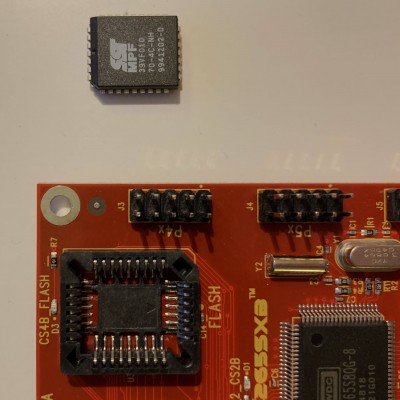
- board and flash chip
The chip has its notch on the top left corner (the photo shows rotated 90° counterclockwise). However, the socket has the notch on the bottom right corner. Will I have to insert the chip with the writing upside down, that is, 180° rotated from the orientation on the photo?
Thank you,
-- Olav
Re: W65C265SXB
Posted: Mon Jan 30, 2023 6:39 pm
by barnacle
I was confused because the forum software decided to show the picture on its side... the only way that chip will fit in that socket is with the chamfer top right on the forum image; bottom right for the original picture.
Neil
Re: W65C265SXB - Which way to iinsert the flash chip?
Posted: Mon Jan 30, 2023 6:49 pm
by SamCoVT
I am a bit unclear which way around I need to insert the chip into the socket.
PLCCs have pin1 in a weird spot - it's in the middle of one of the sides. The IC has a dimple, the socket has an arrow, and the silk screen on the PCB has a dot to show where pin 1 should be. The angled corner helps make it so you can't fit it in the socket backwards. Your intuition on how it goes into the socket is correct.
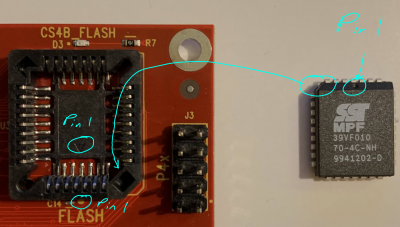
- Pin1 locations on PLCC, socket, and PCB
Re: W65C265SXB - Which way to iinsert the flash chip?
Posted: Tue Jan 31, 2023 2:56 pm
by olav
The angled corner helps make it so you can't fit it in the socket backwards. Your intuition on how it goes into the socket is correct.
plcc.png
Thank you very much. In fact, before connecting the board to USB, I noticed that I had indeed managed to insert the chip the wrong way round.
— Olav