
65ORG16.b Core
-
ElEctric_EyE
- Posts: 3260
- Joined: 02 Mar 2009
- Location: OH, USA
-
ElEctric_EyE
- Posts: 3260
- Joined: 02 Mar 2009
- Location: OH, USA
Is this something to be concerned about? Been giving me the warning since making the adjustment to the Z flag.
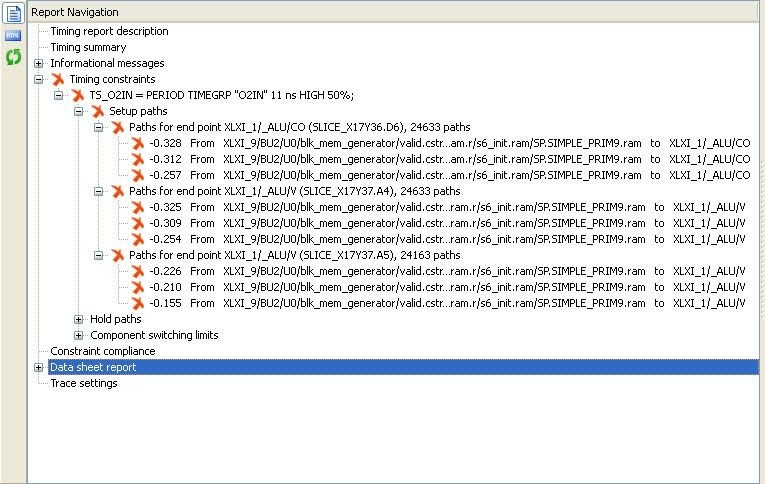
It did fail @11ns. You mean this?
Code: Select all
WARNING:Xst:2677 - Node <XLXI_1/_ALU/Z> of sequential type is unconnected in block <top_level>.It did fail @11ns. You mean this?

If you click on the paths, you get more detailed information.
But 12 ns is pretty good. With the 18 ns, I thought something may be wrong, but 12 ns is fine. That's going to be pretty much impossible to improve.
And, yeah, in order to see the top speed, you'll have to play with the constraints. If you put the constraint at 20 ns, and the tools reach 19.9, they're not going to try any harder, so you'll never see the top speed.
But 12 ns is pretty good. With the 18 ns, I thought something may be wrong, but 12 ns is fine. That's going to be pretty much impossible to improve.
And, yeah, in order to see the top speed, you'll have to play with the constraints. If you put the constraint at 20 ns, and the tools reach 19.9, they're not going to try any harder, so you'll never see the top speed.
-
ElEctric_EyE
- Posts: 3260
- Joined: 02 Mar 2009
- Location: OH, USA
Is this something to be concerned about? Been giving me the warning since making the adjustment to the Z flag.
__________________________________________________________________________________________________________________________
Also interesting to note, when I set optimize for speed to high. Max delay is 12.002ns. When I set it back to normal, it passes again with Max delay of 11.551ns...
Next on the agenda is to trim BCD out, which lucky for me I have your original .cpu and .ALU files from 10/27/2010 to compare against. But there are a couple places where I'm not sure whether I should trim them out of not and would appreciate your help.
Code: Select all
WARNING:Xst:2677 - Node <XLXI_1/_ALU/Z> of sequential type is unconnected in block <top_level>.Also interesting to note, when I set optimize for speed to high. Max delay is 12.002ns. When I set it back to normal, it passes again with Max delay of 11.551ns...
Next on the agenda is to trim BCD out, which lucky for me I have your original .cpu and .ALU files from 10/27/2010 to compare against. But there are a couple places where I'm not sure whether I should trim them out of not and would appreciate your help.
-
ElEctric_EyE
- Posts: 3260
- Joined: 02 Mar 2009
- Location: OH, USA
I think I've got the ALU.v trimmed of BCD.
Looking at cpu.v right around line 543 that contains:
Should I change it back to:
Looking at cpu.v right around line 543 that contains:
Code: Select all
AXYS[regsel] <= (state == JSR0) ? DIMUX : { ADD[dw-1:4] + ADJH, ADD[3:0] + ADJL };Code: Select all
AXYS[regsel] <= ADD;No, it should be:
That's needed for the RDY support.
Code: Select all
AXYS[regsel] <= (state == JSR0) ? DIMUX : ADD;
-
ElEctric_EyE
- Posts: 3260
- Joined: 02 Mar 2009
- Location: OH, USA

-
ElEctric_EyE
- Posts: 3260
- Joined: 02 Mar 2009
- Location: OH, USA
Was abit premature, but after a few more corrections, I got it to pass synthesis ok. No speed gains by removing BCD...
An area to observe for correctness which was a little bit of a challenge is around line 98 in the ALU, and lines 1096-1112 in the cpu. I think they're ok so I'm going forward.... Should I add my name to the copyright? heh
An area to observe for correctness which was a little bit of a challenge is around line 98 in the ALU, and lines 1096-1112 in the cpu. I think they're ok so I'm going forward.... Should I add my name to the copyright? heh
-
ElEctric_EyE
- Posts: 3260
- Joined: 02 Mar 2009
- Location: OH, USA

you've made a fork, so now you can visit a file you want to change, hit Edit This File, and paste in your new contents. Then put in a commit message and hit Commit Change.
Edit: for example, this is your cpu.v file
Edit: for example, this is your cpu.v file
-
ElEctric_EyE
- Posts: 3260
- Joined: 02 Mar 2009
- Location: OH, USA
-
ElEctric_EyE
- Posts: 3260
- Joined: 02 Mar 2009
- Location: OH, USA
Hi EEye
no, any browser, any OS. Let me walk you through it.
these are text operations you're about to do, in a text box - rather like these comment editting boxes. You're not going to upload a file, you're going to post new content to github, and then github's version of the file will be changed.
so, you visit the file in github, in your fork, and you hit the edit button, and the file content in the text box is now open for edit. You could now make a small change or two, and hit the commit button, preferably with a descriptive comment in the comment box.
for big change, I'm suggesting you wipe out all the text in the text box, by selecting all of it: Edit-> Select All -> Delete, or Right Click->Select All->Delete. And then visit your favourite editor (Notepad, Wordpad, ISE), pull up the new file contents, select the whole file text using Edit->Select All ->Copy. Finally, back to the browser and the github text box, paste in your updated content: Edit->Paste or Right Click->Paste.
(Or you might be the kind of person who uses Control-A, Control-C, Control-X and so on)
Does that start to make more sense? You're editting text, not uploading files. But when you hit submit, github will be up to date, and you can download a new version (and so can I!)
Cheers
Ed
no, any browser, any OS. Let me walk you through it.
these are text operations you're about to do, in a text box - rather like these comment editting boxes. You're not going to upload a file, you're going to post new content to github, and then github's version of the file will be changed.
so, you visit the file in github, in your fork, and you hit the edit button, and the file content in the text box is now open for edit. You could now make a small change or two, and hit the commit button, preferably with a descriptive comment in the comment box.
for big change, I'm suggesting you wipe out all the text in the text box, by selecting all of it: Edit-> Select All -> Delete, or Right Click->Select All->Delete. And then visit your favourite editor (Notepad, Wordpad, ISE), pull up the new file contents, select the whole file text using Edit->Select All ->Copy. Finally, back to the browser and the github text box, paste in your updated content: Edit->Paste or Right Click->Paste.
(Or you might be the kind of person who uses Control-A, Control-C, Control-X and so on)
Does that start to make more sense? You're editting text, not uploading files. But when you hit submit, github will be up to date, and you can download a new version (and so can I!)
Cheers
Ed