Page 19 of 32
Re: Kowalski Simulator Updates
Posted: Wed Mar 06, 2024 11:11 am
by jdimeglio
hey guys, Seeing if this thread still going? ...and any more development for the simulator?
Re: Kowalski Simulator Updates
Posted: Wed Mar 06, 2024 12:48 pm
by 8BIT
I have not done any more work lately. I would still like to make the 65816 simulator but it may be a few years before I get started on that. I am still supporting bug fixes and will take requests for additional features with the understanding they may take some time or may not be implemented.
I initially took this up as I needed to fix some cycle counting bugs and found a list of known bugs reported by others. Then I got the itch to add 65816 support. The assembler was not hard. Expanding the environment to support 16MB of memory took a little more effort. The simulator will be a huge undertaking and will take a lot of my spare time, which I currently have very little of.
thanks,
Daryl
Re: Kowalski Simulator Updates
Posted: Wed Mar 06, 2024 11:19 pm
by BigDumbDinosaur
Daryl’s hard work has turned an already-good editor/assembler into an excellent one. There are some features and changes I think would be useful, which I’ve mentioned in the past, but will repeat to spare anyone from sifting through old posts.
Editor:
- Goto Line Number
If an assembly error occurs and the culprit is in an INCLUDE file, the assembler will point to the line in the top-level, i.e., main, source file that is INCLUDEing the source file with the error. After loading the INCLUDEd file, it is necessary to scroll or page to get to the line with the error. It would be more efficient to have a “goto” editor function to jump to a specific line.
Currently, [Ctrl-G] is an alternative to using [F3] to continue on a search. I propose that [Ctrl-G] become the keystroke used to invoke the “goto” function, which keystroke seems to be common usage in many text editors, such as UltraEdit.
- Find Pattern Match
The find text ([Ctrl-F] and replace text ([Ctrl-R]) functions only understand literal text. It would be useful to allow pattern substitution in search strings, with ? and * as wildcard characters, for example, ABC*MNO??XYZ. In this example, the * would match anything in between ABC and MNO, and ?? would match any two characters between MNO and XYZ.
- Search-and-Replace Crashes
Extensive use of the search-and-replace function will eventually cause the editor to become unresponsive, causing a loss of all work in progress. The only recourse when this occurs is to kill the program from the Windows task manager.
In trying to establish a pattern for this bug, I’ve come to the conclusion that a search-and-replace that makes a lot of changes to the file being edited is overflowing the editor’s undo stack. It’s only a theory... 
Assembler
- The .PARAMTYPE (parameter type) internal macro variable that is supposed to differentiate between a macro argument passed as numeric and an argument passed as a character string, causes an error if used. The below short program illustrates this.
Code: Select all
         .opt caseinsensitive,swapbin

string   .macro ...                         ;accepts variable number of parameters
         .if @0                             ;if at least 1 parameter is passed...
.p           .=1                            ;.P is a variable, not a symbol
             .rept @0                       ;repeat for number of parameters
                 .if .paramtype(@.p) == 2   ;if parameter is a string...
                     .byte @.p$             ;assemble it
                 .endif
.p               .=.p+1                     ;next parameter
             .endr
             .byte 0                        ;terminate string
         .endif
         .endm

         *=$400

         string "this is",$12," a test"
File handling:
- Filenames
- Change the default filename extension for a source code file to .ASM, which is nearly universal in the assembly language world. Retain .65S for backward compatibility with older versions of the simulator.
- Change the default binary object file extension to .BIN, whether saved as a binary image or a binary program—the binary program format is identical to that of the binary image. Perhaps the “binary program” (.65P) option should be removed, since its specific feature is unimplemented.
- Remove the default filename Binary Code for object files of all types, since it is unlikely the default is what the user would want (I, for one, never put blanks in filenames, nor do I capitalize them). What would be useful is once a filename has been established for a particular object file type, that name would become the default for the current edit/assemble session. Doing so would reduce typing and the likelihood of mistakes.
- File Types
- Change the default saved object file format to Motorola S-record, which is more widely used in 6502 programming than the Intel hex format (I’ve never seen Intel hex used in some 47 years of writing 6502 code).
Speaking of Intel hex format, the assembler does not correctly save into Intel hex format when a 65C816 program has been assembled to an extended address, e.g., *=$FE1234. Bits 16-23, $FE in this example, are not in the records’ load address. On the other hand, saving into S-record format does result in the generation of S2 and S8 records, which feature fully supports 24-bit addressing.
- Consistent with change ‘A’ above, change the default load object file format to Motorola S-record.
Re: Kowalski Simulator Updates
Posted: Thu Mar 07, 2024 5:05 am
by jdimeglio
i've been using the simulator for years and grateful for keeping it rolling forward.
Re: Kowalski Simulator Updates
Posted: Fri Mar 08, 2024 9:52 am
by BillG
Is any documentation available?
HTMLHelp does not work after Microsoft killed Internet Explorer.
There is nothing on
https://sbc.rictor.org/kowalski.html
Re: Kowalski Simulator Updates
Posted: Fri Mar 08, 2024 3:28 pm
by 8BIT
Hi Bill,
The HTMP Help still works on my Windows 10. Are you saying it does not work with newer versions of Windows?
I have no other documents to share. I did find this folder using Google, which contains some basic documentation.
https://github.com/jdimeglio/6502-Simul ... aster/Docs
Thanks for your feedback!
Daryl
Re: Kowalski Simulator Updates
Posted: Fri Mar 08, 2024 11:00 pm
by BillG
This is what I get when I try to view help:
According to this:
https://learn.microsoft.com/en-us/troub ... r-properly
The .CHM is blocked because it was downloaded from "an untrusted source."
After unblocking in Properties, it now works.
Who is the jackwagon who decided to enable magic powers a black hat can exploit IN A HELP FILE of all places?
More creeping ItsCoolitis. Hey, that's cool! Let's do it regardless of the security risk. It all started with putting HTML and its evil sibling JavaScript into e-mail messages.
Re: Kowalski Simulator Updates
Posted: Sat Mar 09, 2024 3:19 pm
by 8BIT
I'm glad you found the solution. I'll write up some instructions for fixing that for others and add it to the web page.
thanks!
Daryl
Re: Kowalski Simulator Updates
Posted: Thu Mar 14, 2024 10:12 pm
by BigDumbDinosaur
Discovered another “oops!” in the assembler.
The attached image show the assembler “stuck” in an error condition due to a line of code having a typo in it. The line in question has a red arrow pointing to it in the left margin and the error is two invocations of the res (“reserve”) macro. By “stuck,” I mean the only way to clear this error is to kill the assembler from the Window$ task manager. Clicking the OK button endlessly reiterates the error. Fortunately, I had saved the source file before assembling...
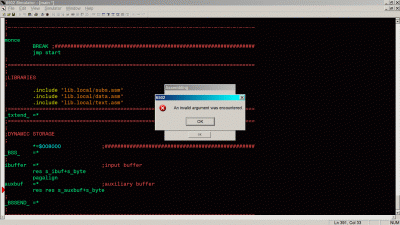
- Kowalski Assembler Stuck Following A Fatal Error
Re: Kowalski Simulator Updates
Posted: Fri Mar 15, 2024 12:00 am
by 8BIT
Ok, I'll try to look at it this weekend.
I'm glad you didn't loose your work.
Daryl
Re: Kowalski Simulator Updates
Posted: Fri Mar 15, 2024 5:38 am
by BigDumbDinosaur
Ok, I'll try to look at it this weekend.
Thanks!
I'm glad you didn't loose your work.
I've gotten in the habit of saving all “dirty” files before assembling or performing a search-and-replace, since the latter has gotten me numerous times.
Re: Kowalski Simulator Updates
Posted: Fri Mar 15, 2024 6:15 pm
by jdimeglio
If we talking about wish list
heheheheh
I'd love to see two things
1. basic 6551 support that sends data to virtual com port - where say another terminal app can listen/connect to. (basically want to run ANSI codes to the screen)
2. 6551 can produce IRQ when there's a character in the buffer (basically help me create IRQ driven keyboard routines)
thought id through it out there.. Otherwise how do people test 6551 IRQ routines?
Otherwise @Daryl love the work
Re: Kowalski Simulator Updates
Posted: Fri Mar 15, 2024 7:04 pm
by BigDumbDinosaur
If we talking about wish list
heheheheh
I'd love to see two things
1. basic 6551 support that sends data to virtual com port - where say another terminal app can listen/connect to. (basically want to run ANSI codes to the screen)
2. 6551 can produce IRQ when there's a character in the buffer (basically help me create IRQ driven keyboard routines)
thought id through it out there.. Otherwise how do people test 6551 IRQ routines?
I’m confused. What does the 6551 have to do with an editor/assembler that runs on MS Windows?
Re: Kowalski Simulator Updates
Posted: Fri Mar 15, 2024 7:27 pm
by barrym95838
Some of us use it as a simulator too, BDD. It's in the title.
Re: Kowalski Simulator Updates
Posted: Fri Mar 15, 2024 7:34 pm
by 8BIT
... Otherwise how do people test 6551 IRQ routines?
I have no plans to expand the IO past where Michael K. built in simple terminal support.
however, I've tested IRQ routines many times with this Simulator. here's how.
Load the code to be tested and be sure your IRQ routine and vector is set up.
Add breakpoints wherever IO is read or written
Run the simulator and it will stop at the breakpoint. Modify any register value or flag based on the expected operation with real HW.
continue the simulator.
If you have a loop running and want an IRQ to trigger, simply trigger the manual IRQ (button at the top menu bar) and let your IRQ handler run.
You can also single step the simulator to watch for expected/suspect operation.
You don't need real hardware to test your code... you just have to be a little creative

best wishes!
Daryl