Page 18 of 62

Re: Vulcan-74 - A 6502 Retro MegaProject

Posted: Tue Oct 27, 2015 1:30 pm
by Oneironaut
That would be ok as well, as long as it will be consistent.
I wrote a program that collects (and converts) images, samples, and the binary file into a huge image to be written to the external SPI Flash Memory (Cartridge). Once I understand what I will get with CC65, I will adjust my program to work with it. If it has to spew out 00768 zeros first, no problem!

The goal is to design everything so that anyone interested in building a Vulcan-74 can program the platform without needing to know what is going on under the PC hood. Learning about logic gates and homebrew video game design should not include a 20 page lesson on DOS commands, running Linux, or require doing battle with the toolchain.

When I am done, CC65 will be invisible to the user completely.
Just write C code, and press "Burn Cartridge".... Pacman in 4 hours!

Brad
Arlet wrote:
Quote:
Regarding Zero Page, I don't need to initialize that segment, so even just zeros would be fine.
Yes, but even that I've not managed to do. So, you may end up having to deal with a binary file of 64k - 256 bytes, starting at page 1. Of course, it wouldn't be too hard to use an external tool to add 256 zeroes to the front of that.

Re: Vulcan-74 - A 6502 Retro MegaProject

Posted: Thu Oct 29, 2015 12:11 pm
by Oneironaut
Busy week again. Have not seen my lab for 2 weeks!

I did manage to pick through the online CC65 docs and print them, and it seems easy enough to define a new target. It looks like the output file will need to be "reworked" through my Vulcan-74 Toolkit Program, but that's no issue. The goal remains the same... single button programming without ever needing to know anything about command line, linkers, object files, and all that other foo that should be transparent to the user. Just code in C, and press "Burn Cartridge". If it takes any longer than 10 seconds to see the results directly on the V74 screen after making a code change, then the tool-chain is bollixed. This will not be acceptable.

Once I get this flow working the way I like, the next step will be the addition of an assembly optimized library of V74 commands like DrawSprite, SetAlpha, PlayVoice, etc.

This weekend is also looking over-booked, but I will try to get something done on the project soon!
Perhaps I need the ghost of Jack Tramiel to haunt me, pushing for an unrealistic deadline to have a working prototype!

Radical Brad

Re: Vulcan-74 - A 6502 Retro MegaProject

Posted: Sat Oct 31, 2015 2:48 pm
by Oneironaut
Still hacking away at CC65 using the docs and many other web resources.
After a day, I have yet to produce a binary output file.
I can see that this is a very configurable compiler for many platforms, but.... damn!
It's like having a 300 page manual of procedures and posturing to operate a can opener!!!
I will not quit until I have it working.

Once I figure out what I only need out of all the CC65 directories, it's all going in one directory, and the rest is getting deleted.
I will probably end up with 3 executables and a few support files, and that's all.
My Vulcan-74 Toolkit will then make all the needed calls as soon as the user supplies Main.C
This will all happen as a shell call from my program in the background...

Code: Select all

cc65 -t none -O --cpu 65C02 Main.c
ca65 --cpu 65C02 Vulcan-74.s
ca65 --cpu 65C02 Main.s
ld65 -C Vulcan-74.cfg -m Main.map Vulcan-74.o Main.o -o Cartridge.bin


Cartridge.bin will then be converted, having the other 4-64MB of sound and graphics data tagged on.

There is no reason for anything to be so damn complicated.
It took ONE DAY to learn 6502 assembly from scratch and get some sprites moving.
I am now on DAY THREE of simply trying to get CC65 to write an output file!

Next time I post here, this mess will be a ONE CLICK operation.
Code your main loop, and Press "Burn Cartridge". DONE!!!!

The toolchain needs to understand that is is MY slave, and NOT the other way around!
Ok, Signing off for now until I have beaten my opponent into submission....

Radical Brad

Re: Vulcan-74 - A 6502 Retro MegaProject

Posted: Sat Oct 31, 2015 6:02 pm
by Oneironaut
For entertainment purposes, and perhaps to help someone else with my lack of C and ancient DOS apps experience, I shall present my learning curve in graphic detail.
* Note : I am not asking for guidance here. I want to see how long it will take me to figure this out in my own way.

I have read the documentation here in great detail several times, and printed out every page available...

http://www.cc65.org/doc/

So now I mostly get how all of these command line programs work, CC65.exe, CA65.exe, and LD65.exe.
Of course, docs are written for those coming from this era, whereas I come from an era where the tool-chain is ready to use out of the box.
Xilinx, ATmel, Microchip, etc... These IDEs install and work without fiddling under the hood.
As a side note, I only started with C a year ago to help make my AVR game systems easier to code, so last week was my first introduction to several new terms such as linker, object file, and all of that stuff I really don't care to learn more than I need to about. AVR GCC (Studio) worked out of the box.

Now my goal here is to strip CC65 down to the absolute minimal state needed to generate an output file for my hardware.
I do not require multiple platforms, memory maps, etc. I only need to go from Main.c to Cartridge.bin.

I have moved the required files (or so I think) from their directories to a new folder, and have created a simple batch file...

Code: Select all

bin\cc65 -t none --cpu 65C02 Main.c
bin\ca65 --cpu 65C02 Vulcan-74.s
bin\ca65 --cpu 65C02 Main.s
bin\ld65 -C Vulcan-74.cfg Vulcan-74.o Main.o -o Cartridge.bin  
This will later be done live by calling the EXEs from my Vulcan-74 Toolbox Software.

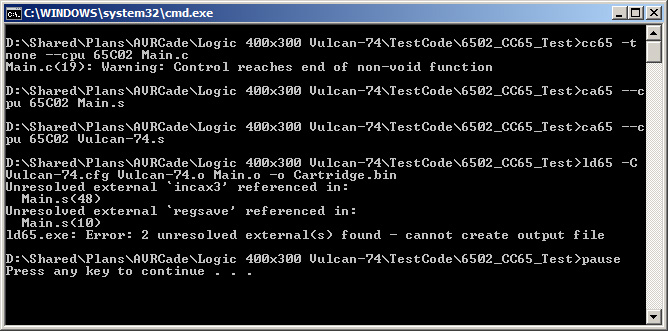
I know I am getting close now, because there are only a few errors, not the original 2 pages worth...

Image

Looking into the docs, there is a reference to something called crto.s or crt0.s (can't tell if it's zero or letter O in my printout!).
It seems that this files is important, although oddly it is missing from any directory (searched the entire cc65 folder).

I am now doing my research as to what this is, and why it is missing, and why it is only half-ass explained in the docs.

I shall report back when I move to the next string of errors!
Again, please don't help, I know that this will seem so damn basic to many, bit for me, spoon fed knowledge is tasteless.

Back to hacking...

Radical Brad

Re: Vulcan-74 - A 6502 Retro MegaProject

Posted: Sat Oct 31, 2015 6:30 pm
by Michael
Hi Brad.

I hate to complain about something that's free and that obviously represents a significant effort but I do agree that CC65 isn't the most intuitive or easy-to-use set of tools. Fortunately, Grant Searle posted a zip file with the bare essentials for assembling a copy of OSI BASIC (Grant's osi_bas.zip) that was a big help for me. I for one would welcome anything that would improve the user interface and experience for this nifty tool set.

Keep up the good work.

Cheerful regards, Mike, K8LH

Re: Vulcan-74 - A 6502 Retro MegaProject

Posted: Sat Oct 31, 2015 6:47 pm
by Oneironaut
Hey thanks, that example was exactly what I was looking for... ditch all the bulk, and put it all in a single .S file.
It's nice to see someone else do this "trimming" successfully.

Being a minimalist, I have always struggled with high level languages and all the verbosity and bulk they bring along.
I still think that with the power offered by the Vulcan Hardware, coding in C will be the way to go.
Working with 16 bit math and basic game logic is so much easier in a high level language.

Hopefully by the end of the day, I will have code working on the real hardware!

Thanks for the example, this should be all I need form here.

Brad

Michael wrote:
Hi Brad.

I hate to complain about something that's free and that obviously represents a significant effort but I do agree that CC65 isn't the most intuitive or easy-to-use set of tools. Fortunately, Grant Searle posted a zip file with the bare essentials for assembling a copy of OSI BASIC (Grant's osi_bas.zip) that was a big help for me. I for one would welcome anything that would improve the user interface and experience for this nifty tool set.

Keep up the good work.

Cheerful regards, Mike, K8LH

Re: Vulcan-74 - A 6502 Retro MegaProject

Posted: Sat Oct 31, 2015 7:35 pm
by Oneironaut
Micheal, seems that once I replaced the version of CA 65 you supplied in the example (V2.13.3) with the one I had downloaded (V2.15), things are working better.
Somehow I ended up with a newer version, and it has the code "GIT" appended to the version number. not sure what that means... Author initials perhaps??
Anyhow, most errors are gone now.

...might have been fighting that one all night!

I agree, for such a powerful tool that seems to have had a recent update, it baffles that there is no GUI or clear docs.
Perhaps it was written for those that should already know enough to use it.... that is NOT me!

Anyhow, trudging on, I am not picking through the "osi_bas.s" file to see what mumbo jumbo I need to add to my file to satisfy the toolchain.
I already have a set of assembly routines written in the Kowalski Assembler that work, so it's just a matter of adding the C compiler goop.

Assembler Process...
1) Toggle the switch.

C Compiler Process...
1) Fill out 200 page form to request access to room containing the switch.
2) Make 7 copies of the form, and send them to management.
3) Fax the acceptance form to the guard house in front of the room with the switch.
4) The guard only speaks Swahili, so send it to the translator first.
5) The fax machine requires a special sized 13x9 paper, so be careful.
6) Wait for the returned gate access form. This will be transferred via modem.
7) Make sure you have a Punter protocol emulator to receive the form.
8) Print the form and translate it back to English. bring this to the switch room.
9) You now need to access the switch control computer. This only runs Timbuktu Linux V2.22.32.40005.00001.
10) Upload the access form using a 3 wire serial cable with 7 bit non parity protocol.
...... and on and on and on and on.
61) What was I trying to do??? I forgot.

Anyhow, back to learning the overly complex to achieve the ultimately simple.
I may need to move to another room, this one is filling up with Yak hair!

Radical Brad

Re: Vulcan-74 - A 6502 Retro MegaProject

Posted: Sat Oct 31, 2015 11:28 pm
by Oneironaut
Progress has been made with the CC65 journey.

I managed to at least get my ball bouncer test program into the 6502 Program Memory using the CC65 toolset.
The program code was placed in an endless loop in the .SEGMENT "STARTUP" just to make sure my Binary was correct.
At this point, I do not have any C code written, and I know the journey has only just begun.

Here is what I have done so far....

1) Deleted everything but the CC65 executable files. Don't need any of the other stuff!!

2) Made a batch file based on help from the example posted by Michael...

Code: Select all

cc65 -t none --cpu 65C02 Main.c
ca65 --cpu 65C02 Main.s
ca65 --cpu 65C02 Vulcan-74.s
ld65 -C Vulcan-74.cfg Vulcan-74.o Main.o -o Cartridge.bin
pause
exit
3) Made a memory configuration file using help from the AtariAge forum posts...

Code: Select all

MEMORY {
	ZP:		start = 00000, size = 00256, type = rw;
	IO:		start = 00512, size = 00256, fill = yes, fillval=234, file = %O;
	RAM:		start = 00768, size = 64764, fill = yes, fillval=234, file = %O;	
	VECTORS:	start = 65532, size = 00004, fill = yes, fillval=234, file = %O;
}

SEGMENTS {
	ZEROPAGE:		load = ZP, 	type = zp;
	STARTUP:		load = RAM, 	type = ro;
	CODE:			load = RAM,	type = ro;
	VECTORS:		load = VECTORS,	type = ro;
}
4) Started a Vulcan-74 Library based on some coding I did in the Kowalski Assembler...

Code: Select all

 ; ********************************************************************************
 ; *** VULCAN-74 STARTUP SEQUENCE
 ; ********************************************************************************

; RESET VECTOR VALUE 00768 STORED AT ADDRESS 65532
.SEGMENT "VECTORS"
.BYTE <00768
.BYTE >00768

; PROGRAM CODE BEGINS AT ADDRESS 00768
.EXPORT __STARTUP__ : absolute = 1;
.SEGMENT "STARTUP" 

 ; SET GPU MEMORY SELECT TO DISABLED = 0
 STZ 549

 ; temp set alpha $$$ make sub
 STZ 535

 ; CLEAR DECIMAL MODE
 CLD


 ; SIMPLE BALL BOUNCE TEST BELOW WILL BE REPLACED BY STARTUP CODE

 ; DEFINE BALL VARS
ballx = 100
 STZ ballx
 STZ ballx+1

balldx = 102
 STZ balldx

ballvx = 103
 LDA #3
 STA ballvx

bally = 104
 STZ bally
 STZ bally+1

balldy = 106
 STZ balldy

ballvy = 107
 LDA #3
 STA ballvy


 ; LOAD AND PLOT 1024 PIXELS (32x32)
 LDX #0
 LDY #0
SPR_LOOP:

 ; LOAD PIXEL FROM PROGRAM MEMORY
 LDA BALLS,X
 
 ; PLOT PIXEL TO SPRITE MEMORY
 STX 0 ; DEST ADDRESS.LO
 STY 1 ; DEST ADDRESS.MD
 STZ 2 ; DEST ADDRESS.HI
 STA 3 ; PIXEL DATA
 JSR SPRITE_PLOT

 ; COMPLETE LOOP
 INX
 BNE SPR_LOOP
 INC SPR_LOOP+2
 INY
 CPY #32
 BNE SPR_LOOP


 ; ********************************************************************************
 ; *** MAIN PROGRAM LOOP
 ; ********************************************************************************
MAIN:
 ; MOVE SPRITE RIGHT
 LDA #0
 CMP balldx
 BNE SHR
 CLC
 LDA ballx
 ADC ballvx
 STA ballx
 BCC MSR
 INC ballx+1
MSR:

 ; SPRITE HIT WALL RIGHT
 LDA #1
 CMP ballx+1
 BNE SHR
 LDA #112
 CMP ballx
 BCS SHR
 LDA #1
 STA balldx
SHR:

 ; MOVE SPRITE LEFT
 lda #1
 CMP balldx
 BNE SHL
 SEC
 LDA ballx
 SBC ballvx
 STA ballx
 BCS MSL
 DEC ballx+1
MSL:

 ; SPRITE HIT WALL LEFT
 LDA #0
 CMP ballx+1
 BNE SHL
 CMP ballx
 BCC SHL
 STZ balldx
SHL:

; BOUNCE SIMULATION
 LDA bally
 LSR
 LSR
 LSR 
 INA
 sta ballvy
 
 ; MOVE SPRITE DOWN
 LDA #0
 CMP balldy
 BNE SHD
 CLC
 LDA bally
 ADC ballvy
 STA bally
 BCC MSD
 INC bally+1
MSD:

 ; SPRITE HIT WALL DOWN
 LDA #1
 CMP bally+1
 BNE SHD
 LDA #12
 CMP bally
 BCS SHD
 LDA #1
 STA balldy
SHD:

 ; MOVE SPRITE UP
 lda #1
 CMP balldy
 BNE SHU
 SEC
 LDA bally
 SBC ballvy
 STA bally
 BCS MSU
 DEC bally+1
MSU:

 ; SPRITE HIT WALL UP
 LDA #0
 CMP bally+1
 BNE SHU
 CMP bally
 BCC SHU
 STZ balldy
SHU:

 ; sprite pos
 LDA ballx
 STA 0
 LDA ballx+1
 STA 1
 LDA bally
 STA 2
 LDA bally+1
 STA 3

 ; sprite size
 LDA #32
 STA 4
 STA 6
 LDA #0
 STA 5
 STA 7

 ; sprite adr
 LDA #0
 STA 8
 STA 9
 STA 10

 ; DRAW SPRITE
 JSR SPRITE_DRAW

 ; SWAP VIDEO SCREENS
 JSR VIDEO_FLIP

 ; CONTINUE MAIN LOOP
 JMP MAIN


 ; ********************************************************************************
 ; *** SWAP VIDEO SCREEN ON NEXT VERTICAL SYNC
 ; ********************************************************************************
VIDEO_FLIP:

 ; WAIT FOR VERTICAL SYNC LO
WAIT_SYNC_LO:
 LDA 564
 BIT #1
 BNE WAIT_SYNC_LO ; was bne

 ; WAIT FOR VERTICAL SYNC HI
WAIT_SYNC_HI: 
 LDA 564
 BIT #1
 BNE WAIT_SYNC_HI

 ; FLIP VIDEO SCREENS   
 STA 512

 ; RETURN TO CALLER
 RTS


 ; ********************************************************************************
 ; *** PLOT SINGLE PIXEL TO VIDEO MEMORY
 ; ********************************************************************************
 ; *** ZP00 : DESTINATION LOCATION X1.LO
 ; *** ZP01 : DESTINATION LOCATION X1.HI
 ; *** ZP02 : DESTINATION LOCATION Y1.LO
 ; *** ZP03 : DESTINATION LOCATION Y1.HI
 ; *** ZP04 : PIXEL COLOR VALUE
 ; ********************************************************************************
VIDEO_PLOT:

 ; SET DESTINATION LOCATION X1
 LDA 0    
 STA 517
 LDA 1    
 STA 518

 ; SET DESTINATION LOCATION Y1
 LDA 2    
 STA 513
 LDA 3    
 STA 514

 ; SET PIXEL COLOR VALUE
 LDA 4    
 STA 529

 ; RETURN TO CALLER
 RTS 


 ; ********************************************************************************
 ; *** PLOT SINGLE PIXEL TO SPRITE MEMORY
 ; ********************************************************************************
 ; *** ZP00 : SPRITE SOURCE ADDRESS LO
 ; *** ZP01 : SPRITE SOURCE ADDRESS MD
 ; *** ZP02 : SPRITE SOURCE ADDRESS HI
 ; *** ZP03 : PIXEL COLOR VALUE
 ; ********************************************************************************
SPRITE_PLOT:

 ; SET SPRITE MEMORY ADDRESS
 LDA 0    
 STA 530
 LDA 1    
 STA 531
 LDA 2
 STA 532

 ; SET PIXEL COLOR VALUE
 LDA 3    
 STA 533

 ; RETURN TO CALLER
 RTS 


 ; ********************************************************************************
 ; *** DRAW SPRITE TO THE VIDEO MEMORY
 ; ********************************************************************************
 ; *** ZP00 : DESTINATION LOCATION X.LO
 ; *** ZP01 : DESTINATION LOCATION X.HI
 ; *** ZP02 : DESTINATION LOCATION Y.LO
 ; *** ZP03 : DESTINATION LOCATION Y.HI
 ; *** ZP04 : SPRITE WIDTH VALUE X.LO
 ; *** ZP05 : SPRITE WIDTH VALUE X.HI
 ; *** ZP06 : SPRITE HEIGHT VALUE Y.LO
 ; *** ZP07 : SPRITE HEIGHT VALUE Y.HI
 ; *** ZP08 : SPRITE MEMORY ADDRESS LO
 ; *** ZP09 : SPRITE MEMORY ADDRESS MD
 ; *** ZP10 : SPRITE MEMORY ADDRESS HI
 ; ********************************************************************************
SPRITE_DRAW:

 ; SET SPRITE DESTINATION X1
 LDA 0    
 STA 517
 LDA 1    
 STA 518

 ; CALCULATE SPRITE WIDTH
 CLC
 LDA 0
 ADC 4
 STA 4
 LDA 1
 ADC 5 
 STA 5

 ; SET SPRITE DESTINATION X2
 LDA 4    
 STA 519
 LDA 5    
 STA 528

 ; SET SPRITE DESTINATION Y1
 LDA 2
 STA 513
 LDA 3    
 STA 514

 ; CALCULATE SPRITE HEIGHT
 CLC
 LDA 2
 ADC 6
 STA 6
 LDA 3
 ADC 7
 STA 7

 ; SET SPRITE DESTINATION Y2
 LDA 6
 STA 515
 LDA 7    
 STA 516

 ; SET SPRITE MEMORY ADDRESS
 LDA 8    
 STA 530
 LDA 9    
 STA 531
 LDA 10
 STA 532

 ; SELECT SPRITE MEMORY (2)
 LDA #2 
 STA 549

 ; EXECUTE GPU SPRITE
 STA 534

 ; WAIT FOR GPU READY
SPRITE_RDY: 
 LDA 564
 BIT #2
 BNE SPRITE_RDY

 ; DESELECT SPRITE MEMORY (0)
 LDA #0 
 STA 549

 ; RETURN TO CALLER
 RTS 


 ; ********************************************************************************
 ; *** SET SPRITE ALPHA COLOR
 ; *** ZP000 : SPRITE ALPHA COLOR
 ; ********************************************************************************
SPRITE_ALPHA:

 ; SET SPRITE ALPHA COLOR
 LDA #0 
 STA 535
 
 ; RETURN TO CALLER
 RTS 


 ; ********************************************************************************
 ; *** PLOT SINGLE PIXEL TO PLAYFIELD MEMORY
 ; *** ZP000 : DESTINATION LOCATION X1.LO
 ; *** ZP001 : DESTINATION LOCATION X1.HI
 ; *** ZP002 : DESTINATION LOCATION Y1.LO
 ; *** ZP003 : DESTINATION LOCATION Y1.HI
 ; *** ZP004 : PIXEL COLOR VALUE
 ; ********************************************************************************
PLAYFIELD_PLOT:

 ; SET SPRITE DESTINATION LOCATION X1
 LDA 0    
 STA 544
 LDA 1    
 STA 545

 ; SET SPRITE DESTINATION LOCATION Y1
 LDA 2    
 STA 547
 LDA 3    
 STA 548

 ; SET SPRITE PIXEL COLOR VALUE
 LDA 4    
 STA 550

 ; RETURN TO CALLER
 RTS 


 ; ********************************************************************************
 ; *** DRAW THE PLAYFIELD TO THE VIDEO MEMORY
 ; ********************************************************************************
PLAYFIELD_DRAW:

 ; SET PLAYFIELD SOURCE LOCATION X
 LDA #0 
 STA 544
 LDA #0 
 STA 545

 ; SET PLAYFIELD SOURCE LOCATION Y
 LDA #0 
 STA 547
 LDA #0 
 STA 548

 ; SET PLAYFIELD START LOCATION Y
 LDA 4    
 STA 560
 LDA 5
 STA 561

 ; SET PLAYFIELD END LOCATION Y
 LDA 6    
 STA 562
 LDA 7
 STA 563

 ; SELECT PLAYFIELD MEMORY (3)
 LDA #3 
 STA 549

 ; EXECUTE GPU PLAYFIELD
 STA 551

 ; READ VIDEO STATUS REGISTER AND WAIT FOR GPU READY
WAIT_GPU_READY: 
 LDA 564
 AND #2
 CMP #0
 BNE WAIT_GPU_READY

 ; DESELECT PLAYFIELD MEMORY (0)
 LDA #0 
 STA 549

 ; RETURN TO CALLER
 RTS 


DELAY:
 LDX #0
 LDY #100
dp1:
 dex
 BNE dp1
 DEY
 BNE dp1
 rts


BALLS:
 .BYTE 0,0,0,0,0,0,0,0,0,0,0,9,82,99,100,108,108,108,99,90,9,0,0,0,0,0,0,0,0,0,0,0
 .BYTE 0,0,0,0,0,0,0,0,0,18,108,181,181,181,181,181,181,181,181,181,181,108,90,8,0,0,0,0,0,0,0,0
 .BYTE 0,0,0,0,0,0,0,9,107,181,181,181,181,181,181,181,181,181,181,181,181,181,181,108,17,0,0,0,0,0,0,0
 .BYTE 0,0,0,0,0,0,17,108,116,108,116,116,116,116,116,116,116,116,116,116,116,108,108,108,108,25,0,0,0,0,0,0
 .BYTE 0,0,0,0,0,25,107,116,108,116,116,116,116,116,116,116,116,116,116,116,108,108,108,108,108,107,25,8,0,0,0,0
 .BYTE 0,0,0,0,25,43,108,108,108,116,116,116,116,116,116,116,116,116,108,108,108,108,108,108,107,108,34,25,0,0,0,0
 .BYTE 0,0,0,17,34,107,107,108,108,116,116,116,116,116,116,116,116,108,108,108,107,107,107,107,107,107,107,25,25,0,0,0
 .BYTE 0,0,17,34,34,107,107,107,116,116,116,125,117,116,116,116,108,107,107,107,107,107,107,99,99,99,107,34,25,17,0,0
 .BYTE 0,8,34,33,34,107,107,116,116,125,190,190,190,189,125,116,116,107,107,107,43,43,35,34,34,34,35,34,33,33,9,0
 .BYTE 0,18,34,34,42,107,107,116,125,190,255,255,255,255,190,124,116,107,107,43,43,42,34,34,34,34,34,34,25,25,25,0
 .BYTE 0,34,34,34,42,43,107,116,189,255,255,255,255,255,190,125,116,107,43,43,42,42,34,34,34,34,34,34,25,25,25,8
 .BYTE 9,34,42,42,42,43,107,116,189,255,255,255,255,255,254,125,116,107,43,42,42,42,42,42,34,34,34,33,25,25,33,17
 .BYTE 26,34,42,42,42,42,43,116,189,255,255,255,255,255,190,125,116,115,43,42,42,42,42,42,34,34,34,33,25,25,33,25
 .BYTE 26,34,34,42,42,42,43,51,124,190,255,255,255,255,189,124,115,43,43,42,42,42,42,34,34,34,33,33,25,25,34,25
 .BYTE 34,34,34,42,42,42,43,43,115,124,189,190,190,189,124,116,115,43,43,42,42,42,42,34,34,34,33,33,25,25,34,25
 .BYTE 34,42,34,34,42,42,43,43,43,115,124,124,124,124,116,115,51,43,43,42,42,34,34,34,34,34,33,33,25,33,34,25
 .BYTE 34,34,34,34,42,42,42,43,43,43,43,116,116,115,115,115,43,43,42,42,42,34,34,34,34,33,33,33,33,33,42,25
 .BYTE 34,34,34,34,34,42,42,42,42,43,43,43,115,115,43,43,42,42,42,42,34,34,34,34,34,33,33,33,25,34,42,17
 .BYTE 34,34,42,34,34,42,42,42,42,42,42,43,43,43,42,42,42,42,42,42,34,34,34,33,33,33,33,33,34,42,34,17
 .BYTE 26,34,42,34,34,34,34,42,42,42,43,43,43,43,42,42,42,42,42,34,34,34,34,33,33,33,34,34,42,42,25,17
 .BYTE 17,34,34,34,34,34,34,34,42,42,42,42,42,42,42,42,42,42,34,34,34,34,34,34,34,34,34,34,42,34,25,9
 .BYTE 8,34,34,34,34,34,34,34,42,42,34,34,34,42,42,42,42,42,34,34,34,34,34,34,34,34,34,34,42,25,17,8
 .BYTE 0,26,34,34,34,34,34,34,34,34,34,34,34,34,34,34,34,34,34,34,34,34,34,34,34,34,34,34,34,17,17,0
 .BYTE 0,9,34,34,34,34,34,34,34,34,34,34,34,34,34,34,34,34,34,34,34,34,34,34,34,34,34,25,17,17,8,0
 .BYTE 0,0,17,34,34,34,34,34,34,34,34,34,34,34,34,34,34,34,34,34,34,34,34,34,34,25,25,17,17,9,0,0
 .BYTE 0,0,0,26,34,34,34,34,34,33,33,33,33,33,33,33,33,33,33,33,33,33,25,25,25,17,17,17,17,0,0,0
 .BYTE 0,0,0,8,25,34,34,34,34,25,25,25,25,25,25,25,25,25,25,25,25,25,25,25,17,17,17,17,0,0,0,0
 .BYTE 0,0,0,0,8,25,33,33,33,25,25,25,25,25,25,25,25,25,25,25,25,25,17,17,17,17,17,8,0,0,0,0
 .BYTE 0,0,0,0,0,0,17,25,25,25,25,25,25,25,25,25,25,25,25,17,17,17,17,17,17,17,0,0,0,0,0,0
 .BYTE 0,0,0,0,0,0,0,17,25,25,25,25,17,17,17,17,17,17,17,17,17,17,17,17,8,0,0,0,0,0,0,0
 .BYTE 0,0,0,0,0,0,0,0,8,17,25,25,25,17,17,17,17,17,17,17,17,17,9,8,0,0,0,0,0,0,0,0
 .BYTE 0,0,0,0,0,0,0,0,0,0,8,8,17,17,17,17,17,16,8,8,8,0,0,0,0,0,0,0,0,0,0,0

5) After running the batch file, I get a file called Cartridge.bin, but it is 512 bytes shy due to limitations in CC65.

6) I run my Vulcan-74 BIN to AVR converter, which makes an AVR loadable image and pads back the missing 512 bytes.

7) This is then loaded into the AVR that boot loads the 6502 Program Memory, and the balls begin to bounce!


As soon as I get all the required C foo under control I will then make this all automated within my Vulcan-74 ToolKit.
Things I know (less than) nothing about (yet) are the definitions for a C program to run. BSS, Heap, etc.
If time permits, I will have this all working tomorrow.

The goal will be to remove the ball bouncer from the Library, and have it working as a C program, calling the assembly routines.

Ok, back at it.... there are at least dozen more Yaks that still have hair!
Radical Brad

Re: Vulcan-74 - A 6502 Retro MegaProject

Posted: Sun Nov 01, 2015 12:17 am
by Oneironaut
I added some code to the Main.c file, which will be the only C code used as the game logic.
Just something simple that I can check against the assembly output...

Code: Select all

int x;
int y;

int main (void)
{
x++;
y=y+3;
}
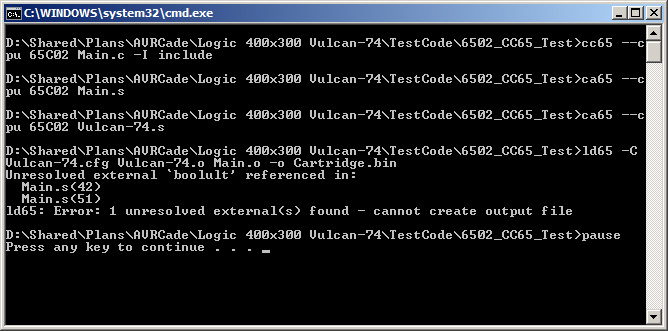
After running the batch file, it is apparent that the real fun is about to start!...

Image

Looking at the compiled Main.s file, it seems to be calling other routines now...

Code: Select all

;
; File generated by cc65 v 2.15 - Git 202ad62
;
	.fopt		compiler,"cc65 v 2.15 - Git 202ad62"
	.setcpu		"65C02"
	.smart		on
	.autoimport	on
	.case		on
	.debuginfo	off
	.importzp	sp, sreg, regsave, regbank
	.importzp	tmp1, tmp2, tmp3, tmp4, ptr1, ptr2, ptr3, ptr4
	.macpack	longbranch
	.forceimport	__STARTUP__
	.export		_x
	.export		_y
	.export		_main

.segment	"BSS"

_x:
	.res	2,$00
_y:
	.res	2,$00

; ---------------------------------------------------------------
; int __near__ main (void)
; ---------------------------------------------------------------

.segment	"CODE"

.proc	_main: near

.segment	"CODE"

	lda     _x
	ldx     _x+1
	sta     regsave
	stx     regsave+1
	ina
	bne     L0003
	inx
L0003:	sta     _x
	stx     _x+1
	lda     regsave
	ldx     regsave+1
	lda     _y
	ldx     _y+1
	jsr     incax3
	sta     _y
	stx     _y+1
	rts

.endproc
I am now looking through all of the other files I hoped to not need in order to find something called "regsave" and "incax3".
These must be code fragments or some kind of alias? Not sure yet as I don't know a hill-o-beans about C compilers (yet).
Found a bunch of files ending in ".h" and others I cannot open in notepad with a ".lib" extension. The answer must be lurking in there someplace.
It will come together soon enough.

Funny, I think I have as many hours beating around in CC65 as I do designing the entire board!!

Later...
Radical Brad

Re: Vulcan-74 - A 6502 Retro MegaProject

Posted: Sun Nov 01, 2015 2:44 am
by Oneironaut
Ok, I think I am getting close now.
Managed to make an assembly call to some of my assembly routines (Kernal).

Found a missing file called longbranch.mac and it cleared a few other errors.
This seems to be a macro, so I will be promptly absorbing it into the code and deleting it once everything else is working.

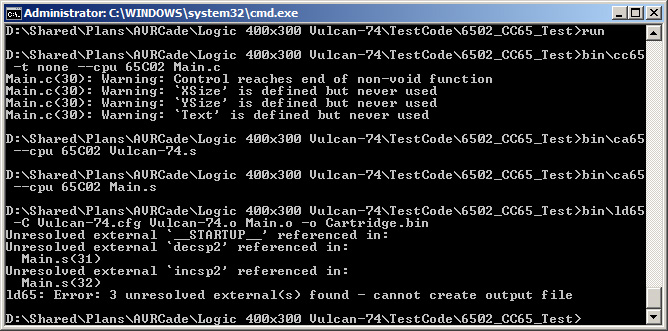
Something is still barfing though, and I am not sure if it's the Compiler or the Linker...

Image

Here is the Main.c Code...

Code: Select all

void __fastcall__ VIDEO_FLIP(void);

unsigned char x = 0;
unsigned char y = 0;

// START OF MAIN
int main (void) {

// SIMPLE DELAY
for (x=0; x<200; x++) {
for (y=0; y<100; y++);
}

// SWAP VIDEO BUFFERS
VIDEO_FLIP();

// END OF MAIN
return(0);
}
and here is the compiled Main.s code...

Code: Select all

;
; File generated by cc65 v 2.15 - Git 202ad62
;
	.fopt		compiler,"cc65 v 2.15 - Git 202ad62"
	.setcpu		"65C02"
	.smart		on
	.autoimport	on
	.case		on
	.debuginfo	off
	.importzp	sp, sreg, regsave, regbank
	.importzp	tmp1, tmp2, tmp3, tmp4, ptr1, ptr2, ptr3, ptr4
	.macpack	longbranch
	.forceimport	__STARTUP__
	.import		_VIDEO_FLIP
	.export		_x
	.export		_y
	.export		_main

.segment	"DATA"

_x:
	.byte	$00
_y:
	.byte	$00

; ---------------------------------------------------------------
; int __near__ main (void)
; ---------------------------------------------------------------

.segment	"CODE"

.proc	_main: near

.segment	"CODE"

	ldx     #$00
	lda     #$00
	sta     _x
L0004:	ldx     #$00
	lda     _x
	cmp     #$C8
	jsr     boolult
	jne     L0007
	jmp     L0005
L0007:	ldx     #$00
	lda     #$00
	sta     _y
L000C:	ldx     #$00
	lda     _y
	cmp     #$64
	jsr     boolult
	jne     L000E
	jmp     L0006
L000E:	ldx     #$00
	lda     _y
	pha
	ina
	sta     _y
	pla
	jmp     L000C
L0006:	ldx     #$00
	lda     _x
	pha
	ina
	sta     _x
	pla
	jmp     L0004
L0005:	jsr     _VIDEO_FLIP
	ldx     #$00
	lda     #$00
	jmp     L0003
L0003:	rts

.endproc
It seems that the hamster turning the compiler wheel wants to call some routine called "boolult", which does not exist!

I have yet to find this chunk of code, and I am getting too tired to continue tonight.
Web scouring for "boolult" brings up nothing coherent to me.
So far, trying to get a C compiler to work has been by far more challenging than any part of coding assembly or making the Vulcan-74 board.
Today has been the single longest span of time I have put into this project, and it was also the most futile!

For now, I will admit that I have lost. Perhaps some sleep will help with the battle if time permits tomorrow.

Until the next bloody battle...
Radical Brad

Re: Vulcan-74 - A 6502 Retro MegaProject

Posted: Sun Nov 01, 2015 4:56 am
by barrym95838
Yeah, Brad, you may have been a bit hasty in your aggressive pruning job from 1) above. Some of those files you deleted might come in handy from time-to-time.

Mike B.

Re: Vulcan-74 - A 6502 Retro MegaProject

Posted: Sun Nov 01, 2015 6:17 am
by Arlet
Quote:
It seems that the hamster turning the compiler wheel wants to call some routine called "boolult", which does not exist!
It should be part of the C library that came with CC65, just like crt0 (C Run Time) you mentioned earlier. Those are routines that the generated code calls to perform things that are too big to generate in assembly every time you use them, or in case of the crt0, set up the environment before calling main().

Re: Vulcan-74 - A 6502 Retro MegaProject

Posted: Sun Nov 01, 2015 2:01 pm
by Oneironaut
Thanks.
Yes, it would appear (after looking at other examples), that my Initialization Sequence is lacking...

Code: Select all


 ; ********************************************************************************
 ; *** VULCAN-74 STARTUP SEQUENCE
 ; ********************************************************************************

; RESET VECTOR VALUE 00768 STORED AT ADDRESS 65532
.SEGMENT "VECTORS"
.BYTE <00768
.BYTE >00768

; PROGRAM CODE BEGINS AT ADDRESS 00768
.EXPORT __STARTUP__ : absolute = 1;
.SEGMENT "STARTUP" 

 ; SET GPU MEMORY SELECT TO DISABLED = 0
 STZ 549

 ; CLEAR DECIMAL MODE
 CLD

; ENTER MAIN C PROGRAM
.IMPORT _main
JSR _main
If I only make assembly calls in Main, it works!
If I try to add anything as simple as X++; then it fails!

In other examples, there are a bunch of calls to routines like "zerobss", "initlib", etc.
I am guessing that these are part of my missing crt assembly code.

I went back and downloaded the entire package again... twice from 2 different locations.
A search did not reveal anything with even the letters *crt* in it.
Knowing Win7 search is crap, I even downloaded UltraSearch to make sure. No crt*.* file.

Out of frustration, I dropped a filed called Supervision.lib into the root, and added it to the batch file.
The batch file finally run, and made the Cartride.BIN file.
I am not sure if it will work yet though, nor do I know what other foo it added.
Looks like that .lib file had enough of what was missing. Too bad it is not readable.

I will probably step back today, as this is the first time I have not enjoyed this project.
It was NEVER my goal to fight a toolchain. The fight should only happen on the board!!
I just want to code in a simple language like C, not become a DOS expert.

I will take the day and consider one of three options from here...

1) Forget C, but lose the ability to code great games in a few hours.
2) Keep on klunking on for weeks until I have CC65 working the way I want.
3) Drop the forty bucks on TIDE, and keep current developers working.

Looking back, I probably should have started with #3 really.

Ok, taking a break for now.....
Radical Brad

Re: Vulcan-74 - A 6502 Retro MegaProject

Posted: Sun Nov 01, 2015 2:46 pm
by nyef
Having now seen what CC65 generates for output on a simple FOR loop, I can understand why it's said to have poor quality code generation. That's dreadful output for what it does.

And now I'm wondering if I could do better, and knowing that I have too many projects on the go right now to take on such a thing.

Re: Vulcan-74 - A 6502 Retro MegaProject

Posted: Sun Nov 01, 2015 2:47 pm
by jmp(FFFA)
Oneironaut wrote:
1) Forget C, but lose the ability to code great games in a few hours.
Please tell me why you seem to believe that C is the only suitable high level programming language for coding games on the Vulcan74?