Speeding up the 65C02
-
ElEctric_EyE
- Posts: 3260
- Joined: 02 Mar 2009
- Location: OH, USA
OwenS wrote:
Was the package actually delivered by UPS, or are you in an area where they contract out the delivery to the USPS (for profitability reasons)?
- BigDumbDinosaur
- Posts: 9426
- Joined: 28 May 2009
- Location: Midwestern USA (JB Pritzker’s dystopia)
- Contact:
ElEctric_EyE wrote:
Code: Select all
Broken external image link
http://i207.photobucket.com/albums/bb73/ultimateroadwarrior/IMG_0090.jpgx86? We ain't got no x86. We don't NEED no stinking x86!
- BigDumbDinosaur
- Posts: 9426
- Joined: 28 May 2009
- Location: Midwestern USA (JB Pritzker’s dystopia)
- Contact:
BigEd wrote:
Some time ago I read a write up of what happens inside a courier's automated hub facility - boxes are moving at outrageous speeds, and when they hit a support pillar or something, with more boxes piling up behind them, that's the kind of damage they get.
Can't find the write-up now.
By the time the postal drones got the machine stopped there had to be about 50 cartons in various states of disembowlment. I suppose UPS runs into that now and then.
x86? We ain't got no x86. We don't NEED no stinking x86!
-
ElEctric_EyE
- Posts: 3260
- Joined: 02 Mar 2009
- Location: OH, USA
After a week of messing with the software, this morning I was finally able to implement the logic into the CPLD. No need to learn verilog, thank God. You can input schematics and the software does all the work to generate the files, including the all imprtant .JED file for programming. It is all extremely simple to learn. It took me so long because the first time I tried to compile the work, I thought it locked up, and I aborted the program, and unbeknownst to me it saved a schematic with bad instructions... I'll leave it at that, but I am extremely excited at all the prospects open now.
The glue logic is only using a small percentage the XC9572's pins and capabilities. Only 12% of the macrocells, 6% of the registers, and 45% of the pins... Now I can easily make the memory map more focused.
For sh*ts and giggles, the past (maybe) 15 minutes I designed a 16 bit preloadable binary counter with the 16 inputs latched, from 8 bits and a select, to save pins. I just picked 2 8 bit binary counters, 2 8 bit latches, and an inverter and wired it up. And BAM, it tells you all the pin assignments, top speeds, everything. For comparison, the counter used 48% of the macrocells, 46% of the registers, and 95% of the pins.
The glue logic is only using a small percentage the XC9572's pins and capabilities. Only 12% of the macrocells, 6% of the registers, and 45% of the pins... Now I can easily make the memory map more focused.
For sh*ts and giggles, the past (maybe) 15 minutes I designed a 16 bit preloadable binary counter with the 16 inputs latched, from 8 bits and a select, to save pins. I just picked 2 8 bit binary counters, 2 8 bit latches, and an inverter and wired it up. And BAM, it tells you all the pin assignments, top speeds, everything. For comparison, the counter used 48% of the macrocells, 46% of the registers, and 95% of the pins.
-
ElEctric_EyE
- Posts: 3260
- Joined: 02 Mar 2009
- Location: OH, USA
The ISE 9.2 software isn't perfect, but I've found as long as you have a schematic to work from, you can start a new project and enter the schematic fresh, and there won't be any problems. I've run into issues where I'll start modifying a schematic, and when I try to implement it, it gives netlist errors. Probably my fault but still, I have no complaints, I can get it to go through error checking and create the .jed file successfully...
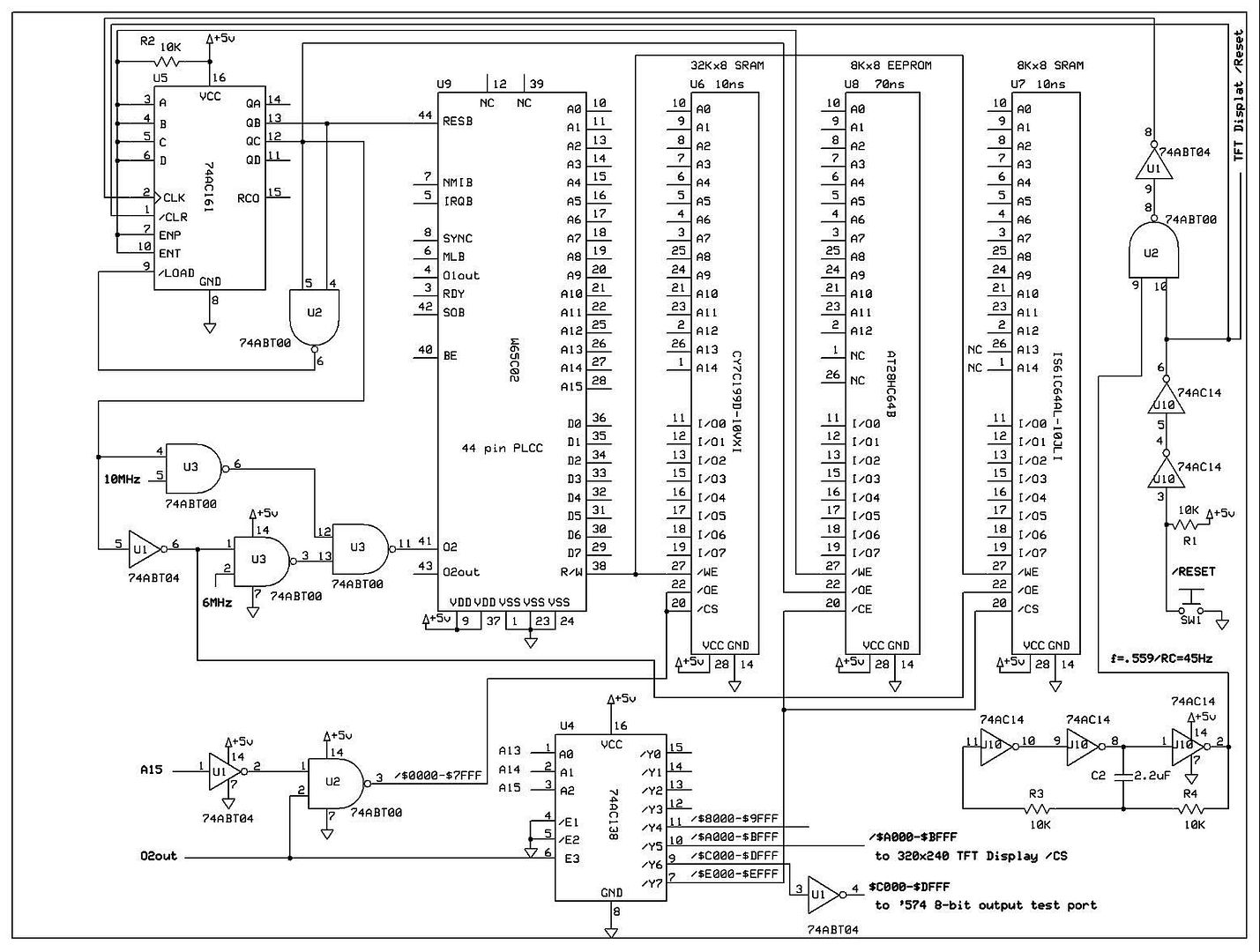
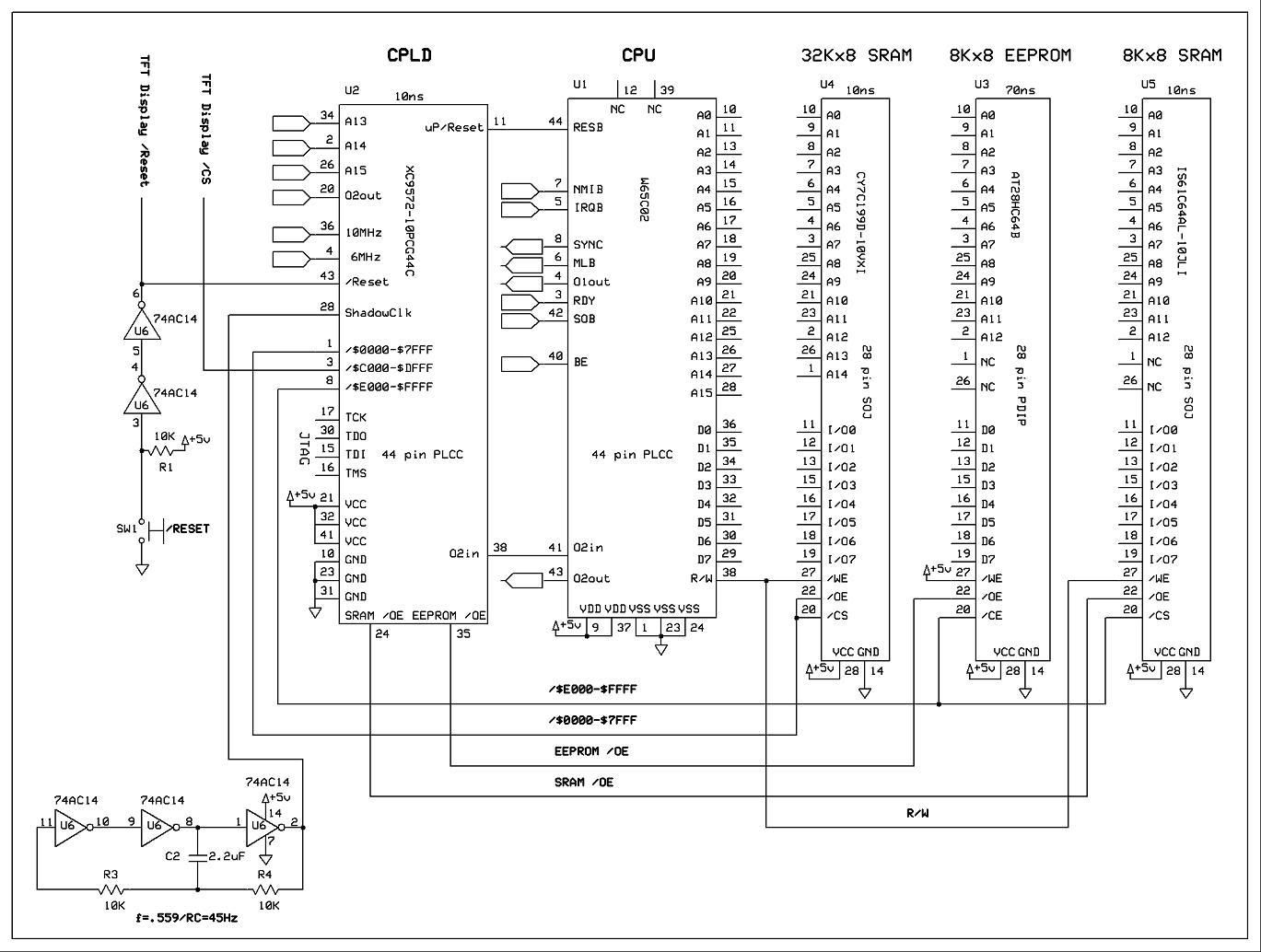
Just to update, I'll post the final schematics with: discrete logic, the CPLD version that replaces the discrete logic, and the one with the SRAM window. None of it has been wired and tested, except for the discrete logic. I have some parts on order to implement the CPLD, so it'll be a couple weeks before I wire the last schematic up.
Discrete logic (old design):
Using XC9572 CPLD to replace the discrete logic (old design):
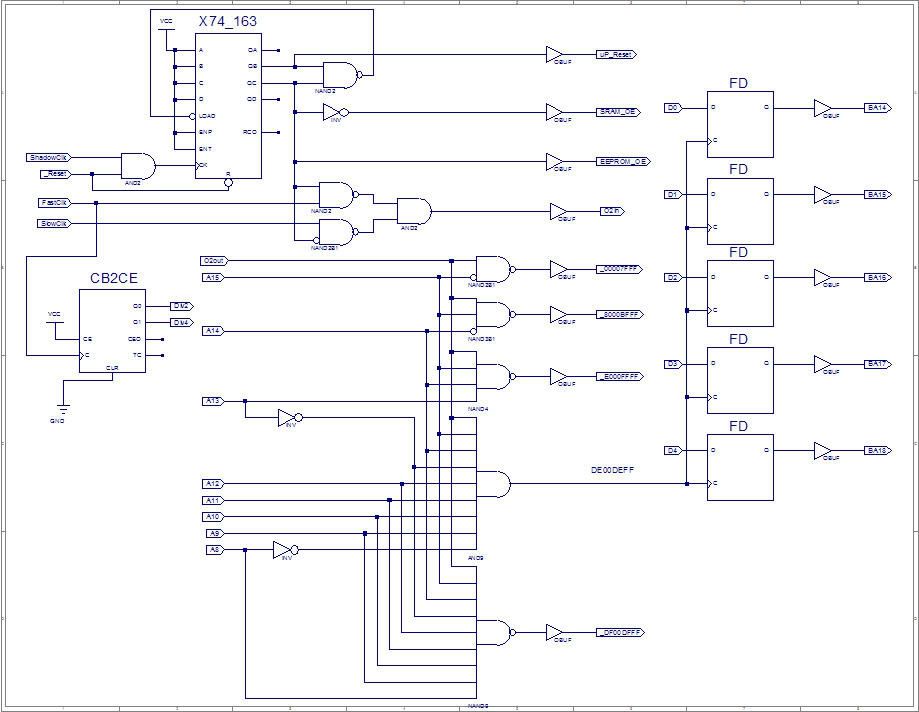
Inside the XC9572 CPLD utilizing all but 2 pins (new design,compare to original): This new one utilizes 21% of macrocells, 13% of registers, & 92% of pins... At this point, I would like to maximize pin usage.
EDIT: Added a divide by 2 and 4 from the FastClk input so user can hardwire a select from onboard divider to SlowClk. Fixed _DE00DEFF latch signal from address decoding to 5 bit flip flop from active low to active high (DE00DEFF). (Utilizing 23% of macrocells, 16% of registers, & 98% of pins)
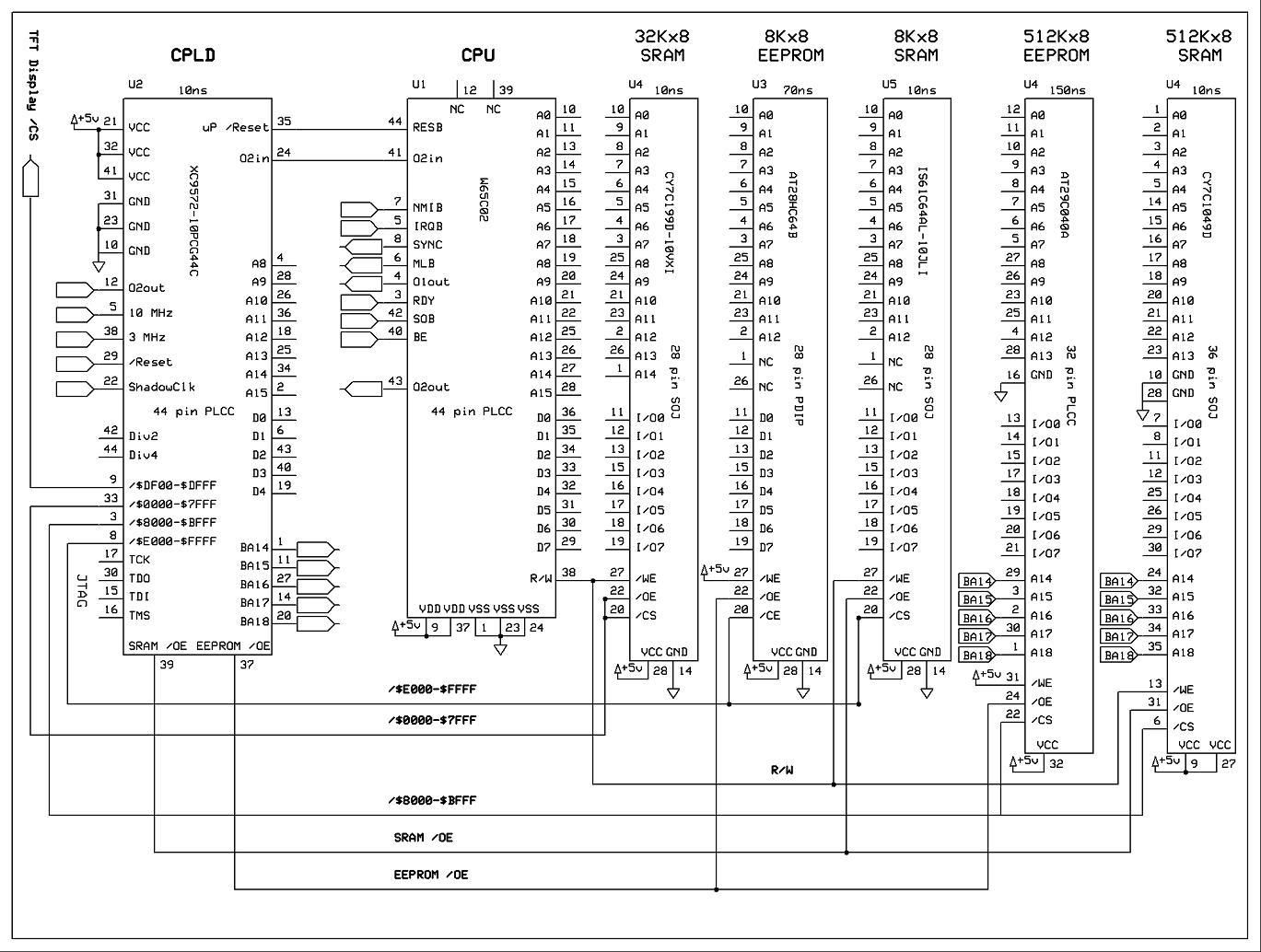
Updated schematic to control a 16K memory window into 512K, using the CPLD logic from the last pic. Different Icons/Pictures, and Fonts will go into this space (right now my character fonts are occupying 4K out of the 8K EEPROM, and I am quickly running out of programming space)... It will be copied into faster RAM just like the OS, so the whole system can run @10MHz. I had to slow down the clock speed from 6MHz to 3MHz, to do the EEPROM to SRAM copy, due to the slow (150ns) 512Kx8 EEPROM. I'll be wiring it up in a week or two... (I ordered 2 oscillators 10MHz and 14.31818MHz, so the 10MHz and 3MHz speeds are not exact speeds on the schematic)
Just to update, I'll post the final schematics with: discrete logic, the CPLD version that replaces the discrete logic, and the one with the SRAM window. None of it has been wired and tested, except for the discrete logic. I have some parts on order to implement the CPLD, so it'll be a couple weeks before I wire the last schematic up.
Discrete logic (old design):

Using XC9572 CPLD to replace the discrete logic (old design):

Inside the XC9572 CPLD utilizing all but 2 pins (new design,compare to original): This new one utilizes 21% of macrocells, 13% of registers, & 92% of pins... At this point, I would like to maximize pin usage.
EDIT: Added a divide by 2 and 4 from the FastClk input so user can hardwire a select from onboard divider to SlowClk. Fixed _DE00DEFF latch signal from address decoding to 5 bit flip flop from active low to active high (DE00DEFF). (Utilizing 23% of macrocells, 16% of registers, & 98% of pins)

Updated schematic to control a 16K memory window into 512K, using the CPLD logic from the last pic. Different Icons/Pictures, and Fonts will go into this space (right now my character fonts are occupying 4K out of the 8K EEPROM, and I am quickly running out of programming space)... It will be copied into faster RAM just like the OS, so the whole system can run @10MHz. I had to slow down the clock speed from 6MHz to 3MHz, to do the EEPROM to SRAM copy, due to the slow (150ns) 512Kx8 EEPROM. I'll be wiring it up in a week or two... (I ordered 2 oscillators 10MHz and 14.31818MHz, so the 10MHz and 3MHz speeds are not exact speeds on the schematic)

Last edited by ElEctric_EyE on Fri Feb 26, 2010 9:33 pm, edited 2 times in total.
-
ElEctric_EyE
- Posts: 3260
- Joined: 02 Mar 2009
- Location: OH, USA
Today I made a baby step and hooked up my XC9572 to the JTAG port. Not being very familiar with JTAG, I decided to wire up power to the CPLD and the TCK,TDO,TDI,TMS, and GND to the connector without hooking up VDD (I wasn't sure if it was VDDin or VDD out). After connecting the VDD, the software recognized the CPLD, erased it and programmed it, WOOO! Evidently the cable has an interface onboard...
Looking back, and for those interested, you just need the cheapie parallel JTAG3 cable ($12 from Digilent: http://www.digilentinc.com/Products/Cat ... ,395&Cat=5 ) and the Xylinx ISE 9.2i software (you have to register it, it's worth it), to get started with CPLD's. I am noticing now Digilent has their own software called Adept ( http://www.digilentinc.com/Products/Cat ... ,66&Cat=12 )which looks to be free as well. I'm gonna test it out and report back...
Working with Xylinx CPLD's has been VERY rewarding so far. I understand now why so many discrete logic IC's are disappearing. But now so are some of the faster older (32-84 pin ) CPLD's in PLCC form, the newer Coolrunner CPLD's (100+pins) seem to be available only in VQF type packages. Good luck soldering those...
Looking back, and for those interested, you just need the cheapie parallel JTAG3 cable ($12 from Digilent: http://www.digilentinc.com/Products/Cat ... ,395&Cat=5 ) and the Xylinx ISE 9.2i software (you have to register it, it's worth it), to get started with CPLD's. I am noticing now Digilent has their own software called Adept ( http://www.digilentinc.com/Products/Cat ... ,66&Cat=12 )which looks to be free as well. I'm gonna test it out and report back...
Working with Xylinx CPLD's has been VERY rewarding so far. I understand now why so many discrete logic IC's are disappearing. But now so are some of the faster older (32-84 pin ) CPLD's in PLCC form, the newer Coolrunner CPLD's (100+pins) seem to be available only in VQF type packages. Good luck soldering those...
-
ElEctric_EyE
- Posts: 3260
- Joined: 02 Mar 2009
- Location: OH, USA
-
ElEctric_EyE
- Posts: 3260
- Joined: 02 Mar 2009
- Location: OH, USA
I think Digilent's Adept software expects particular hardware in the USB adapter - it's not just a cable, it's a JTAG adapter. I get the impression that Xilinx's USB adapters are expensive, and Digilent have defined a different method which allows them to offer a cheaper, but incompatible approach.
If you're using the Xilinx software to do the programming, you'll need a cheap parallel cable (which you have) or a Xilinx-compatible USB cable.
Or, here's Thomas Scheuermann's recipe for building your own using an AVR ucontroller.
If you're using the Xilinx software to do the programming, you'll need a cheap parallel cable (which you have) or a Xilinx-compatible USB cable.
Or, here's Thomas Scheuermann's recipe for building your own using an AVR ucontroller.
-
ElEctric_EyE
- Posts: 3260
- Joined: 02 Mar 2009
- Location: OH, USA
BigEd wrote:
I think Digilent's Adept software expects particular hardware in the USB adapter - it's not just a cable, it's a JTAG adapter. I get the impression that Xilinx's USB adapters are expensive, and Digilent have defined a different method which allows them to offer a cheaper, but incompatible approach.
If you're using the Xilinx software to do the programming, you'll need a cheap parallel cable (which you have) or a Xilinx-compatible USB cable.
Or, here's Thomas Scheuermann's recipe for building your own using an AVR ucontroller.
If you're using the Xilinx software to do the programming, you'll need a cheap parallel cable (which you have) or a Xilinx-compatible USB cable.
Or, here's Thomas Scheuermann's recipe for building your own using an AVR ucontroller.
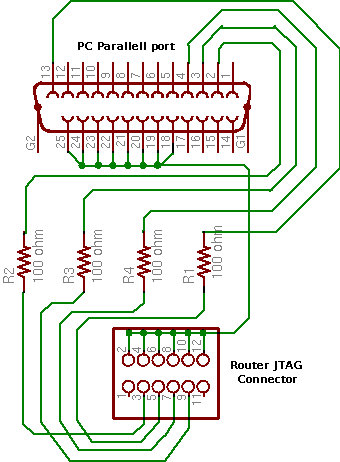
I looked into this: a parallel port cable only needs a few resistors, although it will probably contain some buffers too. A USB cable needs to implement a USB slave device, which is quite a complicated thing to do.
Beware: I also read that any ordinary USB-printer adaptor will probably not have the flexibility to drive a JTAG cable.
I have the four resistors and other connectors for the simplest cable but I haven't yet soldered anything up, and I'm a bit nervous of harming my CPLD or parallel port if I get it wrong.
Beware: I also read that any ordinary USB-printer adaptor will probably not have the flexibility to drive a JTAG cable.
I have the four resistors and other connectors for the simplest cable but I haven't yet soldered anything up, and I'm a bit nervous of harming my CPLD or parallel port if I get it wrong.
Here's a link from the Xilinx website for the parallel cable III schematic.
http://www.xilinx.com/itp/2_1i/data/com ... /fig13.htm
The buffers help protect the PC parallel port. Mine is based on this schematic and works great.
Daryl
http://www.xilinx.com/itp/2_1i/data/com ... /fig13.htm
The buffers help protect the PC parallel port. Mine is based on this schematic and works great.
Daryl
This is the recipe I'm thinking of. Easier, cheaper, but perhaps less reliable and perhaps less safe.