OT: Got my first PCB and now I hate auto-routers...

Let's talk about anything related to the 6502 microprocessor.
Post Reply
User avatar
cbmeeks
Posts: 1254
Joined: 17 Aug 2005
Location: Soddy-Daisy, TN USA
Contact:

OT: Got my first PCB and now I hate auto-routers...

Post by cbmeeks »

OK, I've been building all kinds of failed prototypes on breadboards and the like. So I thought what the heck...let's just make a stupid simple PCB just for prototyping 65C02's. Literally this past Friday (22nd) I sat down at the computer and knocked out a design in Kicad. I had never taken it as far as the PCB but I pushed through. Took me probably 4-5 hours total (like I said...simple).

I had always heard to not use the auto-router but after spending 20 minutes routing pins I got frustrated and did it anyway. I mean...looked perfect to me and only took 20 seconds!

Boy was I wrong...

My first mistake was assuming a couple of clicks would replace good old-fashioned manual labor. My second mistake was not checking literally every net and see if they were actually connected.

My third mistake was a typo in one of my labels, missing labels, etc. In my defense, this isn't a project I'm going to submit to NASA. This is just a kick in the pants for me to get more PCB's done. Baby steps.

Anyway, I paid my $24.52 to JLCPCB on Saturday morning (23rd, around 2-3 AM EST) and today, Wednesday 27th (5:30 PM EST) DHL delivered it. My total cost....$24.52 for 10 boards.

Each board is 67.4 mm x 128.3 mm so I didn't qualify for the $2 special. I didn't really try to squeeze my design down. I also got free shipping because it was my first order. I think shipping would have been around $18 or so.

I rip open the package and am immediately impressed with the quality (keep in mind...this is my first). But it feels really sturdy to me. It appears that a seasoned designer could get a pretty good product from them. Although, they do plaster their "makers mark" on it in tiny letters.

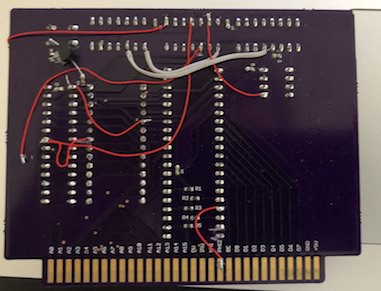
I start poking around with my DMM and notice many pins are simply not connected to anything. Upon closer inspection of my PCB layers, I can clearly see they are not connected. My fault. Then again, it was very late at night. lol

Having said all of that...I'm very excited to have received my first PCB. The first one really is the hardest one. I will put a bunch of bodge wires in the back to fix the *many* mistakes I made. I've already started a new design. This design wasn't for a final project. It was a piece of a larger project I'm working on.

All in all, it was a $24 lesson that I can still actually use. :-)

Oh, I guess I could tell you what it is. It's simply a small board that plugs a 65C02, a 62256 RAM and 28256 ROM together with three small "slots". This will allow me to work on glue logic and I/O without constantly wiring those three together.

It has place for a DS1813 and every pin of the 65C02 is brought out to a header. Including the "mystery" pins I've labeled on the board.

Now back to designing!!
Attachments
ERRORS.jpg
Photo Dec 27, 7 26 04 PM.jpg
Photo Dec 27, 7 25 49 PM.jpg
Photo Dec 27, 7 25 21 PM.jpg
Cat; the other white meat.
LIV2
Posts: 173
Joined: 12 Feb 2014
Location: Sweden

Re: OT: Got my first PCB and now I hate auto-routers...

Post by LIV2 »

I know your pain! here's one of my first attempts
Image
:lol:

More important than whether or not to use autorouter, don't forget to run ERC and DRC checks! it will tell you about unconnected nets and other issues.

I wish I was as good at routing as some of the members here, I've been working on and off for months trying to route it in a way I'm happy with.
jds
Posts: 196
Joined: 10 Mar 2016

Re: OT: Got my first PCB and now I hate auto-routers...

Post by jds »

I like your idea of building a minimal board, I wish I could do that myself, but I always end up over complicating it. I should force myself to start with a really simple board. Your slots are a really good idea. What chip are you using for the address decoding?

I recently got a board made up from kicad and it was almost completely ok. I think if you are careful to get the schematic right and then run the checks on the pcb you should be ok. Kicad actually found the only error in my board, but I didn’t understand it and thought it was ok.
User avatar
cbmeeks
Posts: 1254
Joined: 17 Aug 2005
Location: Soddy-Daisy, TN USA
Contact:

Re: OT: Got my first PCB and now I hate auto-routers...

Post by cbmeeks »

jds wrote:
I like your idea of building a minimal board
That was the exact reasoning behind mine. I wanted simple. :-)
jds wrote:
but I always end up over complicating it. I should force myself to start with a really simple board.
I have the exact same problem. Which is why it's taken me SO long to get an actual PCB made. Every time I think of something I think of 10 other things to make it "future proof" or "enhanced" or "smart". And the only thing that comes out of it are ideas that never materialize. So when I made this, my first rule was to keep saying "it's a prototype...take it OUT". Whenever I came to an enhancement idea, I would say "nope...next time.". And that's how it came to be. Warts and all.

jds wrote:
Your slots are a really good idea. What chip are you using for the address decoding?
None. You have to supply your own glue logic. That was one thing holding me back. I wanted flexibility. I wanted an Apple 1 clone. I wanted an Apple IIe clone. Etc. So I decided to make the glue logic modular. Remember...this is for prototyping. :-) My plan is to run the glue logic off a small board I make myself. Then, I have two more slots for I/O.

This board isn't about being a complete computer. It's about prototyping glue logic...prototyping video chips...etc.
jds wrote:
I recently got a board made up from kicad and it was almost completely ok. I think if you are careful to get the schematic right and then run the checks on the pcb you should be ok. Kicad actually found the only error in my board, but I didn’t understand it and thought it was ok.
I think you're right. Kicad actually found many mistakes I made and I fixed them. What I didn't do is fully exploit the DRC option. Including the "List Unconnected". That would have shown me my mistakes.
Cat; the other white meat.
User avatar
BigDumbDinosaur
Posts: 9428
Joined: 28 May 2009
Location: Midwestern USA (JB Pritzker’s dystopia)
Contact:

Re: OT: Got my first PCB and now I hate auto-routers...

Post by BigDumbDinosaur »

cbmeeks wrote:
OK, I've been building all kinds of failed prototypes on breadboards and the like. So I thought what the heck...let's just make a stupid simple PCB just for prototyping 65C02's...I had always heard to not use the auto-router but after spending 20 minutes routing pins I got frustrated and did it anyway. I mean...looked perfect to me and only took 20 seconds!

Boy was I wrong...
Now you know why Garth (and I) extolls the virtues of manual routing. :D

Sorry your project is going off the rails, but failure does serve a purpose: it eliminates that which won't work. Or, at least that's what one instructor told me years ago after an elaborate project of mine (a relay-based PBX) refused to work. :oops:

Aside from the specter of errors creeping in as a byproduct of autorouting, time, patience and experience will allow you to automatically (!) see how to route a design in a way that will minimize real estate consumption, as well as reduce opportunities for noise and performance problems to develop. Persevere and you will get it. It's how I learned.
x86?  We ain't got no x86.  We don't NEED no stinking x86!
User avatar
cbmeeks
Posts: 1254
Joined: 17 Aug 2005
Location: Soddy-Daisy, TN USA
Contact:

Re: OT: Got my first PCB and now I hate auto-routers...

Post by cbmeeks »

BigDumbDinosaur wrote:
Aside from the specter of errors creeping in as a byproduct of autorouting, time, patience and experience will allow you to automatically (!) see how to route a design in a way that will minimize real estate consumption, as well as reduce opportunities for noise and performance problems to develop. Persevere and you will get it. It's how I learned.
Thanks for the kind words. I agree 100%. There would be no success without failure.

On a positive note, my next design is going to be better than my last and I'm pulling from different sources for inspiration.

For starters, I'm going to be studying an Apple IIe motherboard and see how they managed to route those chips...how it was laid out, etc. I figure it should be a good model to study.
Cat; the other white meat.
whartung
Posts: 1004
Joined: 13 Dec 2003

Re: OT: Got my first PCB and now I hate auto-routers...

Post by whartung »

My first thought was "Looks great, too bad it doesn't work."

I give you kudos for actually getting a board out.

It's been nothing but a complete struggle for me, and I just give up.

I just wanted to make an expansion board for the W65C134SXB, to give it some more RAM and some other things, but I got derailed by simply trying to find a header to connect the two out of the 20,000 options that seem to be available.

I was truly dumbfounded at how awful these tools are to use, apparently they have some legacy requirement to be compatible with a user interface designed in the 80s.
User avatar
banedon
Posts: 742
Joined: 08 Sep 2013
Location: A missile silo somewhere under southern England

Re: OT: Got my first PCB and now I hate auto-routers...

Post by banedon »

Nice job :) - and I like the idea of making a simple board for testing glue logic.

The first time I created a PCB (one of my physical Bus Monitors) I used the auto-router (with a little tweaking) as well and, also, didn't quite spot all my mistakes. Fortunately, as ugly as the routing looks, I only needed one bodge wire to correct a single issue where the ground pin of one IC had nor been routed and so had no connection to the ground plane. Got to admit that every time I look at my first PCB it makes me cringe a little just due to the layout lol. In comparison your layout there doesn't look too bad from what I can see. Might be that Kicad does a better auto-routing job than Eagle (older, non-cloud version) :).

I've still got a couple of snap shots, although the under side is with ICs populated:
BusMonitor_Unpopulated.gif
busmon2_underside.gif
User avatar
BigDumbDinosaur
Posts: 9428
Joined: 28 May 2009
Location: Midwestern USA (JB Pritzker’s dystopia)
Contact:

Re: OT: Got my first PCB and now I hate auto-routers...

Post by BigDumbDinosaur »

banedon wrote:
...I only needed one bodge wire...
Bodge wire. I'll have to add that one to my technical vocabulary. :lol:
x86?  We ain't got no x86.  We don't NEED no stinking x86!
hmn
Posts: 21
Joined: 07 May 2017

Re: OT: Got my first PCB and now I hate auto-routers...

Post by hmn »

banedon wrote:
I've still got a couple of snap shots, although the under side is with ICs populated: ...
Are there really 74AC245s supposed to go on there, as per the silkscreen? Looks to me like those should be shift registers instead...
User avatar
banedon
Posts: 742
Joined: 08 Sep 2013
Location: A missile silo somewhere under southern England

Re: OT: Got my first PCB and now I hate auto-routers...

Post by banedon »

hmn wrote:
banedon wrote:
I've still got a couple of snap shots, although the under side is with ICs populated: ...
Are there really 74AC245s supposed to go on there, as per the silkscreen? Looks to me like those should be shift registers instead...
Yeah they're octal buffers :). The Microcontroller needs to sample both the address and data bus 8 bits at a time plus the signals. It does this by turning all octal buffers off (2 for the address bus, 1 for the data bus, 1 for signals - all connected to the same 8 pins on the uC on the B side) and then turns on only the one it wishes to sample at that time. It then turns that off and moves to the next buffer. When it has sampled all buses and signals it then sends the data down the RS232. I have since had an LCD version of this made which made far more sense :).
hmn
Posts: 21
Joined: 07 May 2017

Re: OT: Got my first PCB and now I hate auto-routers...

Post by hmn »

Ah that makes sense, the 245s are turned on individually, forming an 8-bit bus to the uC. This was not apparent to me when looking at the PCB routing - another point in the case against auto-routing I guess ;-)
User avatar
Alarm Siren
Posts: 363
Joined: 25 Oct 2016

Re: OT: Got my first PCB and now I hate auto-routers...

Post by Alarm Siren »

Kicad has an auto-router? :shock:
Want to design a PCB for your project? I strongly recommend KiCad. Its free, its multiplatform, and its easy to learn!
Also, I maintain KiCad libraries of Retro Computing and Arduino components you might find useful.
User avatar
cbmeeks
Posts: 1254
Joined: 17 Aug 2005
Location: Soddy-Daisy, TN USA
Contact:

Re: OT: Got my first PCB and now I hate auto-routers...

Post by cbmeeks »

Alarm Siren wrote:
Kicad has an auto-router? :shock:
I don't know the full story. But I remember when I first started using KiCad it had an autorouter built in. Then, IIRC, they removed it due to some licensing issues.

Now there's an option to use an autorouter but it's more like a standalone product. I *THINK* what is happening is that KiCad now includes a freebie version of some commercial autorouter.

It takes a few clicks to get to it but it's there.
Cat; the other white meat.
Post Reply