
Okay, think about it, you have serial ports to connect together. Basically a nullmodem connection is what you do:
USB to 6551
RTS to CTS
TxD to RxD
DTR to DSR
ground to ground
DSR to DTR
RxD to TxD
CTS to RTS
and ground DCD on both sides.
Also, I suggest using ExtraPutty as the terminal on the PC.
RS232 line drivers
-
floobydust

- Posts: 1394
- Joined: 05 Mar 2013
Re: RS232 line drivers
Regards, KM
https://github.com/floobydust
https://github.com/floobydust
Re: RS232 line drivers
I have the male five volt version of this:
http://www.mouser.com/ds/2/163/DS_DB9-USB-15654.pdf
Page 9 shows the wiring scheme. I believe I am correct to not need a null connection.
Plus, my out going data works perfect. I do not have any serial echo enabled either.
http://www.mouser.com/ds/2/163/DS_DB9-USB-15654.pdf
Page 9 shows the wiring scheme. I believe I am correct to not need a null connection.
Plus, my out going data works perfect. I do not have any serial echo enabled either.
-
DerTrueForce
- Posts: 483
- Joined: 04 Jun 2016
- Location: Australia
Re: RS232 line drivers
Needing to ground the CTS pin is usual, if you don't want to use hardware handshaking.
Do you have hardware handshaking active on your terminal program? Because if you do, the computer is probably hitting the same problem as the ACIA, waiting for a low on its CTS pin before it'll send. If this is the case, you'll need to turn off hardware handshaking, or defeat it in the same way as for the ACIA, by grounding the CTS pin. Or you could try the null-modem thing with hardware handshaking active on your terminal program. That's what the ACIA is designed for, after all.
I use Termite on Windows, btw.
Do you have hardware handshaking active on your terminal program? Because if you do, the computer is probably hitting the same problem as the ACIA, waiting for a low on its CTS pin before it'll send. If this is the case, you'll need to turn off hardware handshaking, or defeat it in the same way as for the ACIA, by grounding the CTS pin. Or you could try the null-modem thing with hardware handshaking active on your terminal program. That's what the ACIA is designed for, after all.
I use Termite on Windows, btw.
-
GARTHWILSON

- Forum Moderator
- Posts: 8773
- Joined: 30 Aug 2002
- Location: Southern California
- Contact:
Re: RS232 line drivers
The null-modem and lots of other info is in my 6551-oriented RS-232 primer at http://wilsonminesco.com/RS-232/RS-232primer.html . My apologies—there are virtually no pictures in the first half. The problem-solving part starts about half way down the page.
http://WilsonMinesCo.com/ lots of 6502 resources
The "second front page" is http://wilsonminesco.com/links.html .
What's an additional VIA among friends, anyhow?
The "second front page" is http://wilsonminesco.com/links.html .
What's an additional VIA among friends, anyhow?
Re: RS232 line drivers
Look at the datasheet I posted. I have the MALE 5v part. I really don't think I need a null modem connection. It also shows the female part, which is shown connected with opposites, a la null modem. Also, I get perfect behaviour when I send stuff to the terminal.
The thing I am doing to try and get data out of the terminal doesn't even involve the ACIA. I'm just trying to see activity on the pin of the adapter that goes to the RxD pin of the ACIA, by sending stuff from the terminal.
I can't get so much as a wiggle on the scope this way.
I have read the RS232 primer more than once. It is very helpful indeed.
Thing is, I don't even know if what I am trying SHOULD work. But I feel it should.
Here is my set up. I have my FTDI adapter hooked to the ACIA as shown in the datasheet for the MALE part. I've posted thediagram from the datasheet.
I only have the TxD, RxD, DTR, and GROUND pins hooked up. I have CTS grounded onthe ACIA. I have the CTS pin on the adapter also grounded.
I have a scope probe on the RxD pin on the adapter. As per the datasheet, this get connected directly to the RxD pin on the ACIA, so I would expect that when I sen data from the terminal, I would see activity on this pin.
When I probe the TxD pin, whilst it is hooked to the ACIA, and the ACIA is transmitting, I get good data. The serial decode on my scope, and the terminal window agree, the data is as expected. If I had my RxD and TxD reversed, I feel this would not be the case.
I have handshaking, both hardware and software, turned off on the terminal.
All I want is to get activity on that RxD pin on the adapter.
The thing I am doing to try and get data out of the terminal doesn't even involve the ACIA. I'm just trying to see activity on the pin of the adapter that goes to the RxD pin of the ACIA, by sending stuff from the terminal.
I can't get so much as a wiggle on the scope this way.
I have read the RS232 primer more than once. It is very helpful indeed.
Thing is, I don't even know if what I am trying SHOULD work. But I feel it should.
Here is my set up. I have my FTDI adapter hooked to the ACIA as shown in the datasheet for the MALE part. I've posted thediagram from the datasheet.
I only have the TxD, RxD, DTR, and GROUND pins hooked up. I have CTS grounded onthe ACIA. I have the CTS pin on the adapter also grounded.
I have a scope probe on the RxD pin on the adapter. As per the datasheet, this get connected directly to the RxD pin on the ACIA, so I would expect that when I sen data from the terminal, I would see activity on this pin.
When I probe the TxD pin, whilst it is hooked to the ACIA, and the ACIA is transmitting, I get good data. The serial decode on my scope, and the terminal window agree, the data is as expected. If I had my RxD and TxD reversed, I feel this would not be the case.
I have handshaking, both hardware and software, turned off on the terminal.
All I want is to get activity on that RxD pin on the adapter.
- Attachments
-

Re: RS232 line drivers
Have you tried connecting the TxD and Rxd together, (no ACIA), and see if you get an echo on your terminal program ?
Re: RS232 line drivers
Nothing with Rx and Tx tied.
And I would expect nothing. Like I mentioned, when I hit send on the terminal, while watching the pin on my scope, nothing happens.
Lets pretend nothing is hooked to the ACIA (as was just the case in my test).
If I have handshaking turned off in the terminal, what minimum connections do I need to see data come out of that adapter's Rx pin (the pin the datasheet says goes to the ACIA's RxD pin)?
And I would expect nothing. Like I mentioned, when I hit send on the terminal, while watching the pin on my scope, nothing happens.
Lets pretend nothing is hooked to the ACIA (as was just the case in my test).
If I have handshaking turned off in the terminal, what minimum connections do I need to see data come out of that adapter's Rx pin (the pin the datasheet says goes to the ACIA's RxD pin)?
-
BigDumbDinosaur

- Posts: 9425
- Joined: 28 May 2009
- Location: Midwestern USA (JB Pritzker’s dystopia)
- Contact:
Re: RS232 line drivers
Let's take a step back. TIA-232 isn't all that difficult if you know what to check. BTW, it would be helpful if you didn't start so many topics about the same project.
- Does the computer you are using as a terminal have a real serial port?
- If the answer to number 1 is "yes" then why not use it instead of adding the complexity of a USB device to the problem?
- Is the proper data format configured on both machines? Usually this will be 8 bit datum size, 1 stop bit and no parity.
- Are you certain you are operating at a data rate (often incorrectly referred to as "baud rate") that is compatible with both machines, meaning a rate that both machines can support? Assuming the use of a 1.8432 MHz oscillator with the 6551, the maximum standard rate is 19,200 bps.
- Are both machines running at the same data rate? For test purposes, a slow rate such as 300 or 1200 bps is suggested.
- If this is a TTL-to-TTL interface, have you determined that you are seeing proper logic levels on all signal lines?
- Do you have TxD of one machine connected to RxD of the other machine?
- Are you certain you have a solid ground between the two machines?
- Is CTS of one machine connected to RTS of the other machine?
- Is RTS being asserted at both ends?
x86? We ain't got no x86. We don't NEED no stinking x86!
Re: RS232 line drivers
BigDumbDinosaur wrote:
[*]Are you certain you have a solid ground between the two machines?
RS232 was designed as a serial connection that can be used between systems on completely different ground levels (I've seen > 100V difference. Then somebody connected the shielding in the cable to both ends.. boom. Shield should be grounded at one end only).
To get correct signal levels you need to connect the signal ground (pin 5 in that picture) in both ends, which is different from what is normally called 'ground'.
-
DerTrueForce
- Posts: 483
- Joined: 04 Jun 2016
- Location: Australia
Re: RS232 line drivers
BigDumbDinosaur wrote:
Do you have TxD of one machine connected to RxD of the other machine?
Is CTS of one machine connected to RTS of the other machine?
Is RTS being asserted at both ends?
Is CTS of one machine connected to RTS of the other machine?
Is RTS being asserted at both ends?
To the third, he has grounded the ACIAs RTS, but the names now confuse me, and I don't know whether he has grounded the RTS on the adaptor.
Re: RS232 line drivers
DerTrueForce wrote:
To the first and second, the pins on his adaptor plug are named wierdly. TxD on the plug is actually the data input to the plug.
Re: RS232 line drivers
If the device fails the RxD-TxD loopback test (with flow control disabled), there's really no need to check baud rates, ground connections, the ACIA/6502, or anything else.
Either the device it's broken, or there's something not right with the PC software/driver.
Either the device it's broken, or there's something not right with the PC software/driver.
-
EugeneNine
- Posts: 59
- Joined: 01 Nov 2016
Re: RS232 line drivers
If your running windows you have to search and find the older working driver version for most USB-Serail adapters first thing. FTDI and prolithic chips are counterfitted a lot so they added code to their drivers to intentionally not work with counterfitted chips but they get a lot of false positives on their own so you have to go back to the old before the counterfit detection.
Its been a long time but I don't ever remember connecting flow control to ground, if you want to test with not using flow control you connect CTS to RTS and CTD to RTD on one side. Make a simple loopback plug on the PC side with CTS connected to RTS and CTD connected to RTD and RX connected to TX then you should be able to see what you typed.
I used DB9/25 to RJ45 adapters for all my serial stuff like the one pictured here for my HP
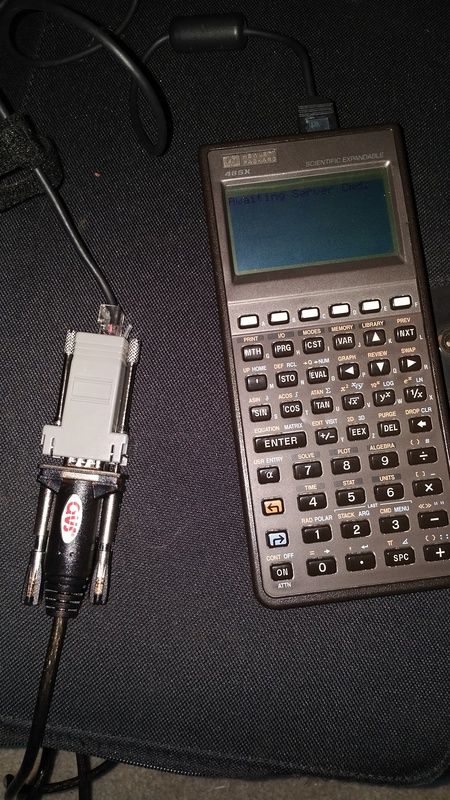
Its easy to connect a jumper between CTS and RTS inside the housing here. There is a standardized pinout EIA 568 I follow but then if I don't pass the flow control through and instead jumper them (or don't connect) I note it on my plug label
Its been a long time but I don't ever remember connecting flow control to ground, if you want to test with not using flow control you connect CTS to RTS and CTD to RTD on one side. Make a simple loopback plug on the PC side with CTS connected to RTS and CTD connected to RTD and RX connected to TX then you should be able to see what you typed.
I used DB9/25 to RJ45 adapters for all my serial stuff like the one pictured here for my HP

Its easy to connect a jumper between CTS and RTS inside the housing here. There is a standardized pinout EIA 568 I follow but then if I don't pass the flow control through and instead jumper them (or don't connect) I note it on my plug label
-
floobydust
- Posts: 1394
- Joined: 05 Mar 2013
Re: RS232 line drivers
Well, an accurate schematic would certainly be a plus on helping you debug things. You can always reverse my earlier post on the nullmodem (TxD to TxD, CTS to CTS, etc.), but you will need to tie both DCD lines to ground. You'll also need to configure the terminal program and the 6551 correctly.
Also, I'll continue to push you towards a better terminal program. I've been using ExtraPutty for years under Win7 with the FTDI USB-Serial adapters and it's works perfectly. You can use RTS/CTS handshaking as well. When initially debugging hardware, it's usually a good idea to use some existing code that is known to work, it simply removes some of the possible problems and let's you focus on less.
Also, I'll continue to push you towards a better terminal program. I've been using ExtraPutty for years under Win7 with the FTDI USB-Serial adapters and it's works perfectly. You can use RTS/CTS handshaking as well. When initially debugging hardware, it's usually a good idea to use some existing code that is known to work, it simply removes some of the possible problems and let's you focus on less.
Regards, KM
https://github.com/floobydust
https://github.com/floobydust
Re: RS232 line drivers
Is there a difference between Putty, and ExtraPutty?
I have Putty. It would be nice to have a program in common with someone here so settings can be verified.
I have Putty. It would be nice to have a program in common with someone here so settings can be verified.