

Sluggish probably isn't the word... it's worth figuring this out in milliseconds and comparing it to human response times. These kinds of designs will trade off the hardware complexity with the number of machine cycles, but I don't think they ever come out slow by human standards.
Putting the modifier keys into a single column and treating it specially is a common tactic. I've a feeling you can apply diodes sparingly to get most of the benefit without most of the cost.
It's a big design space - I suspect every micro is a bit different - but I think it's a fairly flat space, in that there's no great differences of outcome. So - pick an idea and build it!
My 6502 computer
Re: My 6502 computer
Yuri wrote:
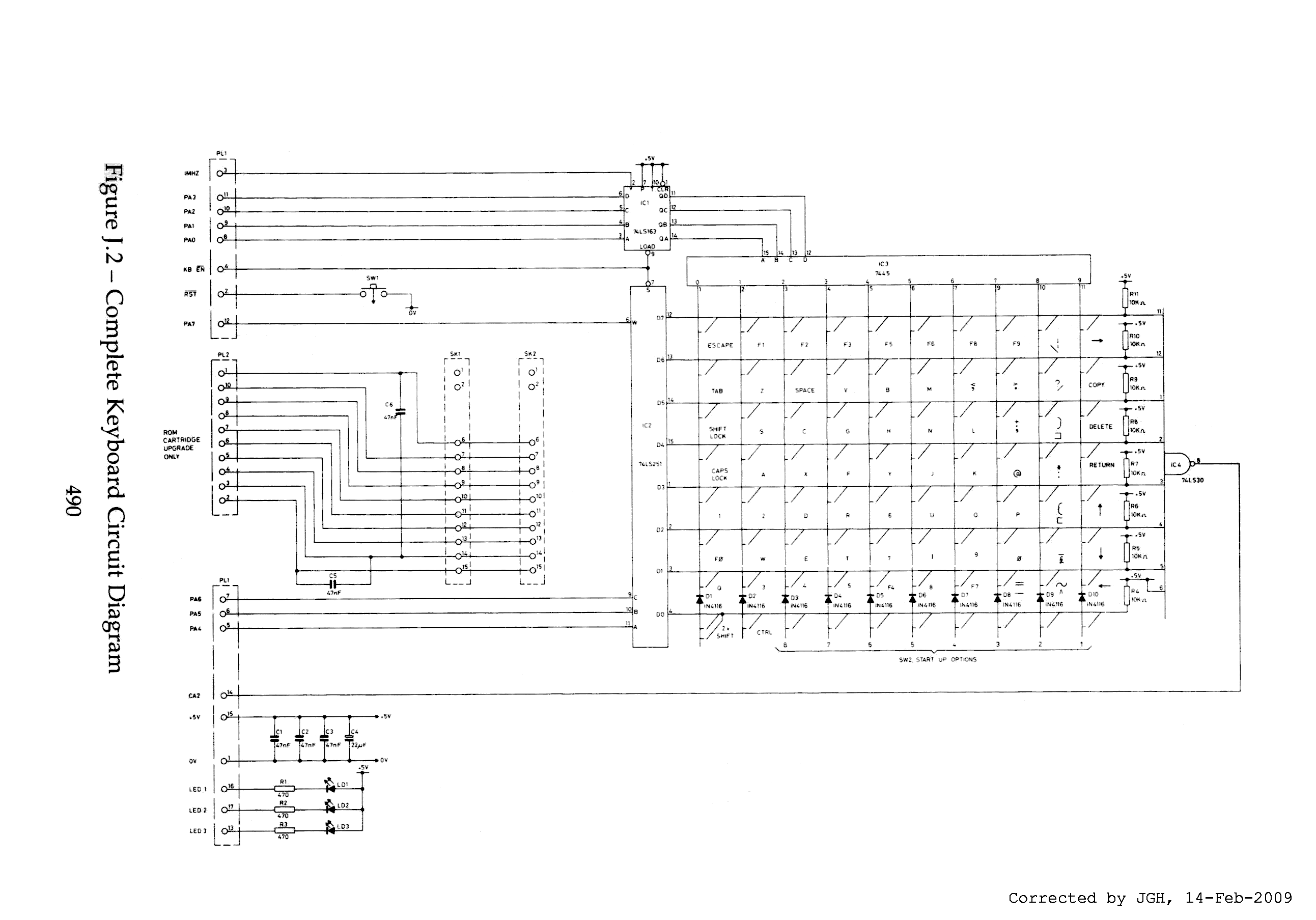
This can work, but consider that the multiplexer is expecting only one row to be active at a time. If you expect to have key combinations such as Shift+Letter (as I expect you will with only 64 or less keys) you will need to make sure to pick locations where it is unlikely two or more keys will get pressed/read in the same column at the same time.
To put it another way, if column 3 is the one you're currently scanning, and keys on rows 2 and 4 are both pressed, you won't be able to tell both are down, the multiplexer is just going to pick one.
Many PC keyboards did/do this to save on costs though, and as I say, they tried to arrange the keys in such a way that multiple combinations where unlikely to come up. If you can accept this, then it is a good way to go, if not you'll want to be able to check each row independently.
There are of course plenty of way to do this and still save on pins on your 6522 if you're trying to keep some around for other things. (E.g. reading game controllers)
At the risk of summoning some ire, Ben Eater mentions this in one of his videos on the PS/2 keyboard:
https://www.youtube.com/watch?v=2lPzTU-3ONI
To put it another way, if column 3 is the one you're currently scanning, and keys on rows 2 and 4 are both pressed, you won't be able to tell both are down, the multiplexer is just going to pick one.
Many PC keyboards did/do this to save on costs though, and as I say, they tried to arrange the keys in such a way that multiple combinations where unlikely to come up. If you can accept this, then it is a good way to go, if not you'll want to be able to check each row independently.
There are of course plenty of way to do this and still save on pins on your 6522 if you're trying to keep some around for other things. (E.g. reading game controllers)
At the risk of summoning some ire, Ben Eater mentions this in one of his videos on the PS/2 keyboard:
https://www.youtube.com/watch?v=2lPzTU-3ONI
I want to add two 3-bit counters for scanning the rows and columns. When a key in the matrix is pressed it will output the values of these two counters with the Control and Shift values to the A port of the 65C22. I could connect the Q output of the 74HC153 up to the CA1 to trigger an interrupt when a key is pressed. That is what I wanted in the first place and why I was trying to implement the ASCII keyboard I had in mind. I wanted to just use a single port of the 65C22 for the keyboard and have it to trigger an interrupt when a key press is detected. I hope I could make clear what I have in mind. The schematics will come soon
 .
.Re: My 6502 computer
BigEd wrote:
Sluggish probably isn't the word... it's worth figuring this out in milliseconds and comparing it to human response times. These kinds of designs will trade off the hardware complexity with the number of machine cycles, but I don't think they ever come out slow by human standards.
Putting the modifier keys into a single column and treating it specially is a common tactic. I've a feeling you can apply diodes sparingly to get most of the benefit without most of the cost.
It's a big design space - I suspect every micro is a bit different - but I think it's a fairly flat space, in that there's no great differences of outcome. So - pick an idea and build it!
Putting the modifier keys into a single column and treating it specially is a common tactic. I've a feeling you can apply diodes sparingly to get most of the benefit without most of the cost.
It's a big design space - I suspect every micro is a bit different - but I think it's a fairly flat space, in that there's no great differences of outcome. So - pick an idea and build it!
I want to handle more in hardware so I could simplify the software implementation of handling things.
It is just a hobby project and not intended for mass production so costs are not a big factor so I probably over-engineer things. Hobbies simply entail costs.
Re: My 6502 computer
Here's an alternative with the option of faster scanning.
The shift register controls which rows are selected. Make them active-low, and they can all be selected by pulsing ROW_CLR. Then you cycle through the columns and see which have keys pressed. Most of the time none will, and you can stop there.
If any columns report a pressed key, first disable all rows by shifting 1 into the shift register. Then select each column that you want to look at, and shift a single 0 through the row selects. Most of the time, if any key is pressed there will only be one, so you only need to test one column.
With some more logic you could use a shift register to select columns as well. This time you want the outputs to be active-high, so they'd need inverters. AND the column selects with their respective columns, then AND those signals together. That should go low if the selected key is pressed (and I haven't flipped the logic around somewhere in there - that's very possible).
That gives you a much quicker scan: first enable all rows and all columns. Most of the time that will report no key pressed, and you can stop there. If not, keep the columns enabled and go through the rows one by one to see which have keys pressed. Then you can select each column in just those rows.
Also, this design can be extended to larger keyboards by chaining multiple shift registers. You don't need any more I/O pins to control them.
If any columns report a pressed key, first disable all rows by shifting 1 into the shift register. Then select each column that you want to look at, and shift a single 0 through the row selects. Most of the time, if any key is pressed there will only be one, so you only need to test one column.
With some more logic you could use a shift register to select columns as well. This time you want the outputs to be active-high, so they'd need inverters. AND the column selects with their respective columns, then AND those signals together. That should go low if the selected key is pressed (and I haven't flipped the logic around somewhere in there - that's very possible).
That gives you a much quicker scan: first enable all rows and all columns. Most of the time that will report no key pressed, and you can stop there. If not, keep the columns enabled and go through the rows one by one to see which have keys pressed. Then you can select each column in just those rows.
Also, this design can be extended to larger keyboards by chaining multiple shift registers. You don't need any more I/O pins to control them.
Re: My 6502 computer
(Completely five of course to make your own preferred trade off between software and hardware!)
Re: My 6502 computer
John West wrote:
Here's an alternative with the option of faster scanning.
The shift register controls which rows are selected. Make them active-low, and they can all be selected by pulsing ROW_CLR. Then you cycle through the columns and see which have keys pressed. Most of the time none will, and you can stop there.
If any columns report a pressed key, first disable all rows by shifting 1 into the shift register. Then select each column that you want to look at, and shift a single 0 through the row selects. Most of the time, if any key is pressed there will only be one, so you only need to test one column.
With some more logic you could use a shift register to select columns as well. This time you want the outputs to be active-high, so they'd need inverters. AND the column selects with their respective columns, then AND those signals together. That should go low if the selected key is pressed (and I haven't flipped the logic around somewhere in there - that's very possible).
That gives you a much quicker scan: first enable all rows and all columns. Most of the time that will report no key pressed, and you can stop there. If not, keep the columns enabled and go through the rows one by one to see which have keys pressed. Then you can select each column in just those rows.
Also, this design can be extended to larger keyboards by chaining multiple shift registers. You don't need any more I/O pins to control them.
If any columns report a pressed key, first disable all rows by shifting 1 into the shift register. Then select each column that you want to look at, and shift a single 0 through the row selects. Most of the time, if any key is pressed there will only be one, so you only need to test one column.
With some more logic you could use a shift register to select columns as well. This time you want the outputs to be active-high, so they'd need inverters. AND the column selects with their respective columns, then AND those signals together. That should go low if the selected key is pressed (and I haven't flipped the logic around somewhere in there - that's very possible).
That gives you a much quicker scan: first enable all rows and all columns. Most of the time that will report no key pressed, and you can stop there. If not, keep the columns enabled and go through the rows one by one to see which have keys pressed. Then you can select each column in just those rows.
Also, this design can be extended to larger keyboards by chaining multiple shift registers. You don't need any more I/O pins to control them.
Re: My 6502 computer
Ok, here is a new version of my schematic as promised. I added the counters and circuitry for the Caps Lock/Shift and control buttons and there is also a reset button.
The keyboard has a clock input that controls the 3-bit counters and these are connected to the 74151 and the 74HC238. The 74151 scans the rows and the 74HC238 the columns.
When a key is pressed the 74151 toggles direction so that the 74HC245 outputs the value of both counters to the output pins of the keyboard and these will go to the 65C22. The Caps Lock/Shift and Control values wil be send with that. So you would have 6-bits that indicate the selected row and column and 1 bit for the shift and one for the control. The OUT pin of the output of the keyboard will go to the CA1 or CA2.
I think this will be the layout I want to go for:
I have to figure out how to layout the buttons in the grid.
When a key is pressed the 74151 toggles direction so that the 74HC245 outputs the value of both counters to the output pins of the keyboard and these will go to the 65C22. The Caps Lock/Shift and Control values wil be send with that. So you would have 6-bits that indicate the selected row and column and 1 bit for the shift and one for the control. The OUT pin of the output of the keyboard will go to the CA1 or CA2.
I think this will be the layout I want to go for:

Re: My 6502 computer
Might want to double check the logic around your Caps Lock key. Don't think the 7474 is going to do what you want hooked up like that.
I suspect you want something closer to this:
Edit:
In fact, looking at this more closely, it seems you have your unused outputs tied to VCC. You don't want to do that. Just leave them disconnected. Inputs should always be tied to either VCC or Ground, but outputs, if unused, should be left disconnected.
I suspect you want something closer to this:
In fact, looking at this more closely, it seems you have your unused outputs tied to VCC. You don't want to do that. Just leave them disconnected. Inputs should always be tied to either VCC or Ground, but outputs, if unused, should be left disconnected.
Re: My 6502 computer
Remember when you come to decoding that the case is upper case if the caps lock status does not equal the shift status, and lower case if it does... that is, the shift undoes the caps lock if its set, but without affecting the caps lock status.
Neil
Neil
Re: My 6502 computer
Yuri wrote:
Might want to double check the logic around your Caps Lock key. Don't think the 7474 is going to do what you want hooked up like that.
I suspect you want something closer to this: Edit:
In fact, looking at this more closely, it seems you have your unused outputs tied to VCC. You don't want to do that. Just leave them disconnected. Inputs should always be tied to either VCC or Ground, but outputs, if unused, should be left disconnected.
I suspect you want something closer to this: Edit:
In fact, looking at this more closely, it seems you have your unused outputs tied to VCC. You don't want to do that. Just leave them disconnected. Inputs should always be tied to either VCC or Ground, but outputs, if unused, should be left disconnected.
Last edited by viridi on Sat May 25, 2024 1:01 pm, edited 1 time in total.
Re: My 6502 computer
barnacle wrote:
Remember when you come to decoding that the case is upper case if the caps lock status does not equal the shift status, and lower case if it does... that is, the shift undoes the caps lock if its set, but without affecting the caps lock status.
Neil
Neil

Re: My 6502 computer
viridi wrote:
I have modified my schematic
Here (below) is another suggested modification (and it applies to the Control keys as well as the Shift keys). Your original version is logically correct, but perhaps you were overthinking things (as can happen to anyone).
ps- I can't resist sharing a delightful alternative circuit for allowing a momentary pushbutton to bouncelessly toggle the state of a flipflop (which in this case is just a pair of inverters wired to "remember" the state). I encountered this gem in the UI circuit of a 20th Century electronic keyboard/synthesizer I was servicing, and I have remembered it ever since!
Edit: a detailed description of how the circuit works is posted here.
- Attachments
-
- bounceless switch.png (2.88 KiB) Viewed 3489 times
Last edited by Dr Jefyll on Fri Jul 18, 2025 2:38 pm, edited 1 time in total.
In 1988 my 65C02 got six new registers and 44 new full-speed instructions!
https://laughtonelectronics.com/Arcana/ ... mmary.html
https://laughtonelectronics.com/Arcana/ ... mmary.html
Re: My 6502 computer
Dr Jefyll wrote:
Yuri has made an important correction. Just be sure you've been careful about the details. Notice that the unused input on pin 4 of the flipflop should be tied high, not low. Also, Yuri has used pin 1 to arrange that the Caps Lock will be off when the system powers up -- which is optional, of course, but it adds a touch of convenience.
Ah ok that is why he connected the reset to the flipflop.
Dr Jefyll wrote:
Here (below) is another suggested modification (and it applies to the Control keys as well as the Shift keys). Your original version is logically correct, but perhaps you were overthinking things (as can happen to anyone).
 . So thanks for your help you guys are great!
This wil make everything a lot simpler indeed.
Dr Jefyll wrote:
ps- I can't resist sharing a delightful alternative circuit for allowing a momentary pushbutton to bouncelessly toggle the state of a flipflop (which in this case is just a pair of inverters wired to "remember" the state). I encountered this gem in the UI circuit of a 20th Century electronic keyboard/synthesizer I was servicing, and I have remembered it ever since!
I adjusted the schematic again like you and Yuri suggested:
Re: My 6502 computer
viridi wrote:
Dr Jefyll wrote:
Yuri has made an important correction. Just be sure you've been careful about the details. Notice that the unused input on pin 4 of the flipflop should be tied high, not low. Also, Yuri has used pin 1 to arrange that the Caps Lock will be off when the system powers up -- which is optional, of course, but it adds a touch of convenience.
Ah ok that is why he connected the reset to the flipflop.
There is no guaranteed state that the 7474 will start up in. It could be set or cleared on power up. By connecting the active low reset pin of the flip flop to the reset line of your system. (Driven by a 1813 or similar such IC) you will startup with caps off every time.
Is it needed? No, but it makes it behave in a consistent way.
The primer has a great section on reset circuits:
https://wilsonminesco.com/6502primer/RSTreqs.html
Re: My 6502 computer
Yuri wrote:
Yep,
There is no guaranteed state that the 7474 will start up in. It could be set or cleared on power up. By connecting the active low reset pin of the flip flop to the reset line of your system. (Driven by a 1813 or similar such IC) you will startup with caps off every time.
Is it needed? No, but it makes it behave in a consistent way.
The primer has a great section on reset circuits:
https://wilsonminesco.com/6502primer/RSTreqs.html
There is no guaranteed state that the 7474 will start up in. It could be set or cleared on power up. By connecting the active low reset pin of the flip flop to the reset line of your system. (Driven by a 1813 or similar such IC) you will startup with caps off every time.
Is it needed? No, but it makes it behave in a consistent way.
The primer has a great section on reset circuits:
https://wilsonminesco.com/6502primer/RSTreqs.html
I read the primer but I have to read it many times over
 and more important I need to put it to practice to really learn.